Inspiring
June 21, 2021
Answered

Auto-numbering not displaying correctly in Firefox output

  • June 21, 2021
  • 13 replies
  • 1221 views

I'm using RoboHelp 2020.5.71.


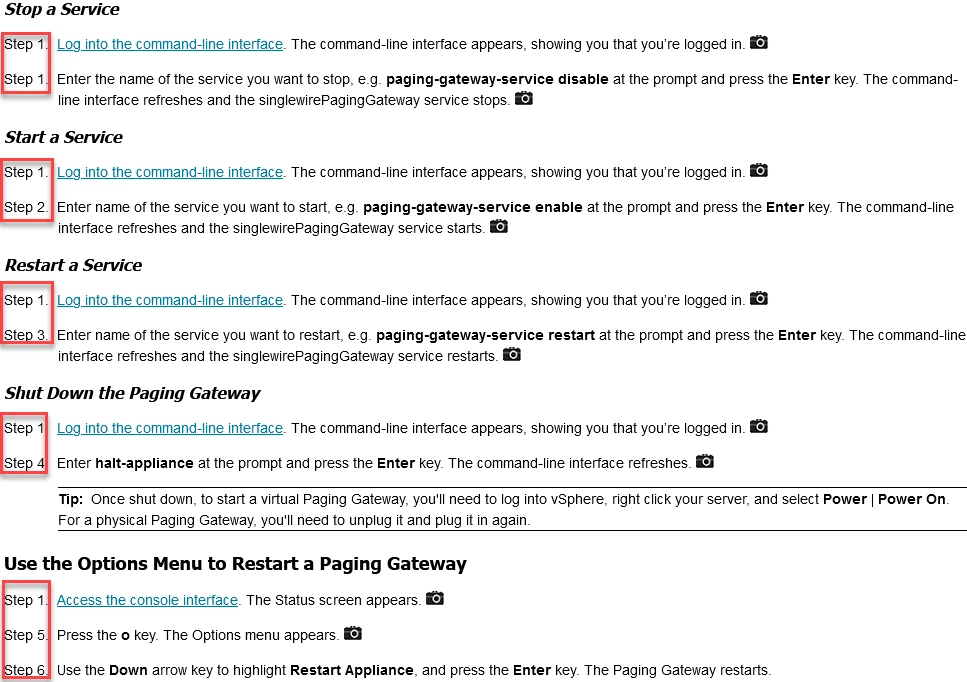
In Firefox, topics with multiple auto-numbered lists aren't displaying the numbers in the correct order: 


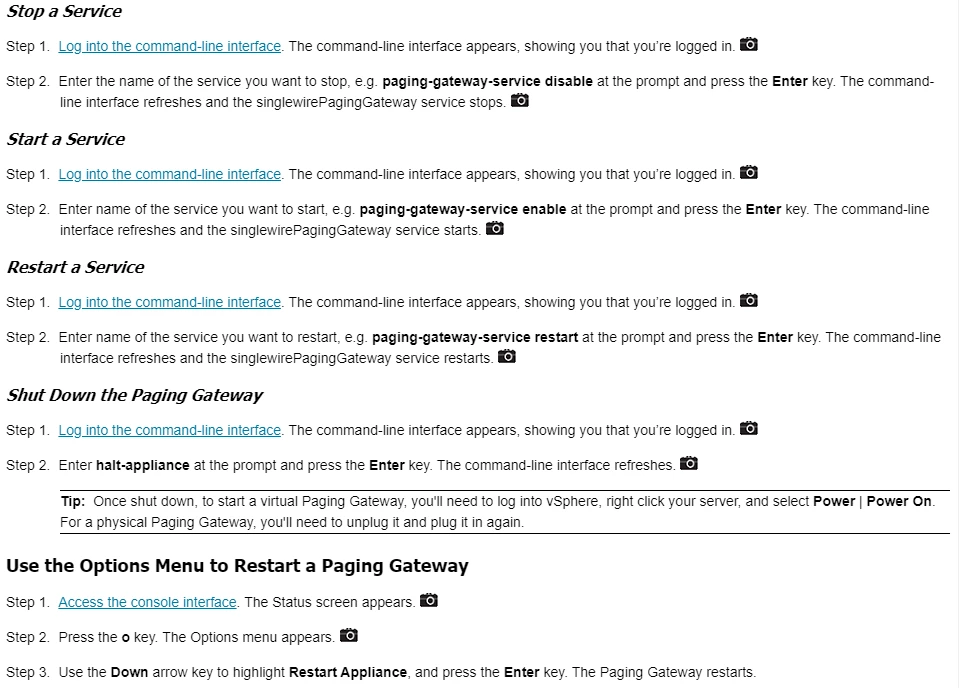
Chrome does not have the same problem:

Is there a way to fix this?

    This topic has been closed for replies.
    Correct answer Singlewire Tech Writer

    Following the directions Peter posted to his RoboHelp site (https://www.grainge.org/pages/snippets/snippets.htm#:~:text=Adobe,problems%20in%20Firefox), I created a sample project with a topic that had multiple numbered lists using the "counter-reset" parameter. I confirmed that the output showed correctly in Chrome and Edge:


    First List

    Step 1.

    Step 2.


    Second List

    Step 1. 

    Step 2.


    And that the lists displayed incorrectly in Firefox:


    First List

    Step 1.

    Step 2.


    Second List

    Step 1. 

    Step 3.


    Using Source view, I searched for "counter-reset" and replaced it with "counter-set". I generated the project and then viewed the output in Chrome, Edge, and Firefox.


    The lists displayed correctly for all browsers. 

    13 replies

    Singlewire Tech WriterAuthorCorrect answer
    Inspiring
    July 6, 2021

    Following the directions Peter posted to his RoboHelp site (https://www.grainge.org/pages/snippets/snippets.htm#:~:text=Adobe,problems%20in%20Firefox), I created a sample project with a topic that had multiple numbered lists using the "counter-reset" parameter. I confirmed that the output showed correctly in Chrome and Edge:


    First List

    Step 1.

    Step 2.


    Second List

    Step 1. 

    Step 2.


    And that the lists displayed incorrectly in Firefox:


    First List

    Step 1.

    Step 2.


    Second List

    Step 1. 

    Step 3.


    Using Source view, I searched for "counter-reset" and replaced it with "counter-set". I generated the project and then viewed the output in Chrome, Edge, and Firefox.


    The lists displayed correctly for all browsers. 

    Inspiring
    June 24, 2021

    With Peter's help, I've logged a bug with Mozilla: https://bugzilla.mozilla.org/show_bug.cgi?id=1718070

    Adobe Employee
    June 23, 2021

    This looks like an issue with firefox when counter-reset is used with lnline style.

    Peter Grainge
    Community Expert
    Community Expert
    June 23, 2021

    I just took a look at the source view of your topic and there are a lot of div tags applied around that area.


    I am wondering if that is what is affecting your numbering. Create a couple of lists without using any div tags.


    Autonumbering that I have set up creates simple code such as


    <p class="numbered">Item One</p>

    <p class="numbered">Item Two</p>

    <p class="numbered">Item Three</p>

    ________________________________________________________
    See www.grainge.org for free Authoring and RoboHelp Information

    Use the menu (bottom right) to mark the Best Answer or Highlight particularly useful replies. Found the answer elsewhere? Share it here.
    Peter Grainge
    Community Expert
    Community Expert
    June 22, 2021

    I can see it is perfect in Edge and goes wrong in Firefox.


    I'll leave @vikchand to look at the CSS. 

    ________________________________________________________
    See www.grainge.org for free Authoring and RoboHelp Information

    Use the menu (bottom right) to mark the Best Answer or Highlight particularly useful replies. Found the answer elsewhere? Share it here.
    Inspiring
    June 22, 2021

    Good morning. I've attached the CSS file I'm using for that topic. 


    This is the URL for the topic I cite above: https://www.singlewire.com/help/fusion/cucm/#t=InformaCast_Fusion%2FWebmin%2FManage_On-premises_Server_Actions.htm

    Participant
    June 22, 2021

    I experience the same issues. I'm not sure if this is the recommended way to go and what your css and html look like, but for me the following temporary fix resolved my issue: adding the counter-reset in css to div { } and enclosing my incorrectly numbered lists between div tags.

    Adobe Employee
    June 22, 2021

    Hi,

    We were able to replicate this on our end, it looks like a bug in Firefox. Have a look at this documentation from firefox on MDN https://developer.mozilla.org/en-US/docs/Web/CSS/counter-reset. This also has the same issue. It may be a bug with latest version of Firefox. I suggest we wait for them to fix it.

    Community Expert
    June 22, 2021

    @vikchand I can't see any known issues listed on the page? 

    Adobe Employee
    June 22, 2021

    @Amebr But we can see the issue on their page too. May be it is a recent break.

    Adobe Employee
    June 22, 2021

    Hi,

    Can you please share the html source for this topic and corresponding css file?

    Community Expert
    June 22, 2021

    In the published version, it looks like FF and Chrome handle the numbering differently when there are hidden paragraphs (I'm not sure what's going on with that.) 


    The behavour is different from what your screenshots show, but it could be related. So it might be worth contacting support. See the following page for support contact options:
    https://helpx.adobe.com/contact/enterprise-support.other.html#robohelp