

Sylvio @ GRICS
Known Participant
December 4, 2023
Question

Bold not applying to UPPERCASE words in RoboHelp UI

  • December 4, 2023
  • 16 replies
  • 1527 views

One of my colleagues is experiencing the strangest issue:

When editing a topic in the RoboHelp UI (RH 2022.3.93), the <strong></strong> attribute does not seem to apply to words in UPPERCASE. I have attached a screenshot to illustrate the issue. The text in the red rectangles should appear in bold.

Even text that should be boldened through the CSS is affected. In the attached screenshot, the line which starts with "Table A." is actually a H2 and has no inline formatting.
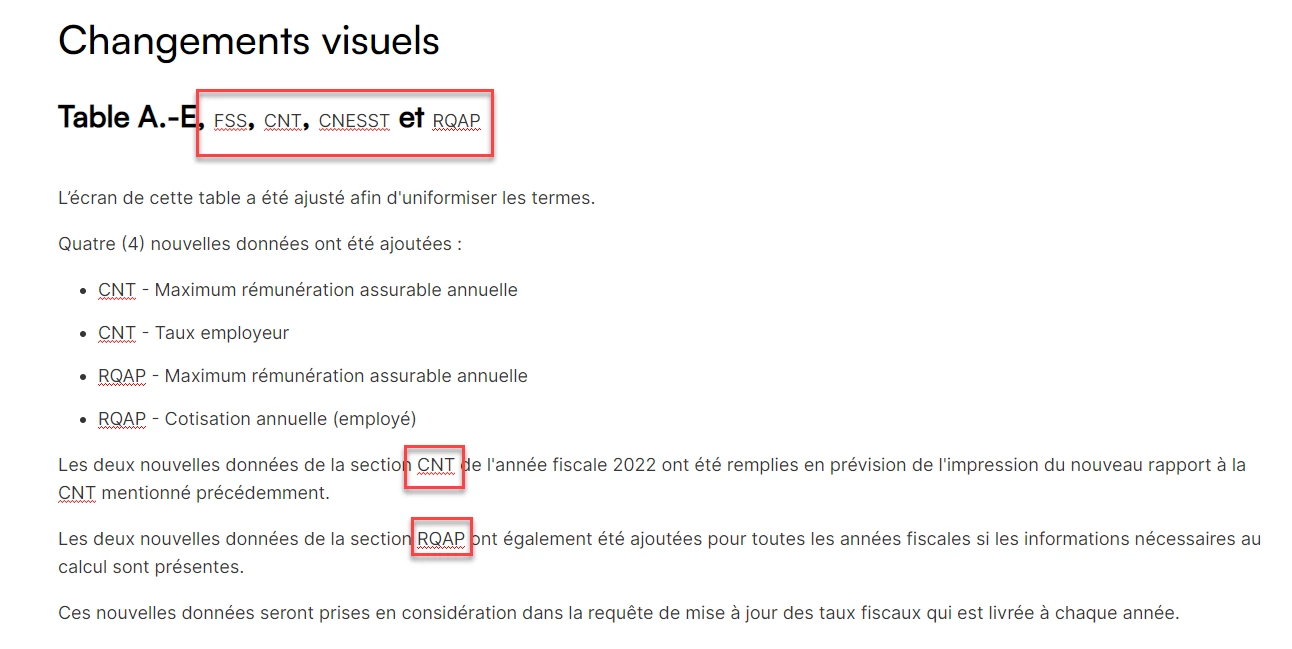
 

This only occurs while editing topics, within the RoboHelp UI. If we preview the topic in Google Chrome, everything looks as expected. The generated output is also fine. Also, when bold is applied to lowercase text (or Sentence-case text) everything is fine.


Stranger still, my colleague and I are both working on the same project, collaborating through GitHub integration. If I open the same topic on my computer, everything is fine on my side, even in the RoboHelp UI. The issue only occurs on my colleague's computer. We're both using Windows 11, and both using the Canadian-French version of both the Windows and RoboHelp UI.


I'm wondering if this could be caused by a regional setting or something? I've never seen this before and I have to admit I'm totally clueless as to what could be causing this!

    This topic has been closed for replies.

    16 replies

    Peter Grainge
    Community Expert
    Community Expert
    December 13, 2023

    Did you ever try a free HTML editor on the rogue machine to see if that renders the code in the topic correctly or the same way that RoboHelp does?

    ________________________________________________________

    My site www.grainge.org includes many free Authoring and RoboHelp resources that may be of help.


    Use menu (bottom right) to mark as Best Answer or to Highlight particularly useful replies. Found the answer elsewhere? Share it here.
    Sylvio @ GRICS
    Known Participant
    December 13, 2023

    For the time being, we have resorted to commenting out the styling for <span> in the css.


    However, this can only be a temporary measure, as we can't be commenting out styles because they don't behave well with the RoboHelp UI.


    This issue has to be something that is specific with my colleague's PC. Despite all my efforts, I was never able to replicate this issue on my PC, and I was never able to fix it on my colleague's PC either. (other than by commenting out the offending style in the css) A lot of uninstalling, cleaning up, reinstalling and re-cloning from our Git repo was involved, both on my own PC and hers, as I was trying to fix the issue on her side and replicate it on mine.


    As @Peter Grainge said, we're clutching at straws now, so I did try to teporarily replace our fancy font with Arial, which is as generic as it gets. The font did change, but the issue did not go away with the font change. In our CSS, headings use the "Satoshi" font, while everything else uses "Inter". The issue will appear anywhere a word in ALLCAPS is used, regardless of the font used or whether it be found in a <p>, <li>, any heading, etc.


    I guess I'll need to bring this up with support, but this will be interesting, as I'm completely unable to reproduce the issue on another PC.


    Anyhow, I want to thank everyone here for taking the time to respond and attempt to provide solutions or suggestions. Even though the issue is not fully resolved, we were able to narrow it down quite a bit!

    Peter Grainge
    Community Expert
    Community Expert
    December 8, 2023

    Clutching at straws now. Could you create a copy of the CSS and set all the fonts to something basic such as Arial?

    ________________________________________________________

    My site www.grainge.org includes many free Authoring and RoboHelp resources that may be of help.


    Use menu (bottom right) to mark as Best Answer or to Highlight particularly useful replies. Found the answer elsewhere? Share it here.
    Peter Grainge
    Community Expert
    Community Expert
    December 7, 2023

    Okay, so far so good, the problem seems to be originating from the CSS, but why is this only happening on my colleague's PC and not on mine or the consultant's?


    There surely has to be a difference between the project on the two machines. Something like Beyond Compare would check the code in both and hopefully find it.

    ________________________________________________________

    My site www.grainge.org includes many free Authoring and RoboHelp resources that may be of help.


    Use menu (bottom right) to mark as Best Answer or to Highlight particularly useful replies. Found the answer elsewhere? Share it here.
    Sylvio @ GRICS
    Known Participant
    December 8, 2023

    Our project is source-controlled by Git and hosted on GitHub. Me and my colleague are working on the same branch. When we un-installed RoboHelp on her PC, we had previously disconnected the project from Git and deleted the local repository. After re-installing, we created the connection profile from scratch and cloned the repository from GitHub.


    This means everything is brand-new and fresh. Also, the slightest differences are immediately picked up by Git. As soon as you open a topic and RH adds a trailing space of modifies the indentation in the code, Git picks it up.


    Also, as I mentioned in my reply to @Amebr , I did look at a problematic file with Notepad++ while it was also open in RH, and there was nothing out of place. I used a test topic containing only two lines of text, so there wasn't much to look at in the code.

    Community Expert
    December 6, 2023

    This sort of reminds me of a vague memory I have from many years ago, but I can't find a reference. It's why I asked about spell check on your colleague's computer. I vaguely remember someone reporting strange formatting for, I think, acronyms, and it had something to do with either glossary hotspots or spell check. (I said my memory on it was vague 🙂 ). I feel like something was "silently" adding spans.


    So. Perhaps investigate the spelling dictionaries and ignored words on your colleagues computer. And compare the spellcheck settings between you and them. You might be able to find a file containing the dictionaries, so you can back them up to restore if they aren't causing problems - I haven't poked around enough to know where to look though.


    Also, perhaps try opening a source topic in a text editor outside Robohelp. I know Classic "corrected" some html so it looked completely different in the editor compared to when viewed in a text editor. Perhaps the same thing is happening here, and you will find "silent" spans around the acronyms when viewed in a text editor.


    Sylvio @ GRICS
    Known Participant
    December 8, 2023

    While we do have spell checkers installed on both our PC's, they are not integrated with RoboHelp. We use Antidote, which is not supported "out-of-the-box" by RoboHelp, as far as I know. There may be a way to make it work, but we have not made any attempts at this.


    I also checked that there were no glossary hotspots, and confirmed that the glossary "wizard" is not enabled.


    I looked at the spell check options in RH, and confirmed that the user dictionary and stop words are empty, so it's not that.


    Lastly, I did as you suggested and opened the file in a separate text editor (we use Notepad++). No difference whatsoever. Also, our project is source-controlled by Git and hosted on GitHub. Therefore, the slightest change in the file would be picked up by Git.

    Peter Grainge
    Community Expert
    Community Expert
    December 8, 2023

    Have you both tried checking all back in and then taking fresh copies of the project?

    ________________________________________________________

    My site www.grainge.org includes many free Authoring and RoboHelp resources that may be of help.


    Use menu (bottom right) to mark as Best Answer or to Highlight particularly useful replies. Found the answer elsewhere? Share it here.
    Sylvio @ GRICS
    Known Participant
    December 6, 2023

    This issue is the weirdest ever...


    Unfortunately, uninstalling, cleaning up and reinstalling did not change a thing.


    Out of desperation, I started to mess around in the CSS, which did have some effect, but did not entirely correct the issue. This led me to believe I may have done an incorrect manipulation when I tested a blank topic with a new CSS, do I tried that again while remotely connected to my colleague's PC:


    1. Creating a blank topic with no CSS, the issue does not occur.
    2. Assigning a CSS that contains only basic styles for headings and paragraphs does not reproduce the issue.
    3.  assigning our project's CSS to that new topic DOES reproduce the issue, contrary to my previous test.


    Okay, so far so good, the problem seems to be originating from the CSS, but why is this only happening on my colleague's PC and not on mine or the consultant's?


    Moving on:


    1.  Created a "torture-copy" of the problematic CSS (so as not to modify the original) and assigned it to our test topic.
    2.  I found that commenting out the following style affected the capitalized words. Basically, in headings, the font size became consistent with the rest of the heading, telling me that the font-size property found here got applied somehow:
    p,
    span {
      font-size: 18px;
      font-family: "Inter", sans-serif;
      font-weight: 400;
      line-height: 1.8rem;
    }

    3. I "un-grouped" the style to identify whether the problem came from the "P" or the "span":

    p {
      font-size: 18px;
      font-family: "Inter", sans-serif;
      font-weight: 400;
      line-height: 1.8rem;
    }
    span {
      font-size: 18px;
      font-family: "Inter", sans-serif;
      font-weight: 400;
      line-height: 1.8rem;
    }

    4. Turns out commenting out the "span" fixes the font size part of the issue.

    5. Further down the CSS, I found this:

    span {
      font-weight: normal;
    }

    6. commenting this out now fixes the issue with bold not applying to capitalized words.


    So, what seems to be happening here is that the style defined for span applies to capitalized words, and that can somehow override inline styling, but only in the RoboHelp UI. everything is rendered correctly in the generated output.


    Okay... So now, we are left with 2 questions:


    1- Why/how is the style defined for <span> applying to capitalized words in the RoboHelp UI?

    2- Why is this happening only on my colleague's PC and not on mine?

    Peter Grainge
    Community Expert
    Community Expert
    December 6, 2023

    Late thought, have you tried <bold> rather than <strong>. Doubt it will help but any port in a storm.

    ________________________________________________________

    My site www.grainge.org includes many free Authoring and RoboHelp resources that may be of help.


    Use menu (bottom right) to mark as Best Answer or to Highlight particularly useful replies. Found the answer elsewhere? Share it here.
    Community Expert
    December 6, 2023

    Given we're out of sensible ideas, does your colleague have spell check dictionaries or ignored words set up in Robohelp preferences? Maybe something weird is going on with spell checking

    Sylvio @ GRICS
    Known Participant
    December 5, 2023

    Thanks everyone for your responses and suggestions!


    I think at this point we will attempt to uninstall and do a clean re-install of RoboHelp on my colleague's PC.


    I don't think that the issue comes from the topic or the CSS, as all of that works just fine on my own PC. I cannot reproduce this issue on my own system. We also have a consultant doing some specialized integrations for us, with access to our RoboHelp project on GitHub, and they can't reproduce this issue either. 


    To further rule out an issue with this specific topic, we checked out other topics (on my colleague's PC), and just adding an uppercase word within a H2 in any topic will reproduce the issue. Interestingly, adding words with sentence case or title case (first letter of each word capitalized), works just fine.


    To completely rule out something weird happening with our project specifically, we created a brand new project with only the default CSS generated by RoboHelp and only one topic. Again, we reproduced the issue on my colleague's PC, but not on mine.


    I'll report back after re-installing.

    Peter Grainge
    Community Expert
    Community Expert
    December 5, 2023

    I for one am very much looking forward to seeing whether that fixes it. 

    ________________________________________________________
    My site www.grainge.org includes many free Authoring and RoboHelp resources that may be of help.


    Use menu (bottom right) to mark as Best Answer or to Highlight particularly useful replies. Found the answer elsewhere? Share it here.
    Jeff_Coatsworth
    Community Expert
    Community Expert
    December 5, 2023

    The only thing I can think of with that misbehaving heading is that you've got some character encoding in there that isn't showing in the editor, but renders incorrectly. Have you tried manually re-entering it into a new topic, verifying that it displays correctly & copy it back into the original misbehaving topic?

    Peter Grainge
    Community Expert
    Community Expert
    December 5, 2023

    Select the errant text and then paste it back in using CTRL Shift V. That removes all formatting. 


    If that works, then reapply the formatting. 

    ________________________________________________________
    My site www.grainge.org includes many free Authoring and RoboHelp resources that may be of help.


    Use menu (bottom right) to mark as Best Answer or to Highlight particularly useful replies. Found the answer elsewhere? Share it here.