


ChrisAlley
Known Participant
April 19, 2021
Pergunta

Books in TOC show as broken links, even though a topic is linked to the book

  • April 19, 2021
  • 12 respostas
  • 950 Visualizações

I don’t have much experience with RoboHelp, so I hope this turns out to have an easy fix. I’m using RoboHelp 2019 (14.0.3.019) to update an existing project that is linked to an existing FrameMaker document. The project was originally set to output to FlashHelp, but I was told to change to WebHelp.


The generated Help seems to be created properly, but I have a problem with the TOC. Every FrameMaker file that has lower-level headings is shown as a book in the TOC, as it should. But when you click on a book at any level, it displays a broken link.
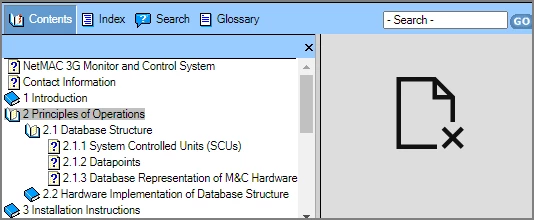
 

If you click on a topic, the content is displayed properly.


However, if you right-click a book and select “Open book in new tab” or “Open book in new window”, you see the correct content. So the correct content is linked to the book; it just will not display directly.


I hope someone can help with this problem. I’d like to click on a book in the TOC and have the content displayed properly, as well as revealing its subtopics in the TOC.


    Este tópico foi fechado para respostas.

    12 Respostas

    Peter Grainge
    Community Expert
    Community Expert
    April 26, 2021

    Late thought. See Importing/Linking Word/Fm Docs (grainge.org) There is a version compatibility requirement for linking.

    ________________________________________________________
    See www.grainge.org for free Authoring and RoboHelp Information

    Use the menu (bottom right) to mark the Best Answer or Highlight particularly useful replies. Found the answer elsewhere? Share it here.
    Jeff_Coatsworth
    Community Expert
    Community Expert
    April 26, 2021

    Hmm, so this RH project is the result of a linked FM book (not imported)? I can't even recall if linking really worked that well in RH2019 (I'm totally an importer myself). It would make sense that if you did an update on the FM side or re-synched the RH content with the FM content, your manual changes to your TOC would get mucked up. Maybe creating a new RH project and trying to re-link it to the FM content might provide a fix?

    ChrisAlley
    Known Participant
    April 27, 2021

    I need to work on a different project for a few days, but I will definitely try recreating the RoboHelp project. Thanks for the suggestion. I'll let you know if it worked. 

    ChrisAlley
    Known Participant
    May 1, 2021

    I recreated the RoboHelp project, and everything worked fine. The RH TOC was linked properly to the FM TOC. I was a little gunshy, so I tried not to update the link to the FM document too often.


    The Responsive HTML5 output looked great, and the project managers seem happy with the result. I do have one question about the Responsive HTML5 viewer. I used the Azure_Blue layout. The sample layout showed Previous and Next buttons in the upper-right corner next to the Print icon. I assumed (you know what often happens when you do that) those buttons would appear automatically and take you to the previous or next topic in the TOC. On my viewer, I get the Print button but not Previous and Next.


    I probably don't understand the real purpose of those buttons or how/why they get created. It occurred to me later that maybe they only appear if I have set up browse sequences, which I do not have. Do you have an idea about the missing Previous and Next buttons?


    Thanks for your help. I appreciate it. I'm the lone writer here. If I had to create online help on a regular basis, I think I could get fairly good at it. But our "once every other year or so" approach makes it difficult. I'm trying to keep good cheat notes for next time.

    Peter Grainge
    Community Expert
    Community Expert
    April 26, 2021

    Is your whole project based on Fm content? If it is then I think it might be better for @Jeff_Coatsworth to see your latest post.


    Back up your project and then delete the CPD file before reopening it. Sometimes fixes issues but I'm not too hopeful in this case.

    ________________________________________________________
    See www.grainge.org for free Authoring and RoboHelp Information

    Use the menu (bottom right) to mark the Best Answer or Highlight particularly useful replies. Found the answer elsewhere? Share it here.
    Peter Grainge
    Community Expert
    Community Expert
    April 20, 2021

    Looking again at your screenshot you are on Classic. That will be why you cannot see a frameless option. You can confirm that by looking at screenshots in the 2019 section of the RoboHelp Tour on my site.


    It's a big change to go to the new UI as you will see. In the long term you will likely need to change but only you can decide if it's a sensible move right now. For speed you will likely need to stick with the Classic version and generate responsive.  

    ________________________________________________________
    See www.grainge.org for free Authoring and RoboHelp Information

    Use the menu (bottom right) to mark the Best Answer or Highlight particularly useful replies. Found the answer elsewhere? Share it here.
    ChrisAlley
    Known Participant
    April 20, 2021

    I do have Classic. Because my project is due soon, I guess I should stick with that for now. But there will be more in the future, so I will definitely look into changing to the new UI. Thanks for the information.

    Jeff_Coatsworth
    Community Expert
    Community Expert
    April 20, 2021

    What's on your menu with the project open?

    Peter Grainge
    Community Expert
    Community Expert
    April 20, 2021

    Are using 2019 Classic or the new UI? 

    ________________________________________________________
    See www.grainge.org for free Authoring and RoboHelp Information

    Use the menu (bottom right) to mark the Best Answer or Highlight particularly useful replies. Found the answer elsewhere? Share it here.
    ChrisAlley
    Known Participant
    April 20, 2021

    Here's where my ignorance pops out. I don't know. How would I find out?

    Peter Grainge
    Community Expert
    Community Expert
    April 20, 2021

    Amber suggested going the frameless route. That would be a better option and easy at this stage.

    ________________________________________________________
    See www.grainge.org for free Authoring and RoboHelp Information

    Use the menu (bottom right) to mark the Best Answer or Highlight particularly useful replies. Found the answer elsewhere? Share it here.
    ChrisAlley
    Known Participant
    April 20, 2021

    How do you specify a frameless output? When I add a new output, frameless isn't on the list. 

    Peter Grainge
    Community Expert
    Community Expert
    April 20, 2021

    Assuming you are using the new UI version of 2019 rather than Classic, in the Output pod click the + icon.

    ________________________________________________________
    See www.grainge.org for free Authoring and RoboHelp Information

    Use the menu (bottom right) to mark the Best Answer or Highlight particularly useful replies. Found the answer elsewhere? Share it here.
    ChrisAlley
    Known Participant
    April 20, 2021

    Thanks, Peter. The Responsive HTML5 output seems to solve the problem.

    Jeff_Coatsworth
    Community Expert
    Community Expert
    April 20, 2021

    Since it was an updated project, you need to add a new output.

    ChrisAlley
    Known Participant
    April 20, 2021

    The Responsive HTML5 output seems to work great. Clicking the book (which now shows as a + sign) displays the correct content, as well as expanding the subtopics. Our software developer is working with the output files to be sure they work with his system. But as standalone Help, the HTML5 browser is way better looking than the WebHelp interface.


    I wish I knew what was wrong with the WebHelp TOC, but I'm glad to have a better alternative. Thanks for your help.  

    Jeff_Coatsworth
    Community Expert
    Community Expert
    April 20, 2021

    I'd create the HTML5 and check it again - it may be a browser issue with what you've created.

    ChrisAlley
    Known Participant
    April 20, 2021

    In my RoboHelp, I don't see Responsive HTML5 as one of the output options. Any suggestions as to why?