


Inspiring
February 17, 2021
Question

Buttons no longer working after upgrade to RH 2020

  • February 17, 2021
  • 24 replies
  • 399 views

Hi, Everyone.


I've been testing out the free trial of RH 2020 (2020.3.32; frameless). To do this, I've upgraded a project from RH 2019 (new UI, 2019.0.14; frameless). 


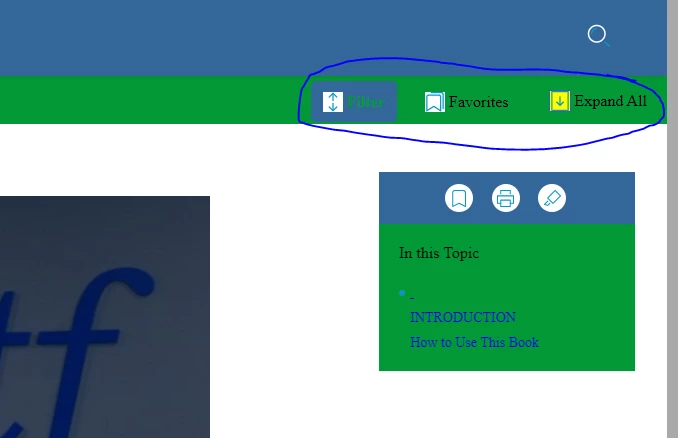
After the upgrade, my three buttons no longer work. They seem dormant -- not responding to clicks in any way. (The other 3 buttons, in the right panel, do work.) I've checked the configurations of the filter button in the output preset. Seems no settings have changed.


Any advice for me? Thank you!
 

    This topic has been closed for replies.

    24 replies

    Peter Grainge
    Community Expert
    Community Expert
    March 17, 2021

    BTW I unmarked what you had set as the correct answer. It is not an answer, it was a suggestion as to what to do next.

    ________________________________________________________
    See www.grainge.org for free Authoring and RoboHelp Information

    Use the menu (bottom right) to mark the Best Answer or Highlight particularly useful replies. Found the answer elsewhere? Share it here.
    Peter Grainge
    Community Expert
    Community Expert
    March 17, 2021

    Possibly as the supplied buttons are configured with certain settings. Why would you configure your own Expand All when one is supplied? I believe what is supplied calls certain functions that you would not know about. Compare ALL the settings.

    ________________________________________________________
    See www.grainge.org for free Authoring and RoboHelp Information

    Use the menu (bottom right) to mark the Best Answer or Highlight particularly useful replies. Found the answer elsewhere? Share it here.
    Inspiring
    March 17, 2021

    @Peter Grainge  Hi Peter.


    Does it matter which "button numbers" I use to configure my buttons? 


    I ask b/c I've found a difference between the settings of my customized Oceanic_200513 and a brand new copy of Oceanic. (Please see screenshot 1.) 


    SCREENSHOT 1


    In Oceanic_200513, I don't remember why, but I've configured Button 4 as my "Expand all" button. (I've skipped over Button 2 and Button 3, which are not used for anything.)


    Oceanic_2 does not skip over any buttons. It uses Button 2 as the "Expand all" button (see screenshot 2). Do you think that's made any difference?


    SCREENSHOT 2

    Inspiring
    March 17, 2021

    Yes, makes sense to try to compare the settings and see if I can fix my original skin.


    Will try and report back. Thank you, Peter!

    Peter Grainge
    Community Expert
    Community Expert
    March 12, 2021

    Whoa! Whilst you might have to recreate all, try examing the properties of both in the skin editor. 


    I'm guessing you could start by looking at the buttons that are not working to see if you can find a difference.

    ________________________________________________________
    See www.grainge.org for free Authoring and RoboHelp Information

    Use the menu (bottom right) to mark the Best Answer or Highlight particularly useful replies. Found the answer elsewhere? Share it here.
    Inspiring
    March 12, 2021

    Great news - I've created the new Oceanic skin and generated output with it. The buttons work!!


    So I guess now I'll just re-create the settings from my original Oceanic in the new one and stick with it?


    Thank you!!

    Peter Grainge
    Community Expert
    Community Expert
    March 11, 2021

    First thing for tomorrow is just create a new Oceanic skin (call it Oceanic2) and try with that to see if the buttons work.


    If they do, report back and ignore the rest. 

    ________________________________________________________
    See www.grainge.org for free Authoring and RoboHelp Information

    Use the menu (bottom right) to mark the Best Answer or Highlight particularly useful replies. Found the answer elsewhere? Share it here.
    Inspiring
    March 11, 2021

    The working skin is from my RH 2019 project (new UI). 


    I'll work through your troubleshooting steps tomorrow. But I wanted to report one thing before I forget. I've changed skins several times (this is in my upgraded project, in RH 2020):

    • The buttons do work in Studio
    • The buttons do not work in Orange or Oceanic (nor in my customized Oceanic from 2019)


    Lastly for today, although I reported earlier that importing my skin resulted in the "restart" error, I now see that the imported skin is sitting there in the skins panel. I will try it out tomorrow.


    Thank you!

    Peter Grainge
    Community Expert
    Community Expert
    March 11, 2021

    I haven't read through again but I think you said the skin was OK until you upgraded. Is the skin in the test project from 2020 where you know there is a problem or a 2019 version. 


    Maybe you need to COPY a backup and open it in 2019 and check it works there. If it does, export the skin and save it somewhere, we may need that later. 


    Assuming the copy worked, upgrade again and see what happens.

    ________________________________________________________
    See www.grainge.org for free Authoring and RoboHelp Information 


    You could also try the skin in the About RoboHelp sample project. 


    Post back when you have done all that. 

    Use the menu (bottom right) to mark the Best Answer or Highlight particularly useful replies. Found the answer elsewhere? Share it here.
    Inspiring
    March 11, 2021

    Thanks, Peter. I did have to copy them to the Documents folder. I didn't have any there, already.


    I've now opened both RH 2020 sample projects.


    I've also created a new project and exported my preferred skin from my RH 2019 project. However, I've tried to import that skin. I keep getting the "restart RH" error.