


Inspiring
February 17, 2021
Question

Buttons no longer working after upgrade to RH 2020

  • February 17, 2021
  • 24 replies
  • 399 views

Hi, Everyone.


I've been testing out the free trial of RH 2020 (2020.3.32; frameless). To do this, I've upgraded a project from RH 2019 (new UI, 2019.0.14; frameless). 


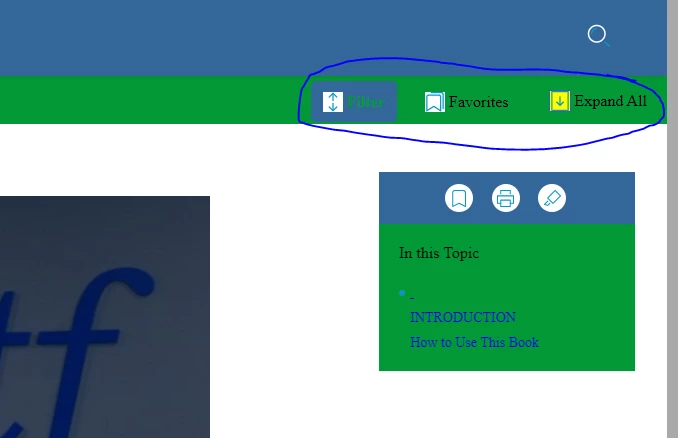
After the upgrade, my three buttons no longer work. They seem dormant -- not responding to clicks in any way. (The other 3 buttons, in the right panel, do work.) I've checked the configurations of the filter button in the output preset. Seems no settings have changed.


Any advice for me? Thank you!
 

    This topic has been closed for replies.

    24 replies

    Peter Grainge
    Community Expert
    Community Expert
    March 11, 2021

    You should find you already have copies in Documents > My RoboHelp Projects. Try them.

    ________________________________________________________
    See www.grainge.org for free Authoring and RoboHelp Information

    Use the menu (bottom right) to mark the Best Answer or Highlight particularly useful replies. Found the answer elsewhere? Share it here.
    Peter Grainge
    Community Expert
    Community Expert
    March 11, 2021

    You got someone who should have known better. Those copies are so that you can replace the copies in Documents if you screw them up. That should have been explained to you. 


    Windows itself protects Programs so that it is only used for the correct purpose.


    Copy them from there into Documents and try again. Please confirm they then work.

    ________________________________________________________
    See www.grainge.org for free Authoring and RoboHelp Information

    Use the menu (bottom right) to mark the Best Answer or Highlight particularly useful replies. Found the answer elsewhere? Share it here.
    Inspiring
    March 11, 2021

    Ah, good troubleshooting ideas, thanks, Peter!


    Re. the sample projects, I'm trying to open them here:


    C:\Program Files\Adobe\Adobe RoboHelp 2020\resources\data\template\projects\Compass Travel


    That's where Adobe Tech Support told me to find them. Should I look for them in the Documents folder?

    Peter Grainge
    Community Expert
    Community Expert
    March 11, 2021

    @martinl83372021 Have you managed to open the sample projects yet and are you trying to open the copies that are in the Documents folder? If they will not open you have to fix that first.


    When that is fixed, create a new project. Export the skin you want from your old project and save it somewhere. Import it into the new project. Does it work then.

    ________________________________________________________
    See www.grainge.org for free Authoring and RoboHelp Information

    Use the menu (bottom right) to mark the Best Answer or Highlight particularly useful replies. Found the answer elsewhere? Share it here.
    Inspiring
    March 11, 2021

    Hi, gb92818477.


    Thanks very much for your reply. The uninstall/reinstall did not solve my problems. 


    HOWEVER, I've taken your suggestion and replaced my skin with the Studio skin. And the buttons work in this new skin


    I've reported this to Adobe TCS support. My issue is still unresolved. I don't want to use the Studio skin. I want to use the Oceanic skin that I've put untold work hours into configuring.


    Thank you!

    Known Participant
    March 11, 2021

    Did reinstalling RoboHelp work?

    We had the same problem after updating two months ago but then we changed all outputs to the new Studio skin, adapted the buttons to our needs, and it's working fine now.

    Editing the buttons is still a bit tricky but has improved from 2019.0.14.

    Inspiring
    February 22, 2021

    Very good, I'll work on that with an uninstall / reinstall.


    Thank you!

    Peter Grainge
    Community Expert
    Community Expert
    February 22, 2021

    That is the latest but it certainly sounds as if something is wrong. I would be trying to fix opening the samples as they definitely should work. 


    Try again when they work.

    ________________________________________________________
    See www.grainge.org for free Authoring and RoboHelp Information

    Use the menu (bottom right) to mark the Best Answer or Highlight particularly useful replies. Found the answer elsewhere? Share it here.
    Inspiring
    February 22, 2021

    Thanks, Peter. I haven't installed any updates. (I'm currently on 2020.3.32 -- is that the most current version?)


    I'm gonna have to get IT to install updates / uninstall & reinstall. Will do so and report back.


    Thank you.


    Peter Grainge
    Community Expert
    Community Expert
    February 22, 2021

    I guess the first question is whether you have applied the updates to 2020 since installing it.


    The 2020 sample projects should open without issue so with updates applied and having tried to restart RoboHelp and open the project again behind you, if it is still failing I would be thinking about uninstalling and reinstalling. You will need to apply the updates again or go to Adobe - Support : RoboHelp Support Center : Service Releases and grab the Update 3 installer from there.

    ________________________________________________________
    See www.grainge.org for free Authoring and RoboHelp Information

    Use the menu (bottom right) to mark the Best Answer or Highlight particularly useful replies. Found the answer elsewhere? Share it here.