
Inspiring
May 4, 2020
Answered

Can I add a custom button to email the topic page?

  • May 4, 2020
  • 14 replies
  • 1360 views

I"m trying to add a custom button to a responsive HTML5 layout, and trying to use the script referenced here in the Javascript code:

https://community.adobe.com/t5/robohelp/how-can-i-add-a-button-to-email-a-link-to-the-current-topic/td-p/10165717?page=1


Here's the code I enter:

window.location=('mailto:someone@theirdomain.com?Subject=Useful Information&body=This page might help: ' + window.parent.frames[1].frames[1].document.title +' ' + escape(window.parent.frames[1].frames[1].document.location))


But each time I save the skin, the name of the new custom button reverts back to "button3" and the code I pasted into the OnClick field disappears. 
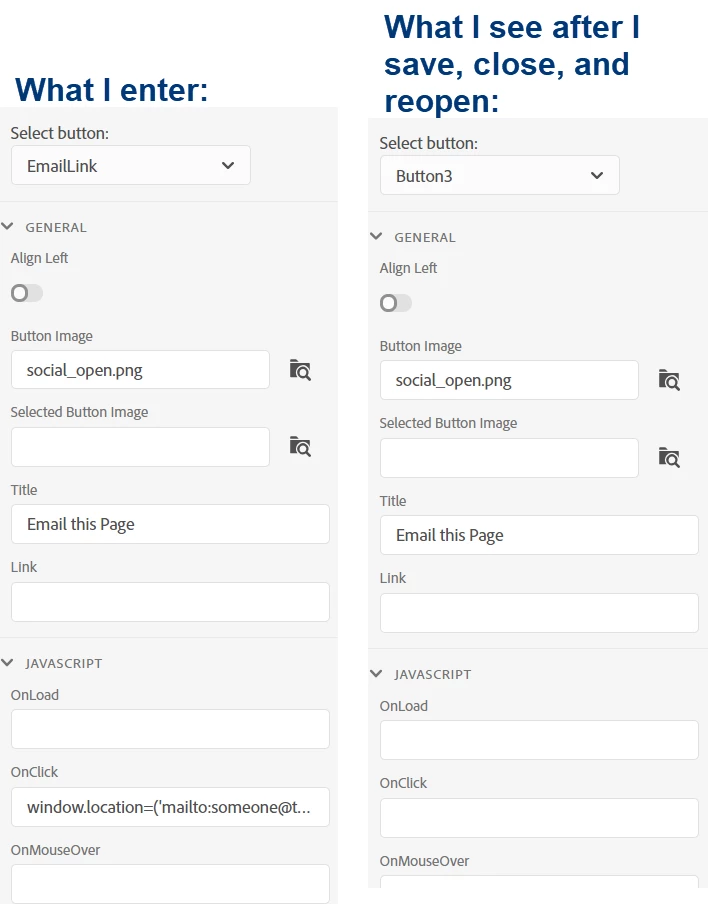
 

Can anyone provide some guidance?

This topic has been closed for replies.
Correct answer abigailatssc

Peter and I spoke, and his advice is what worked - the Javascript field for the custom button won't stick unless you completely remove what was there before and then paste in an entirely new string of text. As long as I've done that, it appears to save my changes.

14 replies

abigailatsscAuthorCorrect answer
Inspiring
May 12, 2020

Peter and I spoke, and his advice is what worked - the Javascript field for the custom button won't stick unless you completely remove what was there before and then paste in an entirely new string of text. As long as I've done that, it appears to save my changes.

Peter Grainge
Community Expert
Community Expert
May 6, 2020

Assuming you meant 7-12 your time, that means from now on. Would 9am your time and 2pm my time work?


If it does, then see the Contact page on my site and email me so that we can arrange how to screenshare.


Use the menu (bottom right) to mark the Best Answer or Highlight particularly useful replies. Found the answer elsewhere? Share it here.
Inspiring
May 6, 2020

Will do - I appreciate your help!

Community Expert
May 6, 2020

I'm not having any issues with the OnClick field content vanishing in a test project, using the Indigo or Azure Blue skins. 


Where is your project located? And is source control involved at all?

Peter Grainge
Community Expert
Community Expert
May 5, 2020

So if you paste it in, it sticks, if you edit in the field it doesn't. Is that what you are saying?


Use the menu (bottom right) to mark the Best Answer or Highlight particularly useful replies. Found the answer elsewhere? Share it here.
Inspiring
May 5, 2020

Well, I thought so until about half an hour ago, and it disappeared again.

Peter Grainge
Community Expert
Community Expert
May 5, 2020

What time zone are you in? Is a screenshare tomorrow possible?


Use the menu (bottom right) to mark the Best Answer or Highlight particularly useful replies. Found the answer elsewhere? Share it here.
Inspiring
May 5, 2020

I'm in EST. I could do a screenshare any time between 7 AM and 12 PM.

Inspiring
May 5, 2020

Okay, so it sticks as long as I don't change the code at all. If I change the subject line or recipient at all, that's when it won't stick.

Peter Grainge
Community Expert
Community Expert
May 5, 2020

The button naming thing is a bug but to the best of my knowledge no one else is having a problem with the code sticking. That's partly why I suggested a new project. I'm hopeful it will work there and that this is a project specific issue. If it is we should be able to fix it.


Use the menu (bottom right) to mark the Best Answer or Highlight particularly useful replies. Found the answer elsewhere? Share it here.
Inspiring
May 5, 2020

I just created a new skin in a brand new project, without even adding any  new topics or anything. The code still disappears after I save, close, and reopen the skin.

Peter Grainge
Community Expert
Community Expert
May 5, 2020

Next step has to be trying in a new project with just a couple of topics.


Use the menu (bottom right) to mark the Best Answer or Highlight particularly useful replies. Found the answer elsewhere? Share it here.
Inspiring
May 5, 2020

Actually I think at this point my next step is going to be waiting for Adobe to patch the bug. At least for this project, the benefit of that button is too outweighed by the cost of me going through so much trial and error to find a workaround that shouldn't need to be worked around in the first place.

Peter Grainge
Community Expert
Community Expert
May 5, 2020

Create a second copy of the skin. Not a duplicate, browse to add it again and give it a slightly different name.


Do you still get the problem?


Use the menu (bottom right) to mark the Best Answer or Highlight particularly useful replies. Found the answer elsewhere? Share it here.
Inspiring
May 5, 2020

That took care of it. And Amebr's code actually works beautifully. Kind of a pain in the booty to have to create a new skin from scratch every time you want to make a change to a custom button, but it's a workaround I can live with in the short term.

Inspiring
May 5, 2020

I spoke too soon. Still disappearing. Not sure what is making it stick sometimes and what's making it go away. I've tried naming the title of the button different things, naming the image I use different things. It just keeps disappearing.


Community Expert
May 5, 2020

Yes, I assumed the help was on a public web server or the help author's internal company web server.


If installed locally on a client company's intranet, sending that information external to to client company may be a big no-no, as Peter said.

Inspiring
May 5, 2020

Yes. this is on a company web server.


Sadly, I can't get Robohelp to leave the code in the OnClick field - it keeps disappearing each time I reopen the skin. I can paste the text direcctly into the code on the page it generates, which is fine, but any time I reopen it in Robohelp it disappears again. I'll report what I'm experiencing to support and hopefully they'll get a fix in in the near future.

Peter Grainge
Community Expert
Community Expert
May 5, 2020

Certainly it works but what you get is the path where the help is installed. If the help is installed on client servers I can't imagine their IT guys being too happy with that. I am also not seeing how that helps when you get the email as the only bit that helps is what the earlier code gives.


The code does give the correct link if the help is accessed from there by all users so nice work on that Amber. 


Use the menu (bottom right) to mark the Best Answer or Highlight particularly useful replies. Found the answer elsewhere? Share it here.