


Inspiring
March 14, 2016
Answered

Can you add the Highlight search results checkbox to Responsive HTML5 output?

  • March 14, 2016
  • 2 replies
  • 1232 views

The Webhelp output has a Highlight search results checkbox like this:

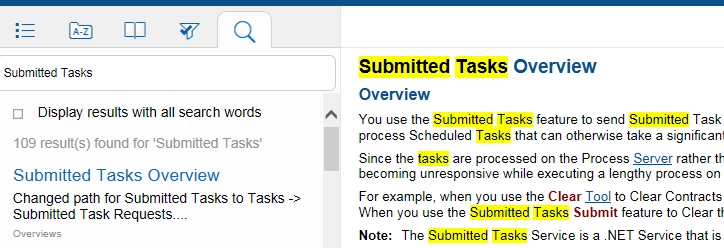
But the Responsive HTML5 output does not have this option despite highlighting the results:
I don't see any way to add this in the Layout Customization window:
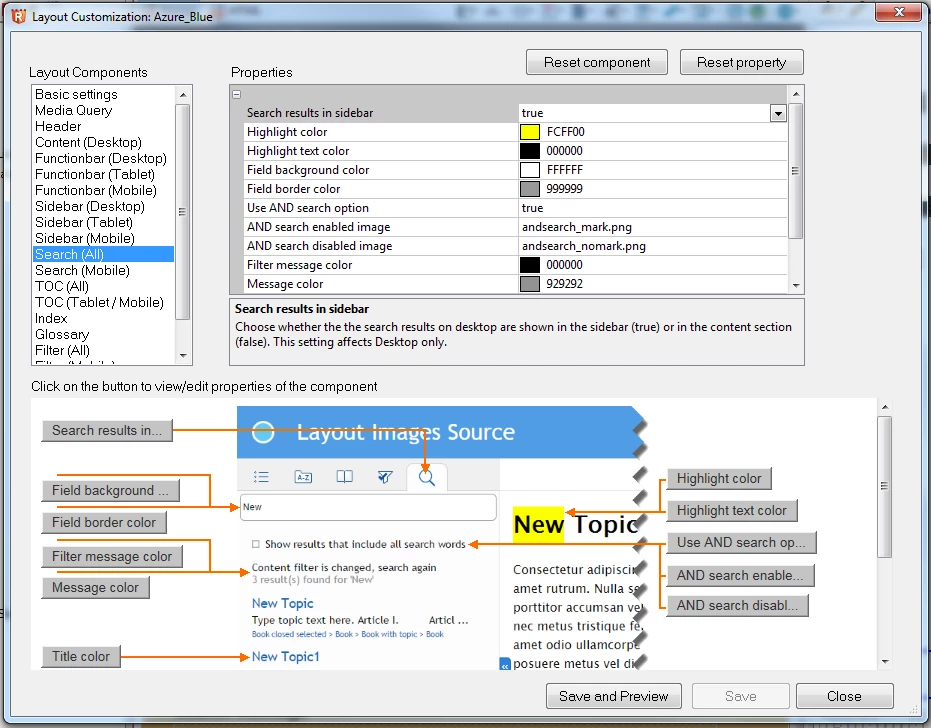
Is it possible to add a checkbox to disable highlighting? We've recently switched to Responsive HTML5 and we've been asked how to turn the highlighting off.

Thanks.

This topic has been closed for replies.
Correct answer CN13579

I found a partial solution to this. I found that if you generate the Responsive HTML5 Output, you can edit the html for the main topic under the search section. The Highlight checkbox code is there, but it's set to hidden. You can unhide it. The problem then is that the checkbox doesn't look like the "Display results with all search words" checkbox. You can work out some styling issues if you get creative. It's nowhere near ideal, but we needed to be able to disable the highlighting.

2 replies

CN13579AuthorCorrect answer
Inspiring
April 27, 2016

I found a partial solution to this. I found that if you generate the Responsive HTML5 Output, you can edit the html for the main topic under the search section. The Highlight checkbox code is there, but it's set to hidden. You can unhide it. The problem then is that the checkbox doesn't look like the "Display results with all search words" checkbox. You can work out some styling issues if you get creative. It's nowhere near ideal, but we needed to be able to disable the highlighting.

Jeff_Coatsworth
Community Expert
Community Expert
April 27, 2016

See the hack described in this post - Re: Changing the default selected setting on the "Highlight search results" field in Search & see if it works in Responsive HTML5

Jeff_Coatsworth
Community Expert
Community Expert
March 14, 2016

Wish list requests should go to the Adobe Bugbase to get them on their radar. In the meantime, could you change the colour of the highlight to something that matches your background topic colour? Or, there is a hack to one of the .js files that get packaged in WebHelp that you used to be able to default the highlight flag to be off – maybe that flag still exists in the HTML5 code?

CN13579Author
Inspiring
March 14, 2016

I'm not going to take the time to tell Adobe directly because I sincerely believe they won't care. I posted a few defects and the only one they ever responded to they said they could not reproduce. We've just had to have some of our devs create fix-up scripts for our needs.The fact that the glossary terms are not pop-ups and work the way they do in Robohelp is proof that Adobe isn't concerned with any wish lists. I've seen posts that are maybe 10 years old asking when pop-up glossary terms will be supported. Yes... I know there's a script, but it is very limited.

Anyways... I was just hoping maybe someone knew enough about the new Robohelp 2015 Responsive Layouts to suggest how to add that in. I was able to add a field into the Layout Customization window, but not the preview section and I could not figure out how to actually get the checkbox to display in the frame (not to mention how to actually make it function). But it does seems like these should be more customizable. I just can't find any documentation on how it works.

Captiv8r
Legend
March 14, 2016

You need someone like Willam van Weelden‌ that is highly skilled in the dark arts of CSS and how all that works.

Hopefully he will see that I've tagged him and will pop in to advise.

Cheers... Rick