


Known Participant
June 1, 2021
Answered

Different Searchresult between webhelp generated in robohelp 2017 and robohelp 2019/2020

  • June 1, 2021
  • 24 replies
  • 677 views

I am working at PengVin Affärssystem AB (Sweden)
We have recently upgrade from robohelp 2017 to robohelp 2020

We build the project as WebHelp / Responsive HTML 5


I have found that the "searchengine" in 2019/2020 does not receive the expected number of hits.

sometimes the difference is very large compared to the old.


For en example:

Searching for the word "Ordererkännande" (=order acknowledgement)
you got 29 hits in the old build
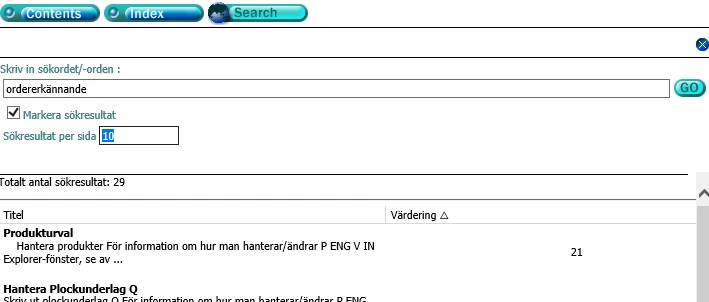
URL for test:
https://webhelp.prod.pengvin.se/webhelp2020/PengVinHelp.htm#Order/Orderregistrering_Q.htm


In the build from robohelp 2019/2020 you got none result .
PengVinHelp (listen2music.se)

The content in both cases is the same


If you search for the word "Fakturor" (=Invoices) you got even worse differences
94 hits in the old build and only 4 in the new build

If you search for the word "Faktura" (=Invoice) you got 
118 hits in the old build and only 149 in the new build

and so on...


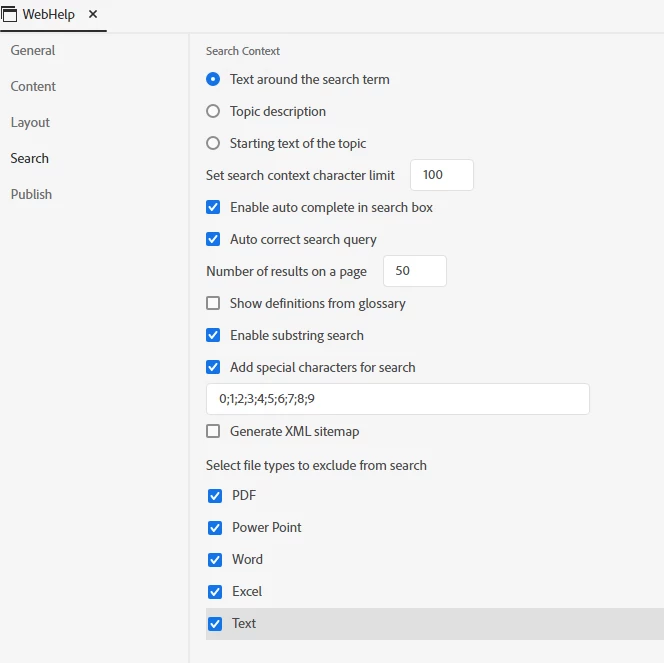
In robohelp output we have these settings for search
 

    This topic has been closed for replies.
    Correct answer Peter Grainge

    I am advised that this will be fixed in Update 5 which is planned for tomorrow (10th June).

    ________________________________________________________
    See www.grainge.org for free Authoring and RoboHelp Information

    24 replies

    Peter Grainge
    Community Expert
    Community Expert
    June 2, 2021

    I reported the number of search results but they have the link to the whole thread. Let's see what comes back.

    ________________________________________________________
    See www.grainge.org for free Authoring and RoboHelp Information

    Use the menu (bottom right) to mark the Best Answer or Highlight particularly useful replies. Found the answer elsewhere? Share it here.
    Known Participant
    June 2, 2021

    Which case did you take futher to Adobe?
    Incorrect search result in Responsive HTML5 or Searching in Frameless output or both?

    Peter Grainge
    Community Expert
    Community Expert
    June 2, 2021

    I am getting the same results and have taken this up with Adobe. They will either reply here or to me in which case I will update the thread. You can remove the link if you want to.

    ________________________________________________________
    See www.grainge.org for free Authoring and RoboHelp Information

    Use the menu (bottom right) to mark the Best Answer or Highlight particularly useful replies. Found the answer elsewhere? Share it here.
    Known Participant
    June 2, 2021

    I have uploaded the entire project in a zip-file here:
    http://www.listen2music.se/uploads/filer/PengVinHelp_rh2020_Krka.zip


    Peter Grainge
    Community Expert
    Community Expert
    June 2, 2021

    Can you share the project? If you can, then see the Contact page on my site and send the project as instructed there. Do make sure you include a link to this thread and please do not email the project direct.

    ________________________________________________________
    See www.grainge.org for free Authoring and RoboHelp Information

    Use the menu (bottom right) to mark the Best Answer or Highlight particularly useful replies. Found the answer elsewhere? Share it here.
    Known Participant
    June 2, 2021

    It is the same behavior in the locally generated output as on the IIS-server.

    Peter Grainge
    Community Expert
    Community Expert
    June 2, 2021

    Is it working in the locally generated output and only failing on the server when you publish or upload?

    ________________________________________________________
    See www.grainge.org for free Authoring and RoboHelp Information

    Use the menu (bottom right) to mark the Best Answer or Highlight particularly useful replies. Found the answer elsewhere? Share it here.
    Known Participant
    June 2, 2021

    Frameless output from our project can not be search at all

    nothing happened no matter what you are searching for.

    Välkommen (listen2music.se)


    Peter Grainge
    Community Expert
    Community Expert
    June 2, 2021

    The problem is a bit more bizarre than you describe. I found an instance of Ordererkännande by poking around and then I accessed another topic from the TOC. See these images.


    Try creating one of the frameless outputs and see if you get better results there. 

    ________________________________________________________
    See www.grainge.org for free Authoring and RoboHelp Information


    Use the menu (bottom right) to mark the Best Answer or Highlight particularly useful replies. Found the answer elsewhere? Share it here.
    Known Participant
    June 2, 2021

    I have now tried to create a new output preset

    And tried to expriment with a several different options in the searchtab but nothing get a reliable searchresult compared to the old build, the old one is the one thats give the correct answer.
    What more could I expriment with?

    I also found that in the example above when searching for "ordererkännade" that gives none result.
    If I search for "ordererkänna" (which it not a correct term at all) I got in this specific case a correct answer

    while the search for the correct term gives
