
Inspiring
February 14, 2020
Answered

Double-Quotes in Glossary Definitions Publish with a Backslash

  • February 14, 2020
  • 21 replies
  • 1010 views

Environment:

  • Win10
  • RoboHelp 2019.11 New
  • Frameless
  • Orange (modified)


Create this in RoboHelp:
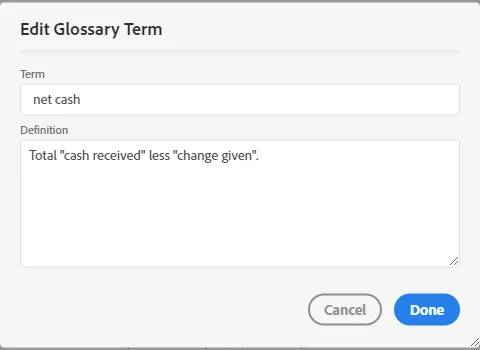
 

How it appears in the output:

 

Problem:

The build/compile process is inserting a backslash immediately prior to each double-quote.


Workaround:

Use a single-quote character instead of the double-quote character; those publish correctly.


This is a bug, right?

This topic has been closed for replies.
Correct answer Peter Grainge

I am advised...

This is happening while generating glossary file in output. Extra \\ is getting added as escape character. You can fix this in output by fixing the gdata1.new file in whxdata folder of output.

You will need to change the value in this file in output. 


As earlier, this will be fixed in the next update.


21 replies

Peter Grainge
Community Expert
Community Expert
March 26, 2020

Please test with Update 12 applied and confirm that this issue is now fixed.


Use the menu (bottom right) to mark the Best Answer or Highlight particularly useful replies. Found the answer elsewhere? Share it here.
RoboFanAuthor
Inspiring
February 19, 2020

Thank you for explaining the cause and sharing "real" workaround via the gdata1.new file! I'm going to stick with single quotes for now - and revisit the options after update 12.

Peter Grainge
Community Expert
Peter GraingeCommunity ExpertCorrect answer
Community Expert
February 19, 2020

I am advised...

This is happening while generating glossary file in output. Extra \\ is getting added as escape character. You can fix this in output by fixing the gdata1.new file in whxdata folder of output.

You will need to change the value in this file in output. 


As earlier, this will be fixed in the next update.


Use the menu (bottom right) to mark the Best Answer or Highlight particularly useful replies. Found the answer elsewhere? Share it here.
Peter Grainge
Community Expert
Community Expert
February 18, 2020

I am advised that the issue will be fixed in Update 12.


Use the menu (bottom right) to mark the Best Answer or Highlight particularly useful replies. Found the answer elsewhere? Share it here.
Peter Grainge
Community Expert
Community Expert
February 18, 2020

In topics they are still glossary definitions. No worries. You have a workaround and Adobe are on the case now.


Use the menu (bottom right) to mark the Best Answer or Highlight particularly useful replies. Found the answer elsewhere? Share it here.
RoboFanAuthor
Inspiring
February 18, 2020

Thank you to everyone for looking into this. I'll use single-quotes for now.

RoboFanAuthor
Inspiring
February 18, 2020

I thought I captured that it was in the glossary definitions in the title. <grin> To be fair, I suppose I should have restated it in the initial post text for clarity.


One other note - I tried replacing &quot with &#34 in the .glo file, but the result was the same.

Peter Grainge
Community Expert
Community Expert
February 18, 2020

Reported. I will let you know if there is any workaround, other than the use of smart quotes or a single quote.


Use the menu (bottom right) to mark the Best Answer or Highlight particularly useful replies. Found the answer elsewhere? Share it here.
Peter Grainge
Community Expert
Community Expert
February 18, 2020

Finally I see the issue. I don't think it was stated anywhere that this issue is only in the Glossary itself rather than in topics. I had been looking in topics and not seeing the problem.


Using the project Amber sent me I added the two glossary terms she had put in the project to a topic. This is what I see in the topic.


This is what I see in Frameless Orange


Now that we are one, I think, I will report it.


Use the menu (bottom right) to mark the Best Answer or Highlight particularly useful replies. Found the answer elsewhere? Share it here.
Community Expert
February 18, 2020

I've sent a sample project through. Let me know if you'd like me to send the output as well.


I tried changing the project language, and the output language to UK with no difference to the output. My Windows language is English AU, with AU and UK set as the preferred languages.

Peter Grainge
Community Expert
Community Expert
February 18, 2020

My glo file content

<glossdef>Total &quot;cash received&quot; less &quot;change given&quot;.</glossdef></glossentry>

Your glo file content

<glossdef>Total &quot;cash received&quot; less &#39;change given&#39;.</glossdef></glossentry>


So the issue is why we are seeing differences. What is your project language?


I just added another glossary term and used your code.


Let me know your project language and I will take it up with Adobe. Maybe they advise something quicker than waiting for a bug fix.


I am not doubting anything you say, especially as Amber got the same results. What I am trying to do is find out why. I am using English UK.


Use the menu (bottom right) to mark the Best Answer or Highlight particularly useful replies. Found the answer elsewhere? Share it here.