Irene259097522u8r
Known Participant
June 6, 2024
Answered

"droptext" and RH2022

  • June 6, 2024
  • 17 replies
  • 2644 views

I upgraded from Rh9 to RH2019 and I am generating Microsoft HTML Help.

With Rh2019 I can click on a small image and get a larger, different image to appear but this doesn't work in RH2022.  Any help anyone can give me will be much appreciated.

Below is the extract from the HTMl file and two pictures.

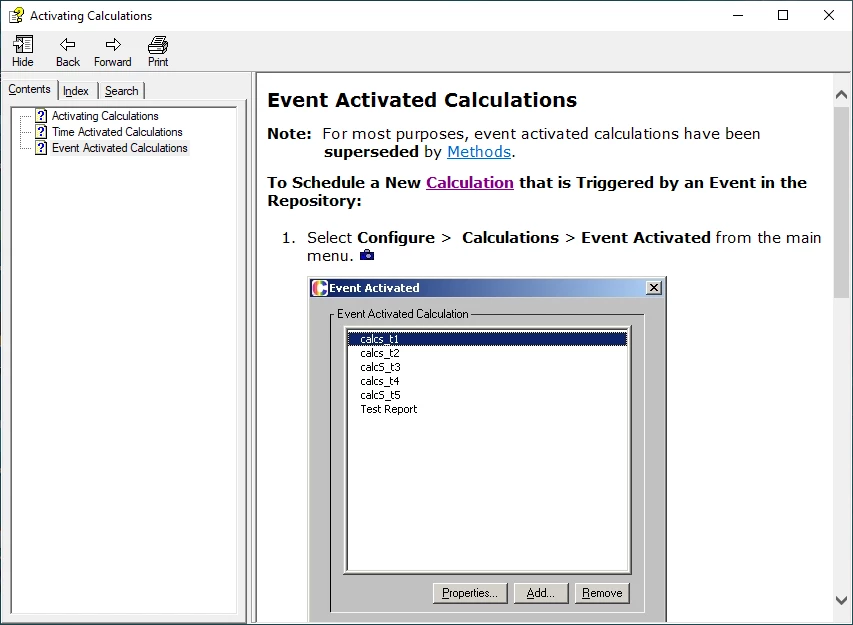
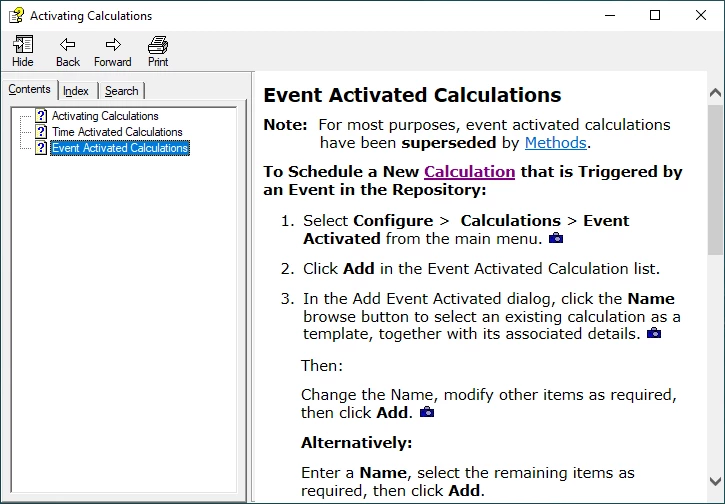
First picture is of what the help looks like before clicking on camera image. 2nd os of what is looks like when it worked.


<li class="p">
      <p>Select <span style="font-weight: bold;">Configure</span> &gt;  <span style="font-weight: bold;">Calculations</span> &gt; <span style="font-weight: bold;">Event Activated</span> from the main menu. <a class="dropspot" data-rhwidget="DropSpot" href="#"><img alt="" border="0" height="13" src="assets/images/Images/CAMERA ICON.JPG" style="border: none;" width="16" /></a></p>
      <div class="droptext" data-targetname="POPUP205435206">
        <p><img alt="" border="0" height="388" src="assets/images/Images/EventCalculatedCalcsList.jpg" style="border: none;" width="360" /></p>
      </div>
    </li>
 

This topic has been closed for replies.
Correct answer Peter Grainge

What I was trying to say was that my 2019 Project upgraded correctly so it could be the problem you are seeing is how you upgraded and that is not clear in the thread.


What you need to try is opening RoboHelp Classic and opening your RoboHelp 9 project that way. You simply point RoboHelp Classic to the RoboHelp 9 project. Back that up first though.


I doubt that 2022.4 will make a difference but it is what I used so it's worth a try. 


You don't use the Import settings and if that is what you have been doing, that is also a likely cause of the problems.


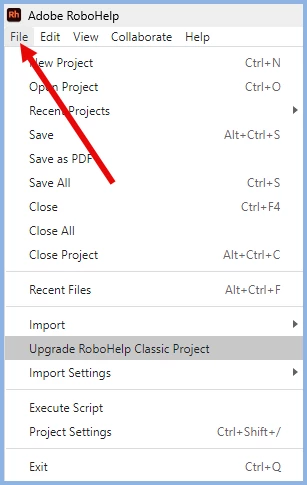
Go to the File menu to upgrade from Classic.


Try that. For 2022.4 go to the Help menu as long as you have admin rights.

________________________________________________________

My site www.grainge.org includes many free Authoring and RoboHelp resources that may be of help.


17 replies

Peter Grainge
Community Expert
Community Expert
July 18, 2024

Why would you expect hassle? It's now at the stage where nothing else has worked so without any disrespect to them, they are your last hope of an easy solution. 

________________________________________________________
My site www.grainge.org includes many free Authoring and RoboHelp resources that may be of help.


Use menu (bottom right) to mark as Best Answer or to Highlight particularly useful replies. Found the answer elsewhere? Share it here.
Irene259097522u8r
Known Participant
July 18, 2024

Maybe I'm just too cynical about these things. Must try not to be.

Peter Grainge
Community Expert
Community Expert
July 18, 2024

I really don't think you are going to find any upgrade path that works. I have tried them without success. I think the problem is back in the RoboHelp 9 version that works in later Classic versions but does not upgrade.


I have given you fix options. Either bite the bullet on those or see if Adobe Support can help. Give them a link to this thread so that they can see what has been tried. 


See https://helpx.adobe.com/contact/enterprise-support.other.html#robohelp for your Adobe Support options. The email link tcssup@adobe.com is recommended as it reaches a team dedicated to Technical Communication Suite products including RoboHelp.


Let us know how you end up fixing it. 

________________________________________________________
My site www.grainge.org includes many free Authoring and RoboHelp resources that may be of help.


Use menu (bottom right) to mark as Best Answer or to Highlight particularly useful replies. Found the answer elsewhere? Share it here.
Irene259097522u8r
Known Participant
July 18, 2024

I completely agree with you about not finding an upgrade path that will work automatically.  Thanks for bearing with me through this. I will let you know how I get on with the upgrade though I'm not sure it is worth the hassle that I expect there would be if I try to get Adobe Support to help.

Peter Grainge
Community Expert
Peter GraingeCommunity ExpertCorrect answer
Community Expert
July 18, 2024

What I was trying to say was that my 2019 Project upgraded correctly so it could be the problem you are seeing is how you upgraded and that is not clear in the thread.


What you need to try is opening RoboHelp Classic and opening your RoboHelp 9 project that way. You simply point RoboHelp Classic to the RoboHelp 9 project. Back that up first though.


I doubt that 2022.4 will make a difference but it is what I used so it's worth a try. 


You don't use the Import settings and if that is what you have been doing, that is also a likely cause of the problems.


Go to the File menu to upgrade from Classic.


Try that. For 2022.4 go to the Help menu as long as you have admin rights.

________________________________________________________

My site www.grainge.org includes many free Authoring and RoboHelp resources that may be of help.


Use menu (bottom right) to mark as Best Answer or to Highlight particularly useful replies. Found the answer elsewhere? Share it here.
Irene259097522u8r
Known Participant
July 18, 2024

Yes, I was actually using the 'upgrade' option. I see what you are saying about converting from RH2019 working, but I think that is not where the problem lies. It is starting with an RH9 project and trying to convert that where I get a problem. I am concentrating on working out the fastest way to make the changes that I know will make the dropdown pictures work rather than trying to figure out why the conversion seems to have not worked correctly.

Peter Grainge
Community Expert
Community Expert
July 18, 2024

Content removed. Right answer in the wrong thread!

________________________________________________________

My site www.grainge.org includes many free Authoring and RoboHelp resources that may be of help.


Use menu (bottom right) to mark as Best Answer or to Highlight particularly useful replies. Found the answer elsewhere? Share it here.
Irene259097522u8r
Known Participant
July 18, 2024

Content removed by moderator as it was in response to a mispost.

________________________________________________________

My site www.grainge.org includes many free Authoring and RoboHelp resources that may be of help.


Irene259097522u8r
Known Participant
July 18, 2024

Content removed by moderator as it was in response to a mispost.

Peter Grainge
Community Expert
Community Expert
July 12, 2024

This is where I have got to.

The Upgrade Process

I suspect the root problem is how you upgraded. Upgrading the proscribed method would have given you a 2019 Classic project and for me that upgraded to 2022.4 correctly, working dropdowns.

Fixing What You Have

If too many changes have been made to the content to go back, then we have to fix the code. First see your code in Classic and in 2022 and my code in 2022.

Your Classic Code

<a class="dropspot" data-rhwidget="DropSpot" href="#"><img alt="" border="0" height="13" src="assets/images/Images/CAMERA ICON.JPG" style="border: none;" width="16" /></a>:</p>
  <div class="droptext" data-targetname="POPUP201100371"">
    <p><img alt="" border="0" height="375" src="assets/images/Images/DNP3AIModule.jpg" style="border: none;" width="450" /> <img alt="" border="0" height="405" src="assets/images/Images/DNP3BIModule.jpg" style="border: none;" width="450" /></p>
    <p class="INDENT-1" style="font-style: italic;">Example Module Properties Dialogs</p>
  </div>

Your Upgrade Code

<a class="dropspot" data-rhwidget="DropSpot" data-target="drop-down" href="#"><img alt="" border="0" height="13" src="assets/images/Images/CAMERA ICON.JPG" style="border: none;" width="16" /></a>:</p>
  <div class="droptext" data-targetname="drop-down">
    <p><img alt="" border="0" height="375" src="assets/images/Images/DNP3AIModule.jpg" style="border: none;" width="450" /> <img alt="" border="0" height="405" src="assets/images/Images/DNP3BIModule.jpg" style="border: none;" width="450" /></p>
    <p class="INDENT-1" style="font-style: italic;">Example Module Properties Dialogs</p>
  </div>


My Upgrade Code
 This is just to show you the difference between your upgrade and mine. It still works using the POPUP references.

 <p><a class="dropspot" data-rhwidget="DropSpot" data-target="POPUP612658455" href="#"><img alt="" border="0" src="../assets/images/arrowdown2.gif" style="border: none;" />Click here</a></p>
  <div data-targetname="POPUP612658455">
    <p>Dropdown content</p>
  </div>
 ****************************************

There are two changes to get your code to work if a correct upgrade is not possible.

CHANGE ONE

Find

<a class="dropspot" data-rhwidget="DropSpot"

Replace

<a class="dropspot" data-rhwidget="DropSpot" data-target="drop-down"

That can be done using RoboHelp Find and Replace

CHANGE TWO

Find

<div class="droptext" data-targetname="POPUP201100371"">

Replace

 <div class="droptext" data-targetname="drop-down">

but where multiple drop-downs will become drop-down, drop-down2, drop-down3 etc

The difficulty here is find can be done with a regular expression and the replace can also be done that way. However, importantly it would not include the numbering in topics with more than one drop-down.

That can be done with a script but that is outside my capabilities. Could your developers help on that?

****************************************


If they put the following into ChatGPT, they will get an answer that I think will make sense to them.


I need a regular expression that finds POPUP201100371" and replaces with drop-down. The first replace will be drop-down and then each replace will have a number starting drop-down2 and incrementing by 1 each time.


Let me know if upgrading again as described is an option and if not whether your developers can help. What I can do is replace all with drop-down and then you manually add the numbers. That would of course require sharing the 2022 project.

________________________________________________________

My site www.grainge.org includes many free Authoring and RoboHelp resources that may be of help.


Use menu (bottom right) to mark as Best Answer or to Highlight particularly useful replies. Found the answer elsewhere? Share it here.
Irene259097522u8r
Known Participant
July 17, 2024

Thank you for your helpful comments. When I started on the path to upgrading from RH9 to RH2022, I was advised by someone at Adobe not to go straight from RH9 to RH2022 and they advised me to go to RH2019 first. I did that on a trial version and I thought I was following their instructions but, not being familiar with RH2019 and upgrading in general, of course I could well have not done it properly.

The good news is that no changes to the content have been done to our help (spread acorss 28 projects). The only changes have been to upgrade the version of RH.

I shall shelve the work I have done on the upgrade and try going straight from RH9 to RH2022.

I will let you know how that goes. 

I do have people who could write the script for me to correct the drop-downs if we need to do that. That said, I found a problem last week with some conditional 'stuff', again associated with a drop-down, where a different picture was meant to appear according to "Online" or "Print", but in the project converted to RH2022, both pictures appeared. 

Irene259097522u8r
Known Participant
July 17, 2024

I took one of the smaller projects and upgraded from the RH9 project to RH2022. This was using version 2022.3.93

I am not sure that 2022.4 is available to me through the business but I guess it would be available on a trial thourgh Adobe.

I'm sorry to day that the problem of the drop-down pictures from the camera icon still persists. I note that the 'Import settings' in my version of RH2022 only shows the option of going from RH2019 or RH2020.

Peter Grainge
Community Expert
Community Expert
July 12, 2024

I just created a 2019 Classic project to 2022.4 and the dropdowns are working correctly. This makes me suspect you upgraded from RoboHelp 9 to 2019 New UI rather then to 2019 Classic and then the new UI.


Subsequent updates may mean you cannot in practice go back because of later content changes but it would still be helpful to finding a solution to know if that was the underlying problem.


Please go back to your last Classic project and upgrade it using 2022.4. The upgrade option is on the File menu.


Meantime I will continue to look into fixing you new UI project as discussed.

________________________________________________________

My site www.grainge.org includes many free Authoring and RoboHelp resources that may be of help.


Use menu (bottom right) to mark as Best Answer or to Highlight particularly useful replies. Found the answer elsewhere? Share it here.
Peter Grainge
Community Expert
Community Expert
July 11, 2024

Email me the code before and after for one dropdown. I am wondering if regular expressions can help here. I rather doubt it but it's worth a try.


See the Contact page on my site and use the email address there.

________________________________________________________

My site www.grainge.org includes many free Authoring and RoboHelp resources that may be of help.


Use menu (bottom right) to mark as Best Answer or to Highlight particularly useful replies. Found the answer elsewhere? Share it here.
Peter Grainge
Community Expert
Community Expert
July 11, 2024

With you now. No worries over the image.


If it helps, I think you will be looking at months rather than days or weeks for the fix.

________________________________________________________

My site www.grainge.org includes many free Authoring and RoboHelp resources that may be of help.


Use menu (bottom right) to mark as Best Answer or to Highlight particularly useful replies. Found the answer elsewhere? Share it here.
Irene259097522u8r
Known Participant
July 11, 2024

Fairly obviously, we can't wait for a fix for the problem so I will need to progress the work. It will take a while! Thanks for bearing with me through this one.

Peter Grainge
Community Expert
Community Expert
July 10, 2024

Please use the photo icon to insert images within the post. Seeing an image inline with the text makes it easier for anyone answering or viewing the post. I have edited your post to add it. That image is from Classic so I'm not seeing how it helps with the 2022 version.


The suggestion to edit the code was before I found a way to use an image in 2022. What I am getting at is if you use the method I described, an image can be a hotspot. What I did here was insert the image using the toolbar camera icon and with the image selected I clicked the dropspot icon on the toolbar.


That shows the image path in the source field and the area to add the dropdown content. That will give you a working dropdown.


If you then click next to the iamge you will see this dialog.


In the fields I have highlighted you would normally add whatever text you want. At the moment if you enter anything it will break the dropdown. It's an image or text for the dropdown at the moment. I thought you wanted an image only so that would save the coding that was originally suggested.


Adobe have been made aware of the issues but I don't know when it will be fixed.

________________________________________________________

My site www.grainge.org includes many free Authoring and RoboHelp resources that may be of help.


Use menu (bottom right) to mark as Best Answer or to Highlight particularly useful replies. Found the answer elsewhere? Share it here.
Irene259097522u8r
Known Participant
July 11, 2024

Thank you. Sorry about not putting the image into the post in the most readable way.

I am using RH2022 to produce Microsoft HTML help, so the image I put in was from that generated help.

Whatever way I take to fix the current issue, I have to alter more than 400 instances where the camera icon is used to show an image when the camera icon is clicked. A different picture is associated with every such instance and often the camera icon is used multiple times within one file. This means a lot of work, but I do know that I can make it work, which is good news, as opposed to having a problem that we can't see how to get over.

I fully understand that you don't know when the issue you have reported will be fixed.

From my point of view, the issue is that clicking on the camera icon no longer shows the image it should show and this appears to be down to a "data-target" attribute. not being present in the htm file.

I hope that I have clearly explained what I am doing, but I'm sure you will question me further if something is not clear.


Peter Grainge
Community Expert
Community Expert
July 10, 2024

Is that quicker than what I suggested. It works as long as you don't try to add text as well. Do you use text in the hotspot as well? 

________________________________________________________
My site www.grainge.org includes many free Authoring and RoboHelp resources that may be of help.


Use menu (bottom right) to mark as Best Answer or to Highlight particularly useful replies. Found the answer elsewhere? Share it here.
Irene259097522u8r
Known Participant
July 10, 2024

I think you were suggesting that I looked at code differences between what works and what doesn't work and that was the way I found that data-target was in the code when it worked. Thanks for that guidance. To start with, I just couldn't see how to 'do' a drop-down image at all. It's not exactly obvious!

With RH2022 I can insert my camera icon image, select it and then select "create drop-down text". A box with the dotted outline appears with the text "Type your dropdown text here" in it and I can then insert an image into that box,along with text. Granted the words don't encourage you to think that you can put an image there, but you can!

The example is a picture of what happens when you insert the image at the beginning of the "Type your dropdown text here" sentence, but I also tried it with the image after the text and that worked as well.