
Inspiring
January 11, 2022
Answered

Failed to Generate Word output (RH 2020)

  • January 11, 2022
  • 34 replies
  • 1951 views

Hi Everyone.


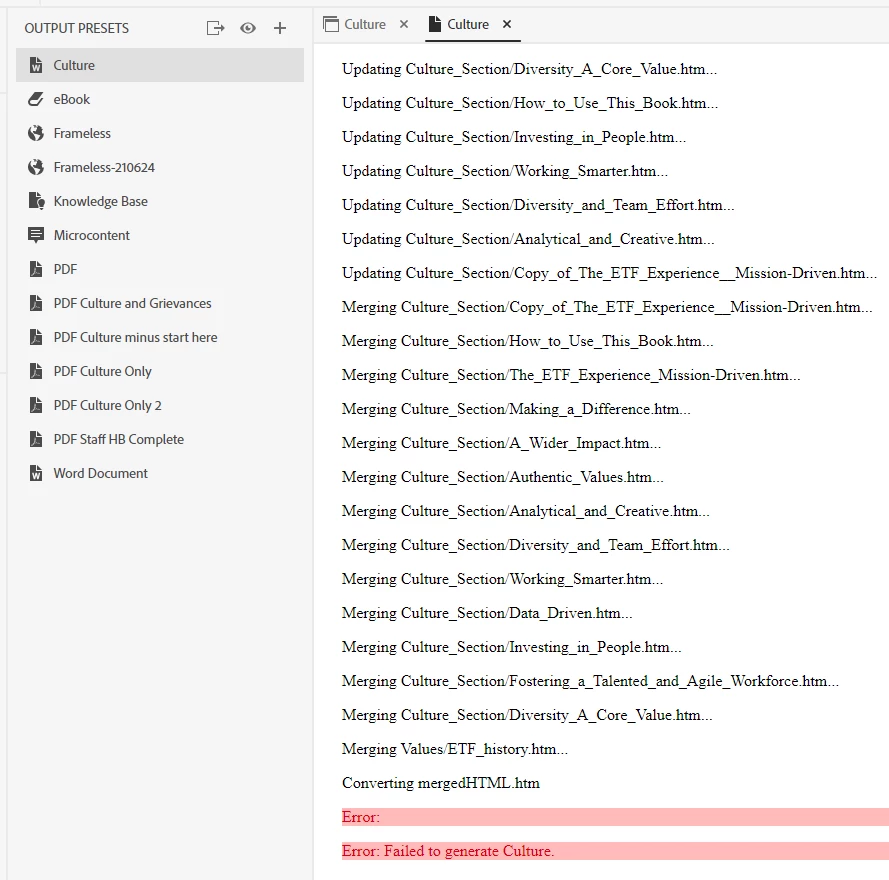
In RH 2020.6.76, when I try to generate Word output, I get the simple error message:  "Failed to generate [name of TOC]"


I've read a bunch of forum threads, leading me to these troubleshooting efforts:

  • Sample project -- output successful
  • Tried removing my CSS -- output fails
  • Tried setting all style mappings to "Use Word default" -- output fails
  • Tried setting Master Page to "none" -- output fails
  • Tried outputting a different TOC to Word -- output fails
  • Tried outputting an older version of this project -- output successful


NOTE:  There's one major difference between my current project and the older version:  when creating my current project, Adobe Tech Support had me create a new project and import all my topics from the older version. (We were troubleshooting an issue with the Online Review feature.)


Here's what I see when right-clicking the output preset:


Any advice for me?


Thank you!
    This topic has been closed for replies.
    Correct answer martinl83372021

    Okay, trying again. (And I apologize that I've confused matters by introducing screenshots of my REAL PROJECT.


    Going back to the TEST PROJECT that I've sent you, I've undone the deletion. 


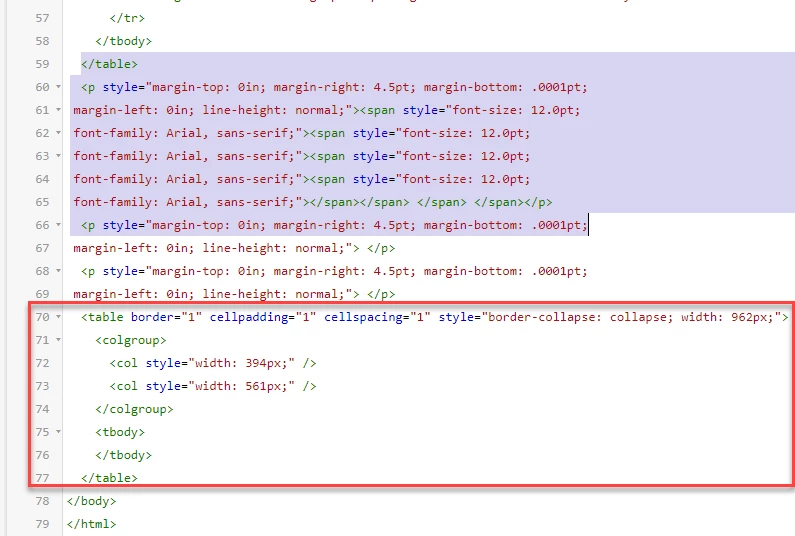
    Your initial message about the code said to "delete the empty table in lines 59 to 66." That's what's selected in this screenshot: 


    But if I understand what you're saying now, I should instead delete what's in the red box?  


    34 replies

    Inspiring
    January 13, 2022

    Success!!!


    Thank you for sticking it out with me, Peter. I know that was a long haul. I so appreciate it!

    Peter Grainge
    Community Expert
    Community Expert
    January 13, 2022

    Yes

    ________________________________________________________
    My site www.grainge.org includes many free Authoring and RoboHelp resources that may be of help.

    Use the menu (bottom right) to mark the Best Answer or Highlight particularly useful replies. Found the answer elsewhere? Share it here.
    martinl83372021AuthorCorrect answer
    Inspiring
    January 13, 2022

    Okay, trying again. (And I apologize that I've confused matters by introducing screenshots of my REAL PROJECT.


    Going back to the TEST PROJECT that I've sent you, I've undone the deletion. 


    Your initial message about the code said to "delete the empty table in lines 59 to 66." That's what's selected in this screenshot: 


    But if I understand what you're saying now, I should instead delete what's in the red box?  


    Peter Grainge
    Community Expert
    Community Expert
    January 13, 2022

    Lines 63 to 68 are what you should have deleted. Read the content.

    ________________________________________________________
    My site www.grainge.org includes many free Authoring and RoboHelp resources that may be of help.

    Use the menu (bottom right) to mark the Best Answer or Highlight particularly useful replies. Found the answer elsewhere? Share it here.
    Inspiring
    January 13, 2022

    Okay, I've made the deletion. But it still won't generate. 


    Here's what the code looks like now.  Is the blank Line 56 a problem?  How about the red X ?


    Peter Grainge
    Community Expert
    Community Expert
    January 13, 2022

    Forget line numbers. Delete the same text.

    ________________________________________________________
    My site www.grainge.org includes many free Authoring and RoboHelp resources that may be of help.

    Use the menu (bottom right) to mark the Best Answer or Highlight particularly useful replies. Found the answer elsewhere? Share it here.
    Inspiring
    January 13, 2022

    Excellent!!! 


    One last question. I've selected the same code in my proper project. The line numbers are slightly different from the Test Project.  I can't tell -- should I include line 66 in the deletion?


    Peter Grainge
    Community Expert
    Community Expert
    January 13, 2022

    It is something in the layout of your page.


    If you go to source view and delete the empty table in lines 59 to 66 it generates. It's an empty table so I don't understand why it is there. If other topics give this issue, look for the same problem.

    ________________________________________________________
    My site www.grainge.org includes many free Authoring and RoboHelp resources that may be of help.

    Use the menu (bottom right) to mark the Best Answer or Highlight particularly useful replies. Found the answer elsewhere? Share it here.
    Inspiring
    January 13, 2022

    Hi Peter.


    I'm unable to use the contact link on your site. My org's security won't  


    I succeeded this time -- didn't realize I had to click on the "MS Exchange" version of my account.


    Test project is on its way, separately.


    Thanks!!

    Jeff_Coatsworth
    Community Expert
    Community Expert
    January 13, 2022

    Just right-click & copy his e-mail address! How much simpler could that be??

    Inspiring
    January 13, 2022

    Oh!  I didn't realize that link contained the email address.  If you click it, it opens a web-based Windows email process.

    Peter Grainge
    Community Expert
    Community Expert
    January 13, 2022

    See the Contact page on my site.

    ________________________________________________________
    My site www.grainge.org includes many free Authoring and RoboHelp resources that may be of help.

    Use the menu (bottom right) to mark the Best Answer or Highlight particularly useful replies. Found the answer elsewhere? Share it here.