Participating Frequently
December 9, 2020
Question

Fixed HTML errors keep returning -- help!

  • December 9, 2020
  • 15 replies
  • 487 views

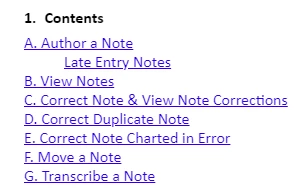
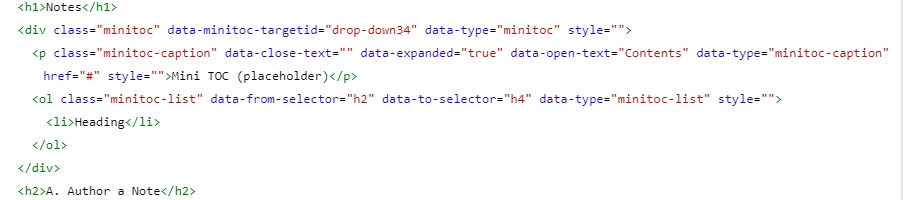
Hi there -- Robohelp formatting seems quite buggy! I've been able to fix most of the errors in the HTML. Then I save. But the errors return when I go back into the editing screen.  Examples: incorrect numbering removed in the 1st example, incorrect numbering back in 2nd example. In the 3rd example, extra spacing has been removed, in the 4th example the extra spaces are back. Does anyone know how I make these fixes permanent? The 1st one I fixed by deleting <li> before and </li> after the paragraph. The spacing I fixed by removing space between </em> and </span> and </li>.

Finally, I have no idea how to remove this numbering from in front of the word contents in the mini-TOC. The HTML is pasted below. Thank you for any suggestions! Dorothy


This topic has been closed for replies.

15 replies

Community Expert
December 15, 2020

Very strange. The css for your output does not seem to be the same as your source.


You do seem to have numbering set on all normal paragraphs using the default css as well. If that's not what you want, I would go in to the p style and unset the Autonumber settings.


I wonder if it's worth creating a new blank project and copying the stylesheet from that, for a fresh style start.


Just to explain a bit about the substyle, as you called it. When you set the Autonumber settings on a style, behind the scenes Robohelp is actually setting the :before substyle. 


Technically, it's a pseudo-element:

"A CSS pseudo-element is a keyword added to a selector that lets you style a specific part of the selected element(s). For example, ::first-line can be used to change the font of the first line of a paragraph."

https://developer.mozilla.org/en-US/docs/Web/CSS/Pseudo-elements 


I kind of get the feeling Adobe doesn't know who they're aiming the interface at. In some cases, the CSS technicalities are front and centre, but in other cases they are obscured. I'm not sure the decisions make it easier for either technical or non-technical users. 🙂


Participating Frequently
December 15, 2020

@Amebr - Here is the p.minitoc-caption with the p.minitoc-caption selected and the Autonumber section expanded. There's also a substyle (?) called ::before. I don't know if it's relevant but here's the css that contains ::before 


a.reltopics-list-item {}
p::before {
counter-increment: p;
content: counter(p, decimal)".";
padding-right: 0.5rem;
}
p.minitoc-caption::before {
padding-right: 0.5rem;
}


Participating Frequently
December 15, 2020

Hi -- The page was created in the trial version of Robohelp available from the Adobe website in early Dec 2020, which said it was 2019.01.11. I didn't see an option to choose a different version. My trial ends Dec 30. I will email Adobe about this. Dorothy

Jeff_Coatsworth
Community Expert
Community Expert
December 15, 2020

If Help > Updates doesn't produce anything for you in 2019, try this page - https://www.adobe.com/support/robohelp/downloads.html

Peter Grainge
Community Expert
Community Expert
December 15, 2020

@Dorothy5C47 Upgrading is going from 2019 to 2020 while updating is within a version. Is this issue in the trial of 2020 and with updates applied?


If you only have a licence for 2019 you can nonetheless install 2020 as a trial and you can update that. Double clicking the RHPJ will try to open the project in 2020 but you will be warned before it upgrades the project. Open a project from within either version will open it in that version.

________________________________________________________
See www.grainge.org for free Authoring and RoboHelp Information

Use the menu (bottom right) to mark the Best Answer or Highlight particularly useful replies. Found the answer elsewhere? Share it here.
Peter Grainge
Community Expert
Community Expert
December 15, 2020

Within the trial period you can apply updates without charge?

Has your trial period expired? 

Are you seeing a dialog saying you cannot update?

________________________________________________________
See www.grainge.org for free Authoring and RoboHelp Information

Use the menu (bottom right) to mark the Best Answer or Highlight particularly useful replies. Found the answer elsewhere? Share it here.
Community Expert
December 15, 2020

Odd. Your screenshot of the code definitely shows the counter being set on the p.minitoc-caption. Can you post a screenshot of the stylesheet editor with p.minitoc-caption selected and the Autonumber section expanded?

Participating Frequently
December 15, 2020

Hey, thanks for the tips. The numbering for p.minitoc-caption was already set to none, so unfortuantely that's not it. I've added the 2019 Robohelp updates (your note about the updater not working is a lifesaver!!), but it seems if I want 2020 updates I have to buy a different liscence. Is it worth it? I need to convince my bosses so it would be great to hear your expertise. Dorothy

Jeff_Coatsworth
Community Expert
Community Expert
December 15, 2020

RH2020 is subscription only now - no perpetual licenses. Sounds like your copy of RH2019 is a perpetual one, otherwise you could download and run both versions if you wanted.

Peter Grainge
Community Expert
Community Expert
December 12, 2020

Trial versions can be updated. There is a bug in updating the version you are using so download 2020.3 from Adobe - Support : RoboHelp Support Center : Service Releases

________________________________________________________
See www.grainge.org for free Authoring and RoboHelp Information

Use the menu (bottom right) to mark the Best Answer or Highlight particularly useful replies. Found the answer elsewhere? Share it here.
Community Expert
December 12, 2020

Okay the numbering is set in your default.css.


Go into you stylesheet and click on the p.minitoc-caption entry, expand the Autonumber section and set Style to none. That should remove the numbering from the caption.


Participating Frequently
December 11, 2020

Hi -- It is a new project. I stripped the text of formatting in Notepad++ before pasting it and formatting. I don't think the issues are in the skin stylesheets, as they show up in the Preview section of the Author section (before the skin is applied.) I can't apply the updates because it's a trial version of Robohelp. I think I've figured out most of the issues but if you have any ideas about why the contents title is numbered, that would be very helpful. TYSM!