

JenniR_12
Inspiring
June 3, 2024
Answered

Footer issues in Robohelp 2022.3.93 (Topic Layouts)

  • June 3, 2024
  • 17 replies
  • 6169 views

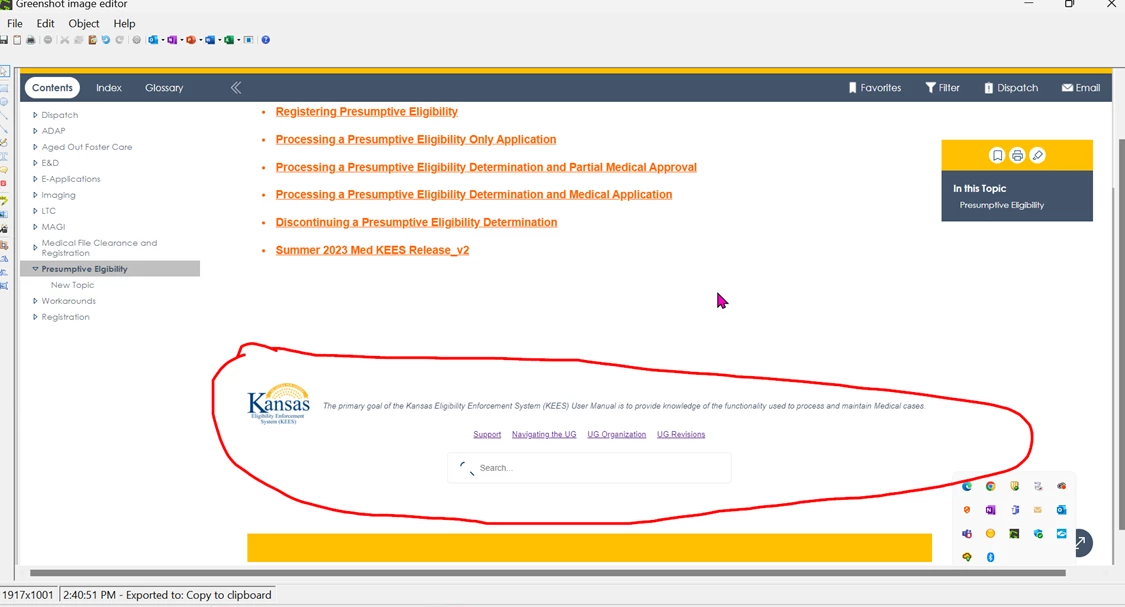
I'm trying to set up a footer, which seems pretty simple.  Create a topic layout and add the footer into the footer region of my topic layout and then add that to the topic layout line of the Layout tab in my Frameless preset.  When I do this, the footer doesn't show up where I thought it would.  I guess my question is this correct.  It seems awfully high on the screen.  I think I thought it would show up in the bar going across the bottom rather than above this bar (see yellow horizontal bar across the bottom of my example).  It looks awkward  where it's placed.  What am I missing?  Thank you.


    This topic has been closed for replies.
    Correct answer JenniR_12

    I have clicked on every single optioin (a few times)  It dawned on me that this had to be a container of some sort but I kept thinking it was related to my footer.  This morning I just looked for anything that said container and came across it.  BSC referenced in the inspector = Browse Sequence Container.  I've learned so much doing this.  This is officially resolved.

    17 replies

    Community Expert
    June 26, 2024

    One thing that might be affecting things is that when you set up the footer topic, I beieve it will only be using the stylesheet attached - eg. the topic stylesheet. Once it's generated, the skin stylesheet will affect it. So that might increase the line-height and things like that. I haven't played with it though, so hard to say for sure.

    Peter Grainge
    Community Expert
    Community Expert
    June 9, 2024

    I have a demo project with topic and template footers set up. Let me know if you want me to send it.

    ________________________________________________________

    My site www.grainge.org includes many free Authoring and RoboHelp resources that may be of help.


    Use menu (bottom right) to mark as Best Answer or to Highlight particularly useful replies. Found the answer elsewhere? Share it here.
    JenniR_12
    JenniR_12Author
    Inspiring
    June 10, 2024

    Hi Peter.  Yes, please send me what you  have.  I am still struggling with the height of the footer.  I agree, it's too large.  I've tried making the rows smaller, but it seems that any changes I have made from this point moving forward, don't do a thing.  I have created mutiplefooter "start over" topics and started from scratch without using copy paste from the original footer in case it's copying over something that is causing the issue.  I've looked at this so much over the last few days that I'm sure I'm making something too hard.  I've looked at tons of articles and copied code from those articles and tried to add it to my CSS, but I don't even know if adding something into my CSS is where I should be doing it.  I've just confused the heck out of myself and forgotton about the simpler stuff.  I did get the spacing issues fixed and I couldn't even tell you exactly what I did to fix it.  I think it went back to looking good after I removed all of the extra things that I had put into my CSS along the way that didn't work and once I removed all of it, the horizontal spacing at least went back to looking like I want it to to look.  


    I have Greenshot on my machine.  I'll use that more often.  i do use it sometimes, but the image editor is wonky and it's just another "thing" that annoys me at the present time 😉  I did figure out that I will seee that screen where it lets you choose small or large only if I use the insert photos button on the toolbar above where you are typing your post.  Hopefully that will be good moving forward.


    Thanks, again for sending me your demo footer.  I'll comb through the settings and see what I can find.


    Jen


    Here are the screenshots showiong again the horizontal spacing differences between my topic and homepage footers.  Again, I have this corrected for the time being.


    Jennifer Rogers
    JenniR_12
    JenniR_12Author
    Inspiring
    June 10, 2024

    As for the search bar, I only added it after I read up on what kind of info to use in a webpage footer.  I saw Search options mentioned and knew I had the option to add it in quickly.  I might remove it.   I'll have to make a decision before Wednesday of this week.  

    Jennifer Rogers
    Peter Grainge
    Community Expert
    Community Expert
    June 8, 2024

    Let us know where you have got to at the end of your day. 

    ________________________________________________________
    My site www.grainge.org includes many free Authoring and RoboHelp resources that may be of help.


    Use menu (bottom right) to mark as Best Answer or to Highlight particularly useful replies. Found the answer elsewhere? Share it here.
    Peter Grainge
    Community Expert
    Community Expert
    June 8, 2024

    A quick test would be to create another footer with just one line of text. The height should be less and if it is, it proves the height of your topic is the issue. 

    ________________________________________________________
    My site www.grainge.org includes many free Authoring and RoboHelp resources that may be of help.


    Use menu (bottom right) to mark as Best Answer or to Highlight particularly useful replies. Found the answer elsewhere? Share it here.
    Peter Grainge
    Community Expert
    Community Expert
    June 8, 2024

    This is an untested theory. The height of your footer will be the height required for the depth of the footer topic unless in the template settings you set a height for the container. If that is less I am not sure what will happen. It will either scrunch your content or, more likely, add a scroll bar. I don't think either of those would look good so try working on your topic.

    ________________________________________________________

    My site www.grainge.org includes many free Authoring and RoboHelp resources that may be of help.


    Use menu (bottom right) to mark as Best Answer or to Highlight particularly useful replies. Found the answer elsewhere? Share it here.
    Peter Grainge
    Community Expert
    Community Expert
    June 8, 2024

    I think I may have missed the table height bit. In the screenshots you can't see it is table based. I believe the footer will be the depth of the footer topic so you need to reduce the height of the rows, plus lose that search? 


    (The screenshot is from Snagit. When expanded it should be very clear. This image is particularly wide, a narrower one would be clear without expanding it)

    ________________________________________________________

    My site www.grainge.org includes many free Authoring and RoboHelp resources that may be of help.


    Use menu (bottom right) to mark as Best Answer or to Highlight particularly useful replies. Found the answer elsewhere? Share it here.
    Peter Grainge
    Community Expert
    Community Expert
    June 8, 2024

    I am seeing one reply here to me but I have had four or five emails. That happens if you change so much as one character. I am assuming that is what has happened.

    ________________________________________________________

    My site www.grainge.org includes many free Authoring and RoboHelp resources that may be of help.


    Use menu (bottom right) to mark as Best Answer or to Highlight particularly useful replies. Found the answer elsewhere? Share it here.
    JenniR_12
    JenniR_12Author
    Inspiring
    June 8, 2024

    I have it figured out.  I hadn't seen this and found it this morning.  Yes, I made edits to the prior post.  I feel like if it's too long I get scolded and if it's too short I get scolded.  I was trying to thread the needle for clarity and length.  I'm sure it was an epic fail.  Disregard.  I think I can get it working after seeing this.

    https://www.grainge.org/RoboHelp_Gems/RoboHelp_Gems.htm#templates


    Jennifer Rogers
    Peter Grainge
    Community Expert
    Community Expert
    June 8, 2024

    It's fine if it is because of edits. My concern was whether they were different posts and I was missing something.


    Please don't see my comments as scolding. I'm trying to guide you to keep things easier for supporters to follow. Short posts that are very to the point and where applicable with bullet points get more attention and make it easier to follow the issue.

    ________________________________________________________

    My site www.grainge.org includes many free Authoring and RoboHelp resources that may be of help.


    Use menu (bottom right) to mark as Best Answer or to Highlight particularly useful replies. Found the answer elsewhere? Share it here.
    Peter Grainge
    Community Expert
    Community Expert
    June 8, 2024

    I think the image issue is coming from pasting them into Word. Try using a screen capture tool. Snagit is by far the best, not expensive but not free. It will enable you to include much better screenshots in your topics. Otherwise Google "free screen image capture software" and there's lots. Greenshot is probably OK for this purpose.


    I have posted in this thread a link to Footers on my site, a new item in Gems. It looks like what you are calling Footer is the Template Footer I describe so you should be able to change things with what I have described there. However, I can only speak for the default settings. 


    The footer in the images looks the same on both the home page and the topic page. What is the difference you are not happy with? What I do see is the footer in both taking up way too much space in my opinion but that's your call. It's a bit like looking through a keyhole.


    You have also got a search widget in it. Why? There is a search at the top. Removing that would reduce the depth of the footer.


    Can you change the footer topic so that is less deep?


    What I would like you to do is create a new template, not for final use but so that you can start afresh and get the footer working with an otherwise uncustomised page. 


    Does that help?

    ________________________________________________________

    My site www.grainge.org includes many free Authoring and RoboHelp resources that may be of help.


    Use menu (bottom right) to mark as Best Answer or to Highlight particularly useful replies. Found the answer elsewhere? Share it here.
    Peter Grainge
    Community Expert
    Community Expert
    June 8, 2024

    @JenniR_12 I suspect part of your problem in understanding footers is there are in fact three types of footer.

    • Topic Layout Footers
    • Template Home Page Footers
    • Template Topic Footers


    The template is really one footer but it can be configured in different ways, for example the background colour.


    I have documented it on my site. See Item 23 at RoboHelp Gems (grainge.org)


    Bear in mind that has been written using a default template. All the changes you have made could impact how it works and I can't help on changing or reversing those.

    ________________________________________________________

    My site www.grainge.org includes many free Authoring and RoboHelp resources that may be of help.


    Use menu (bottom right) to mark as Best Answer or to Highlight particularly useful replies. Found the answer elsewhere? Share it here.
    Peter Grainge
    Community Expert
    Community Expert
    June 7, 2024

    I think adding images has been mentioned before. 🙂 Inline please. Put yourself in the position of someone trying to help you. They have to memorise all those images whilst reading a very lengthy post, in between whatever else they are supposed to be doing. 


    You also need to keep in mind that many users, myself included, use the default template with minimal customisation so there's not so much knowledge of customisation. We just poke around to get what we want. By customising your template so heavily and to put it bluntly, you have dug a hole for yourself. 🙂


    For Now


    The home page and topics are two different things that have to be set up separately, albeit made to look the same. I think it can be same source but adding it in may require different settings.


    You asked elsewhere about dragging but did not mention within a template. There the position is based on settings.


    The Rest


    To answer your other questions would require a deep look at your template or at least some time consuming work on a default template, I think beyond what can be done on the forum with an already customised template. Nonetheless I will take a look and see what I can fathom out.


    What would really help is one image with text on it that says "This is too wide" "I want this image wherever". If it's easier, a number of images but the same idea. A picture is worth a thousand words etc.

    ________________________________________________________

    My site www.grainge.org includes many free Authoring and RoboHelp resources that may be of help.


    Use menu (bottom right) to mark as Best Answer or to Highlight particularly useful replies. Found the answer elsewhere? Share it here.
    JenniR_12
    JenniR_12Author
    Inspiring
    June 8, 2024

    Peter:


    I figured out what was missing on my screenshots FINALLY.  I wasnt using the Insert Photos button on the provided toolbar.  Instead, I was just copying and pasting straight from Word into the post.  Once I clicked the Insert Photos button, I'm consistently able to see the large option that you speak of.  I move so fast that sometimes I would see that option and sometimes I wouldn't and I never spent time figuring out what was what.  I thought I was doing it the same way every single time.  Sorry about that.


    Below is the footer I created in RH as a topic containing my footer content - this is the desired look I need to have once generated EXCEPT I need to make the container smaller than what it is.  The yellow part at the bottom is my footer and it's too high.  I can't get it smaller because everything I have tried seems to change the whole look..   I wold think I would just change the height of the table, maybe?  Or even decrease the row height of the top row and maybe the bottom row, but assuming I know how to change the row height under the table properties - I make the change and literally nothing happens.  Doesn't seem like anyone knows too much about it so I will continue to try and figure it out.  Just didn't know if it was something quick and easy that I just was missing.


    Yet  - this is how it looks once generated on the Home Page - spacing is not right.  Why?  This is conming straight from my topic I  created for my footer content that looks perfect.


    This is how it looks on my topic page footer?  Why?  Again, this is coming directly from the topic I created containing my footer content that looks perfect and also - it doesn't even match what the home page footer looks like and it, too, shows up only after I add the topic to my frameless preset under the Layout tab in the Footer Content line.  If there is another place I need to add this to for either page, please let me know where and what it is because I can't find any other places to do so.  What I know for a fact is that with nothing in that footer conent line, the footer on both homepage and topic page are blank - no footer.  Once I add the topic - these footers appear.  

    Top Left corner looks good - scrolling issue.  I think I can prob figure this out I just haven't had a chance to look again at the information  you provided on scrolling areas issues.  Ii was looking for a low down quick easy way to resolve it but I suspect there is no easy way because nothing has been too easy thus far.  I'll need to set aside some time (a day) to figure it out.  


    Here it shows the top left corner (look at the gray line that says ADAP) - you can see it has shifted slightly and I noticed it happened when I started scrolling.  Again, I'll have to find several hours to set aside to see why that's happening.  Thes are less important than the footer issues I currently have.


    Jennifer Rogers
    JenniR_12
    JenniR_12Author
    Inspiring
    June 8, 2024

    Jeff - I have the picrture of the desired footer in a few places above.  Here it is again.  I don't think it's heavy on content at all.  I actually was thinking of adding a few more links.  But, maybe content heavy to me is different.  I'm not sure. 

    This is how I want footer to look once generated.

    This is the result on the Home Page and you can see it does not look like I have it set up above.  

    This is how it looks on the Topic Page and it's also not correct.  Both Home Page and Topic Page look different from each other and neither looks like I set it up in my topic.  Why?

    I will continue to work on this.  I was looking for the quick fix.  I thought surely others have run into the same issue being that it's just a topic that is controlling what it should do.  If the topic is correct, well, then the footer should be correct in my mind........right?  Wrong.....

    Jennifer Rogers