Known Participant
May 4, 2020
Answered

Frameless output: Can I use different TOC Tile images for the Home page vs. those on secondary page?

  • May 4, 2020
  • 23 replies
  • 1991 views

I have customized images that I use as TOC Tile images on my Frameless skin. The generated homepage reflects these images appropriately. On the Home page in the generated output, when I click on a TOC Tile, it takes me to a secondary page with the same TOC Tiles as the home page, but with different content. On this secondary page, each TOC Tile image is associated with the 8-10 documents I have listed under the main folder. Is there a way to use different TOC Tile images for the secondary page? Also, is there a way to do away with the second 'home page' and get straight into topics?  Please advise. 

    This topic has been closed for replies.
    Correct answer Peter Grainge

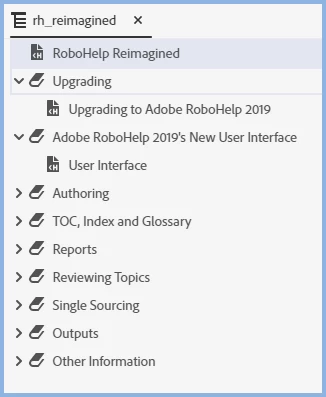
    What you are seeing is something that happens depending on how the TOC is set up. Here's the TOC in the project.


    The first tile in the output is for RoboHelp Reimagined. Above you can see it is a topic. Click that tile in the output and it will go straight to the topic, no second home page.


    Click the tile for Adobe RoboHelp 2019's New User Interface though and you will see a second home page.


    In the TOC above I went to the book Adobe RoboHelp 2019's New User Interface and linked that book to the User Interface topic. I then generated again and you go straight to the topic with no second home page.


    The sample project can be used with many outputs and has been set to work optimally with skins other than frameless or any tiled output. As above though, it can be changed.


    23 replies

    Peter Grainge
    Community Expert
    Community Expert
    May 6, 2020

    Nothing received from wetransfer. Did you get an email from them saying it had been sent? If not something went wrong.


    Use the menu (bottom right) to mark the Best Answer or Highlight particularly useful replies. Found the answer elsewhere? Share it here.
    Known Participant
    May 5, 2020

    I have sent you the zip file as requested using wetransfer platform. Thank you for looking into this issue.

    Peter Grainge
    Community Expert
    Community Expert
    May 5, 2020

    ... or just send me screenshots of your settings. There is definitely something wrong here as no one else has reported this. I have seen that but only with a merged help setup and that was fixed.


    Use the menu (bottom right) to mark the Best Answer or Highlight particularly useful replies. Found the answer elsewhere? Share it here.
    Inspiring
    May 5, 2020

    Hi, Peter and LotusFlower1.


    I too am experiencing the "two home pages."


    Eager to see what soution Peter comes up with.


    Thanks!


    Marty

    cindyh933912
    Participant
    March 5, 2021

    Hi Peter, LotusFlower1 and Marty,


    I too have both a primary and secondary home page. I would like to keep both homepages, but have different toc tile images on each page. Right now, the toc tile images from the primary home page carry over to the secondary home page. Does anyone know if it is possible to have different images on the secondary home page from those on the primary home page and, if so, how would I go about doing it. Thanks so much! 


    Cindy

    Peter Grainge
    Community Expert
    Community Expert
    May 4, 2020

    I had wondered if you had put something in there that was causing this.


    You said it is happening with the RoboHelp Reimagined project. Please zip that up and see the Contact page on my site. Send the project as instructed there. Do make sure you include a link to this thread and please do not email the project direct.


    I would like to see what happens when I generate using your settings.


    Use the menu (bottom right) to mark the Best Answer or Highlight particularly useful replies. Found the answer elsewhere? Share it here.
    Known Participant
    May 4, 2020

    I did have a link for Skin Home Page Content (that enabled me to show additional information below the tiles):

    I removed the link from here and regenerated my frameless output. But I still have 2 Home pages - (a) main home page and (b) secondary page listing all the contents but in TOC-tile style like the main home page. Clicking on each one then takes me to Topic pages. 

    Peter Grainge
    Community Expert
    Community Expert
    May 4, 2020

    Something must be wrong with your configuration. Both of those skins go from the home page to the topics without going through a second home page.


    Have you perhaps entereed something in the Skin Home Page Content field? It should be blank.


    Use the menu (bottom right) to mark the Best Answer or Highlight particularly useful replies. Found the answer elsewhere? Share it here.
    Known Participant
    May 4, 2020

    Yes, I have 2019.0.12

    Peter Grainge
    Community Expert
    Community Expert
    May 4, 2020

    Do you have Update 12 applied?


    Use the menu (bottom right) to mark the Best Answer or Highlight particularly useful replies. Found the answer elsewhere? Share it here.
    Known Participant
    May 4, 2020

    Thank you, please do. Also look at the Robohelp Reimagined sample (using Oceanic Skin or Orange skin). They both deliver 2 Home Pages before topic pages appear. I've fashioned my first frameless project after these samples (esp. Learn a Latte sample - Orange skin). A successful delivery of this prototype project will determine if my department will proceed with the use of Frameless outputs in Robohelp. So your help is greatly appreciated. 
    Additionally, is there a way to add 3 tabs with captions in the title-bar area of the Top section of the home page? Something like this in the top right section of the title bar:

    Currently, my customized project skin (based on Orange skin) does not seem to allow any additions to the title bar. Any pointers for that will also be helpful. 

    Peter Grainge
    Community Expert
    Community Expert
    May 4, 2020

    I will take a look at Learn a Latte in the morning.


    Use the menu (bottom right) to mark the Best Answer or Highlight particularly useful replies. Found the answer elsewhere? Share it here.