Known Participant
May 4, 2020
Answered

Frameless output: Can I use different TOC Tile images for the Home page vs. those on secondary page?

  • May 4, 2020
  • 23 replies
  • 1991 views

I have customized images that I use as TOC Tile images on my Frameless skin. The generated homepage reflects these images appropriately. On the Home page in the generated output, when I click on a TOC Tile, it takes me to a secondary page with the same TOC Tiles as the home page, but with different content. On this secondary page, each TOC Tile image is associated with the 8-10 documents I have listed under the main folder. Is there a way to use different TOC Tile images for the secondary page? Also, is there a way to do away with the second 'home page' and get straight into topics?  Please advise. 

    This topic has been closed for replies.
    Correct answer Peter Grainge

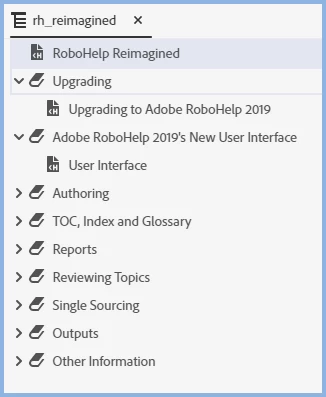
    What you are seeing is something that happens depending on how the TOC is set up. Here's the TOC in the project.


    The first tile in the output is for RoboHelp Reimagined. Above you can see it is a topic. Click that tile in the output and it will go straight to the topic, no second home page.


    Click the tile for Adobe RoboHelp 2019's New User Interface though and you will see a second home page.


    In the TOC above I went to the book Adobe RoboHelp 2019's New User Interface and linked that book to the User Interface topic. I then generated again and you go straight to the topic with no second home page.


    The sample project can be used with many outputs and has been set to work optimally with skins other than frameless or any tiled output. As above though, it can be changed.


    23 replies

    Known Participant
    May 4, 2020

    And to your question : Do the top level books in your TOC that become your home page tiles have nothing but books in them with topics further down? - the answer is:


    The top level books in my TOC (that become my home page tiles) have only topics in them (some imported PDFs and some created topics). 

    Known Participant
    May 4, 2020

    Peter, that is how I found it to work. I was unhappy with it as well. In Robohelp, if you go to the Learn a Latte Project in Samples, and generate a Frameless Website Output, it does the same thing. It goes to the next "Home Page"-looking secondary page and lists all the content from under the main folder as tiles. 

    Peter Grainge
    Community Expert
    Community Expert
    May 4, 2020

    I am trying to work out how you have managed to get the home page to go to a second home page as that is not how it is supposed to work. Is this something you have deliberately set up somehow or just the way you found it working?


    Do the top level books in your TOC that become your home page tiles have nothing but books in them with topics further down?


    Use the menu (bottom right) to mark the Best Answer or Highlight particularly useful replies. Found the answer elsewhere? Share it here.