Inspiring
May 27, 2020
Answered

How do I get rid of numbering within a numbered list?

  • May 27, 2020
  • 5 replies
  • 812 views

RoboHelp 2019

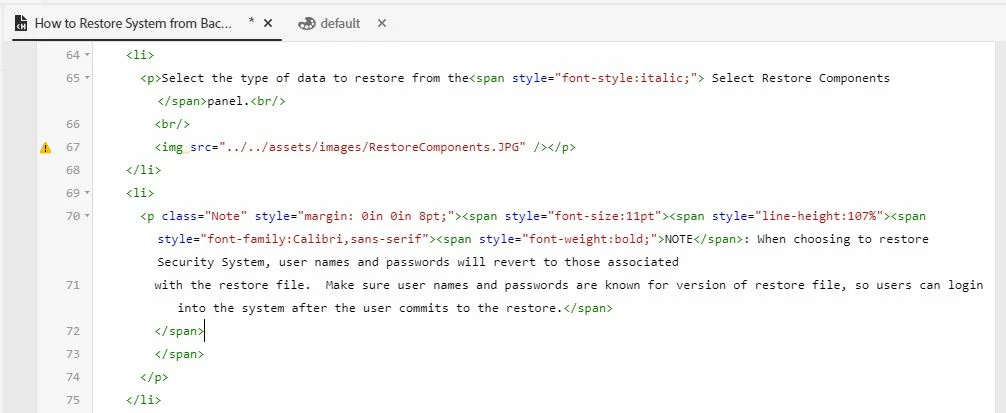
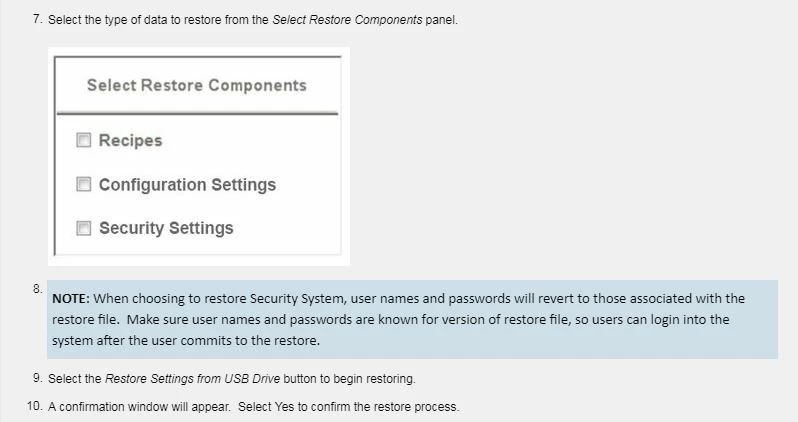
Refer to attached: The Note (blue) in this list is numbered.  How do I get rid of the number?  The "Note" style has been applied. The "Note" style is not numbered, but when applied, retains the numbering from the list.

Refer to attached HTML
This topic has been closed for replies.
Correct answer Peter Grainge

I have discussed this with Adobe and they have raised a bug. Meantime there is an easier way to get the Restart Numbering field to appear.


Start the second list and then look at the breadcrumbs above the topic and click LI.


5 replies

Peter Grainge
Community Expert
Peter GraingeCommunity ExpertCorrect answer
Community Expert
June 6, 2020

I have discussed this with Adobe and they have raised a bug. Meantime there is an easier way to get the Restart Numbering field to appear.


Start the second list and then look at the breadcrumbs above the topic and click LI.


Use the menu (bottom right) to mark the Best Answer or Highlight particularly useful replies. Found the answer elsewhere? Share it here.
Peter Grainge
Community Expert
Community Expert
June 5, 2020

🙂


Use the menu (bottom right) to mark the Best Answer or Highlight particularly useful replies. Found the answer elsewhere? Share it here.
GLNT1Author
Inspiring
June 4, 2020

Thanks, Peter. When I tried this weeks ago, it did not work. I must have had things in a bad state? 

Anyway, I started the topic fresh and this time your suggestion worked!  Thank you so much.

Peter Grainge
Community Expert
Community Expert
May 27, 2020

With the cursor in the style that shouldn't be numbered, look at the toolbar and you should see the list icon shaded. Click it and select the None option on the right.


You could also backspace so the image becomes part of the previous number and use shift enter. After the image use Enter again and numbering will restart.


It really would help us help you if you kept this problem in one thread. Right now we seem to be diving all over the place. 🙂


Use the menu (bottom right) to mark the Best Answer or Highlight particularly useful replies. Found the answer elsewhere? Share it here.
Jeff_Coatsworth
Community Expert
Community Expert
May 27, 2020
GLNT1Author
Inspiring
May 27, 2020