
Inspiring
February 15, 2016
Question

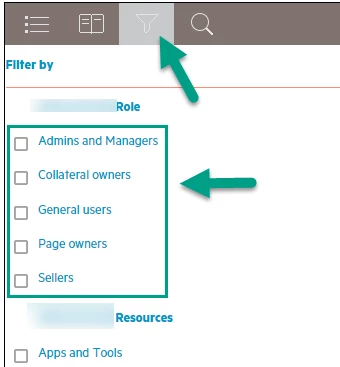
How do I get the filter checkbox back? I did not alter these graphics in the Layout Customization tool.

  • February 15, 2016
  • 1 reply
  • 1657 views

I was mucking around in the layout.css to adjust the horizontal placement of my header (just moving it from left-aligned to centered by changing the 3 em in the body.media-desktop div.header div logo to 15em), when lo and behold my filter checkboxes were altered as shown below, before and after. I never changed anything close to the Filter.

BEFORE: Normal checkboxes
AFTER: ABNORMAL (multiple format changes to the checklist)
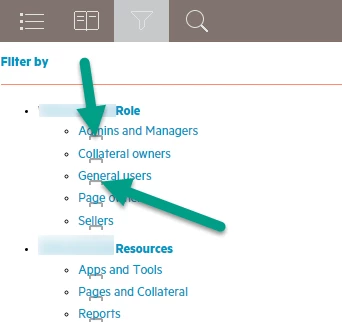
Note that in the "after" shot, I can actually click on the "remains" of the checkbox to filter.

This topic has been closed for replies.

1 reply

Captiv8r
Legend
February 15, 2016

Hi there

Until Willam van Weelden‌ pops in to advise I will say that with my own experimenting on the layout file to try and better control what is impossible to control via the customization dialog, I encountered some odd behaviors myself. Somehow I munged my whole layout. I'm not sure you have said anything about doing this, but you might try creating a completely new Single Source Layout in the pod and seeing if that clears things. That seemed to be the answer for my own case.

Cheers... Rick

Inspiring
February 15, 2016

Exactly! Here's what I subsequently encountered:

This problem had a ripple effect on other elements in my output. Multiple elements seem to have shifted; specifically:

1. My top TOC book is hidden, and once a TOC book is open, I can't close it (I rebuilt TOC just to be sure).

2. If I select a different topic than the default topic, I can then show that default topic by clicking up inside the header (not shown above but clicking above the TOC icon re-opens the default topic).

3. The extra search box at right has shifted downwards from its original position. This is the one whose background color I had so successfully changed all by myself - only to have this come back to haunt me:

If a miracle cure exists in a piece of code, it would be wonderful to know of it. Once taken that miracle, I will never, ever go into this code again!

Willam van Weelden
Inspiring
February 17, 2016

The CSS is rather strict because the positions of the elements are related to one another. If you want to go into the CSS, use the SCSS source files instead. Those contain the correct variables and calculations to fix any issues when you change width or margins. You can get the SCSS source files from: https://helpx.adobe.com/robohelp/robohelp-screen-profiles-layouts.html

How did you update the CSS code? I did a quick check on the layout and if I edit the CSS directly, I didn't see the same issue as describe. Did you open the CSS in the RoboHelp CSS editor? That editor can't handle the CSS of the layout and it may be causing issues.