
boi softwareg47298238
Participating Frequently
October 28, 2019
Question

In RH 2019 Update 9 Responsive HTML5 output, certain characters not displayed in search result

  • October 28, 2019
  • 12 replies
  • 671 views

Hi Everyone,


I use Adobe RoboHelp 2019 Update 9 (Version 14.0.9) including the Hotfix from https://helpx.adobe.com/robohelp/kb/hotfix-for-robohelp-update-9-2019-release.html and encountered the following problem:
I have a simple html file "First_Topic.htm" which includes a text containing different characters.
(I slightly modified the file "First_Topic.htm" which was generated when creating a new RoboHelp project.)
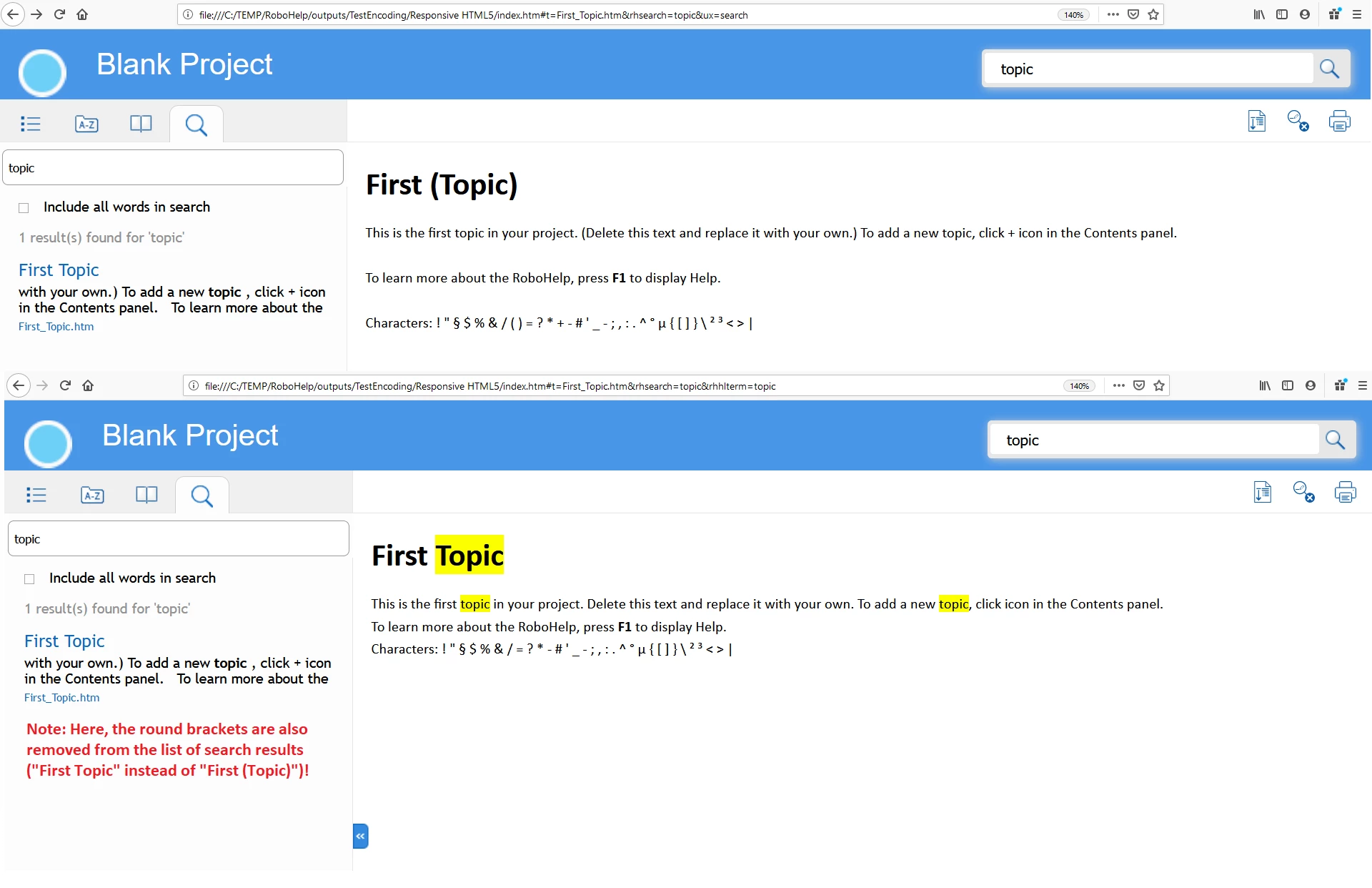
When I generate a Responsive HTML5 output and search for a keyword (e.g. "topic"), in the search result, characters like the plus sign (+) or round brackets are removed.
Furthermore, it seems that paragraphs (<p></p>) are removed as well or at least will be displayed with a smaller margin.
I currently only encountered the problem in the context of plus signs, round brackets, and paragraphs, but other characters and html tags may be affected as well.
I attached a picture to illustrate the problem showing the original content and the content after clicking on the search result.


I tested it with Mozilla Firefox, Internet Explorer, and Edge. The problem occured in all browsers.


I tried to set "Encoding" to "Unicode(UTF-8 without BOM)" in RoboHelp, but that did not change the behaviour.


I assume that the problem has something to do with encoding and the JavaScript logic used by the search functionality of RoboHelp.


During my analysis of the problem, I opened the Web Console of Firefox and, among others, encountered the following error messages:
Empty string passed to getElementById(). layoutwidgets.min.js:5:29350
Empty string passed to getElementById(). layoutwidgets.min.js:5:29394
The character encoding declaration of the HTML document was not found when prescanning the first 1024 bytes of the file. When viewed in a differently-configured browser, this page will reload automatically. The encoding declaration needs to be moved to be within the first 1024 bytes of the file. First_Topic.htm:53


I'm not sure, if the messages have something to do with my problem, but maybe this info is helpful for you.


I haven't found a way to solve the problem on my own. It would be very helpful, if you could provide an update/hotfix to solve the problem.


Thanks in advance and best regards,
Sabine
 

This topic has been closed for replies.

12 replies

Peter Grainge
Community Expert
Community Expert
November 5, 2019

I believe they have indicated that elsewhere but as with any update dates can change.


www.grainge.org

Use the menu (bottom right) to mark the Best Answer or Highlight particularly useful replies. Found the answer elsewhere? Share it here.
dvrvb
Inspiring
November 5, 2019

Hi,

I just want to add that the same issue is happening with the frameless skin (based on the Oceanic one).

Using search, not only the "( )" are missing, but also all the 'white spaces' are left out (that is also noticable in the screenshot that Sabine posted, in the beginning of this thread.

Regards,

Dirk

boi softwareg47298238
Participating Frequently
November 5, 2019

Dear Peter Grainge!


Thank you for the good news.

When can we expect that Adobe publishes the new update?

Will it be until the end of November 2019?


Best regards,
Sabine

Peter Grainge
Community Expert
Community Expert
October 31, 2019

Adobe have verified this is a bug and I am hopeful it will fixed in the next update.


www.grainge.org

Use the menu (bottom right) to mark the Best Answer or Highlight particularly useful replies. Found the answer elsewhere? Share it here.
Peter Grainge
Community Expert
Community Expert
October 29, 2019

I reported the formatting issue as well.


www.grainge.org

Use the menu (bottom right) to mark the Best Answer or Highlight particularly useful replies. Found the answer elsewhere? Share it here.
boi softwareg47298238
Participating Frequently
October 29, 2019

Dear Amebr! Dear Peter Grainge!


Thank you for your testing and that you referred it to Adobe.

I'm glad that you were able to replicate the problem. This takes us a step closer to resolving it. 🙂


Best regards,
Sabine

Community Expert
October 29, 2019

I can confirm that with a new project created in 2019 New with Update 9 hotfix, parentheses display in the topic, but after searching, all parentheses are removed.


Also, formatting seems to change somewhat.


Peter Grainge
Community Expert
Community Expert
October 29, 2019

Bizarre. Today I tested again in a brand new project and get the same result as you. In your project I see the problem too.


I have tried a number of changes but nothing helps so I have referred the problem to Adobe. I will let you know what they come back with.


@Amebr - Now you have the hotfix and if you have time, could you try the same in a new project. It's as simple as adding the top row of characters.


www.grainge.org

Use the menu (bottom right) to mark the Best Answer or Highlight particularly useful replies. Found the answer elsewhere? Share it here.
boi softwareg47298238
Participating Frequently
October 29, 2019

Dear Peter Grainge!


I have sent my project using wetransfer.com.


Best Regards,
Sabine

boi softwareg47298238
Participating Frequently
October 29, 2019

I mean the ...grainge.org address.

Peter Grainge
Community Expert
Community Expert
October 28, 2019

I have retested using the new UI version and it is still working as it should. See the Contact Page on my site and send me your project as instructed there.


www.grainge.org

Use the menu (bottom right) to mark the Best Answer or Highlight particularly useful replies. Found the answer elsewhere? Share it here.
boi softwareg47298238
Participating Frequently
October 28, 2019

Dear Amebr! Dear Peter Grainge!


Thank you for your replies.


I use the new version of Adobe RoboHelp 2019 and not the Classic one.
Sorry, I will indicate that in further posts in the Adobe Support Community.


Yes, I created a brand new project.
Then, I only modified the content of the html file First_Topic.htm and adapted the Output Path of the Responsive HTML5 output preset.


Yes, "settings > apps" shows RoboHelp 2019 with the version info 14.0.9.50.
The postfix ".50" indicates the hotfix I installed, right?


I tried my project once with no skin assigned and once using Azure Blue.
In both cases, I got the problem.


I read the release notes of the hotfix and noticed, that the correction concerning removing parentheses was for RoboHelp Classic, but I hoped that it will also affect/solve my problem.


Please just tell me, if I should provide you my project, the output of my project, or something else.


Best Regards,
Sabine