


Inspiring
January 26, 2023
Answered

Mini Toc not creating link for headers preceded by bookmark

  • January 26, 2023
  • 5 replies
  • 732 views

I upgraded to RoboHelp 2022. I'm haivng an issue with Mini Tocs that were working correctly in the previous versions.

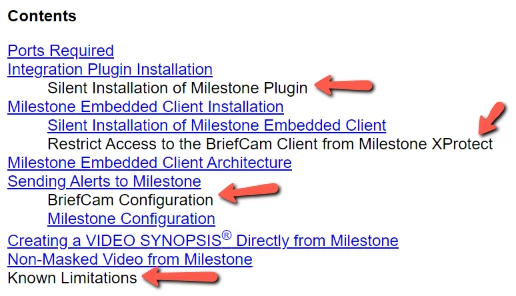
For headers where I put a bookmark right before the header (I click to the left of the header and insert a bookmark), these headers are showing up as text and not as links.

I don't want to have to reset all of my bookmarks, so if I was wondering if anyone has found a workaround for this.

Thanks.


    This topic has been closed for replies.

    5 replies

    Known Participant
    February 21, 2023

    There's gonna be a fix in the upcoming Update 1 for RH 2022 - see prerelease demo.

    Community Expert
    January 29, 2023

    Please do vote on the bug listed in the other thread so that it's more likely to be fixed. 🙂

    Inspiring
    January 30, 2023

    I voted on the Bug Report as well.

    AmebrCommunity ExpertCorrect answer
    Community Expert
    January 27, 2023
    Inspiring
    January 29, 2023

    Thanks. That's what I was looking for.

    Community Expert
    January 27, 2023

    I think I remember someone posting about this previously and Peter found a workaround of putting the bookmark at the end of the heading instead. It's worth trying even if I'm imagining things. 🙂


    I'll see if I can find the post and if the original poster logged a bug for it.

    Peter Grainge
    Community Expert
    Community Expert
    January 26, 2023

    Try comparing the source code for a working and non-working bookmark. Is the only difference where they appear or is the code different?

    ________________________________________________________

    My site www.grainge.org includes many free Authoring and RoboHelp resources that may be of help.


    Use the menu (bottom right) to mark the Best Answer or Highlight particularly useful replies. Found the answer elsewhere? Share it here.
    Inspiring
    January 26, 2023

    Thanks.

    All bookmarked headers are not appearing properly. When I remove the bookmark, the link appears as expected.


    This one works:

    <h4>Milestone Configuration</h4>


    These are examples of the ones that don't work:

    <h4><a id="Silent_Installation_of_Milestone_Plugin"></a>Silent Installation of Milestone Plugin</h4>


    <h4><a id="Restrict_Access_to_the_BriefCam_Client_from_Milestone_XProtect"></a>Restrict Access to the BriefCam Client from Milestone XProtect</h4>