
New 2019 and IE11
I sent an email to Adobe Tech Support last Friday early and have not heard back from them. I am posting this so maybe I will get some kind of response.
I have several HTML5 help files that I have converted from classic 2019 to New 2019. Everything works perfectly in Classic 2019. However in New 2019, the help only works from the C:\ directory, not a network directory. I use IE11 as a browser because that is the default browser for the federal courts. Some of my help files go out to over 70 federal courts, so requiring a change to the default browser is out of the question.
My question to Adobe Tech Support was:
Will the following tag be automatically added in the next update of RH New 2019? If I add the below tag to the index.htm file, then the
help system works outside the C:\ directory.
<meta http-equiv="X-UA-Compatible" content="IE=edge" />
Unfortunately, the index.htm file is a generated file and I do not want to have to remember to copy and paste this line in EVERY time I generated the help files (there are several help files I would need to do this for).
Am I out of luck in using New 2019 until the courts upgrade their default browser?
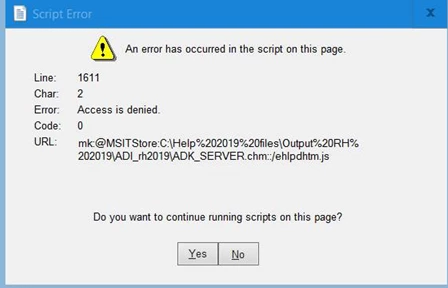
The next question (which may be related) is that popups do not work in generated files (even on the C drive). I can configure them in New 2019, view them, but once I generate (I tried my chm file here) I received the error message below, Would this be a IE11 problem also?


 AdChoices