Participating Frequently
October 23, 2020
Question

Not seeing complete search results or their ranking in RoboHelp 2020

  • October 23, 2020
  • 11 replies
  • 285 views

Hello! 


We recently shifted to using RoboHelp 2020, and in fact, just today, I updated to the latest version as well. However, I am seeing a problematic issue with RH's search results that I'd really appreciate some help with. I am probably missing a setting or something, but I just can't figure it out. 


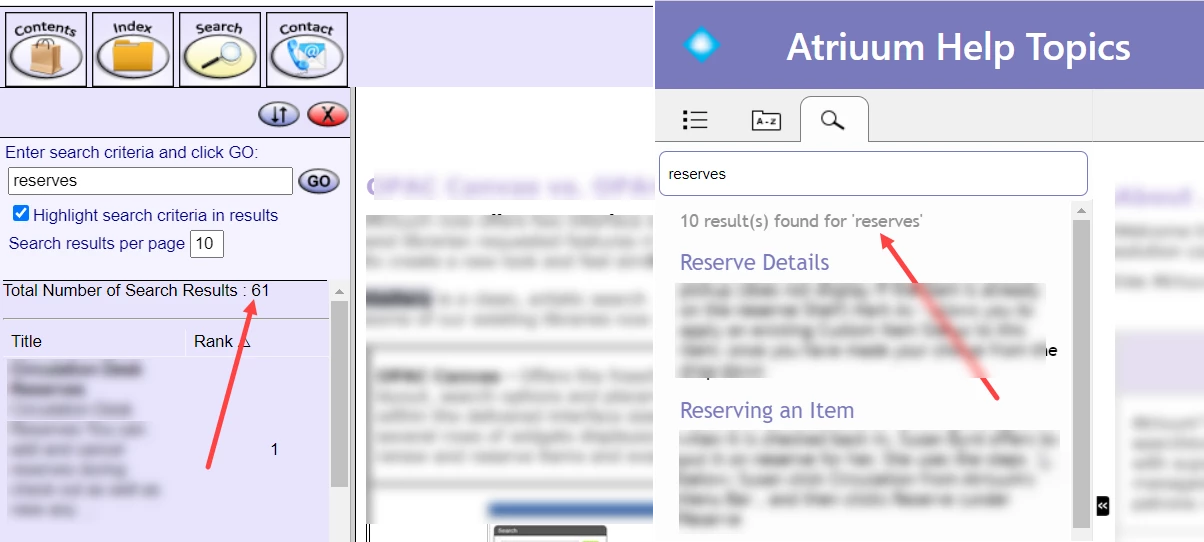
We are no longer seeing any rankings and some of our results are missing as well. Please see the image below. While our old output yielded 61 topics, the new one only does 10.


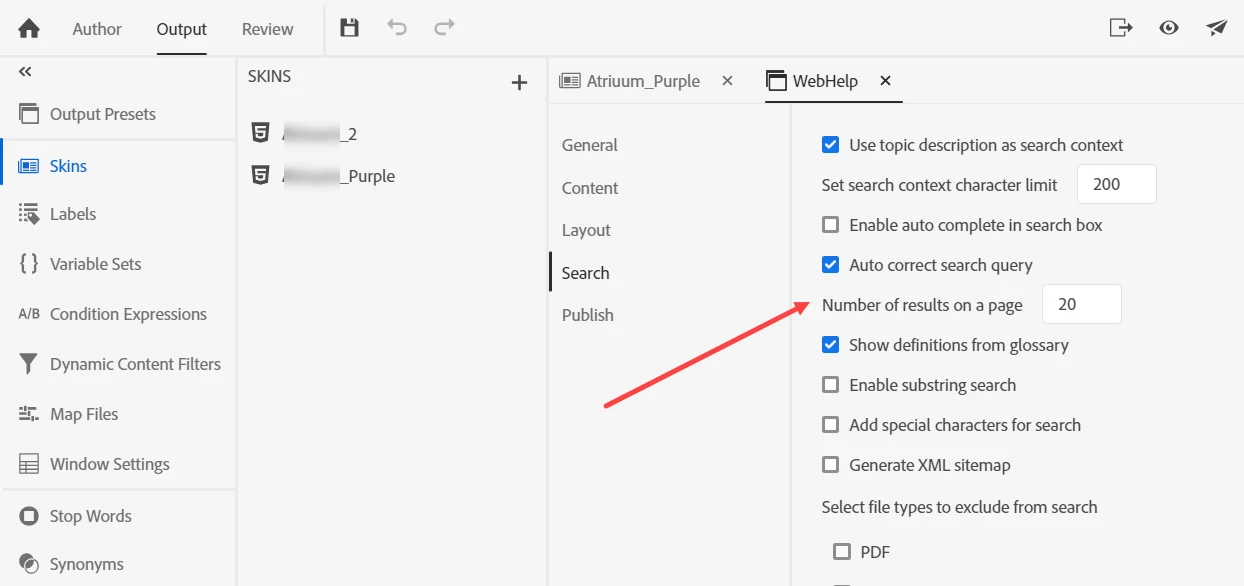
I tried this setting below but all it does is increase the results to only 20 per page. Enabling the substring search doesn't help either. I looked over the Project Settings, Preferences, but there doesn't seem to be anything that relates to this. 


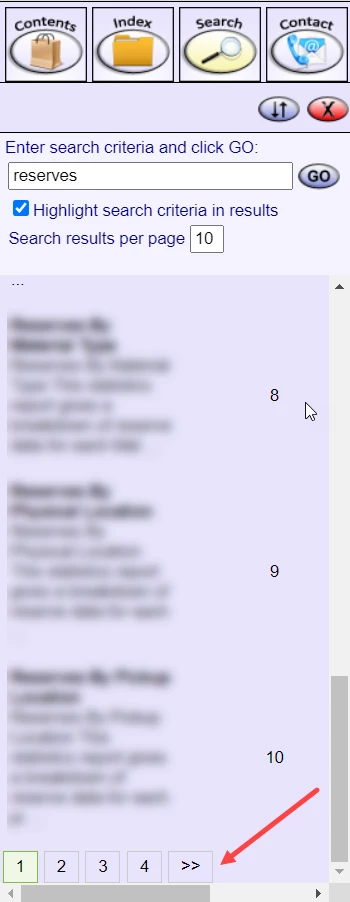
I am still not able to see all my results, ranking,  nor any nav arrows at the bottom of the search results allowing me to move on to another page like we used to (image below). 


Finally, some of our topics aren't even showing up in the search results even though they are in the project and display in the old version. 
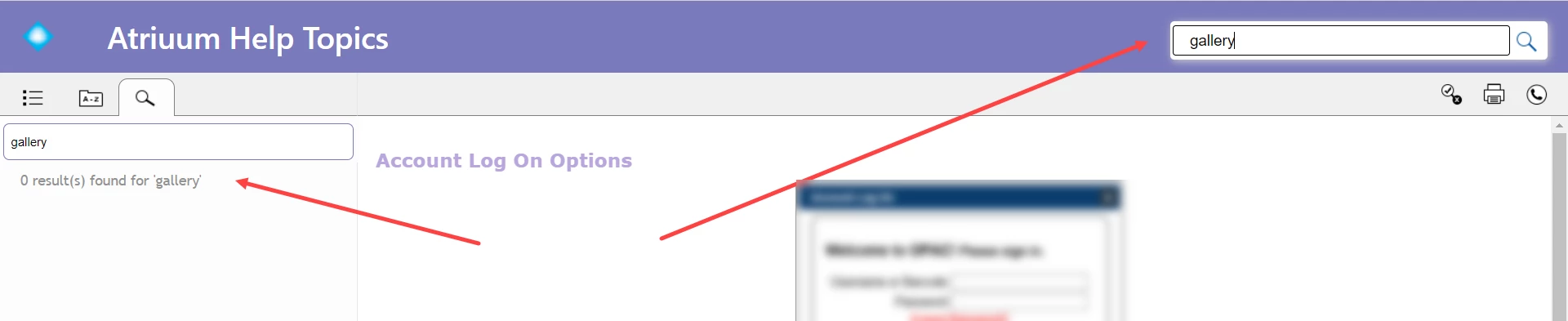
Any auggestions or ideas would be much appreciated!

    This topic has been closed for replies.

    11 replies

    MaggieMS8Author
    Participating Frequently
    November 12, 2020

    Haha... I normally don't but upgrading RH this time around has been painful and so I have taken a very by-the-book approach. 


    Well, once we start documenting in RH Classic 2019, we don't plan to go back to 2017. I just wasn't quite sure if our project updated and we were good to go or not. Thanks for the assurance! 

    Peter Grainge
    Community Expert
    Community Expert
    November 12, 2020

    You shouldn't believe everything you read. 🙂


    For some reason you don't get asked in 2019 as the code is very similar and you will likely be OK if you work in both versions. Now the spoiler. Don't come back and complain if you later find that backfires. You may use one of the differences between the two (not many) and that may cause an issue that you don't find until later.


    So the chances are it will be OK but there's also a chance it will not and you will find out later.


    You pays your money and you take your chances.


    Use the menu (bottom right) to mark the Best Answer or Highlight particularly useful replies. Found the answer elsewhere? Share it here.
    MaggieMS8Author
    Participating Frequently
    November 12, 2020

    Right - we hope that Adobe will let us know when they have gotten our specific bug fixed. But your comment brings up another issue we are facing that perhaps you can shed some light on. When we opened our 2017 project in RH Classic 2019, we didn't get any message about an upgrade to the project or conversion. Adobe's PDF doc states, "If you open a project created in a previous version of RoboHelp, you are asked whether to convert it before opening it."

    Also, if I close the project in RH 2019 Classic, and open it in RH 2017, it seems to open just fine. I'd have though that if the project was upgraded in RH 2019, I wouldn't be able to retroactively open it in 2017.  Any ideas? Other than that, the project seems to be working fine. Thanks! 

    Peter Grainge
    Community Expert
    Community Expert
    November 12, 2020

    OK thanks. 


    I suggest you watch for 2020 Update 3 and try in that. You can leave 2019 installed and run both. As I think you will know, when you upgrade the Classic project RoboHelp does not change it in any way. The Classic project remains as it was and the new version is separate. 


    That means you can test in 2020 but still work in 2019 Classic if it is unsuccessful.


    Use the menu (bottom right) to mark the Best Answer or Highlight particularly useful replies. Found the answer elsewhere? Share it here.
    MaggieMS8Author
    Participating Frequently
    November 12, 2020

    Unfortunately, there is not much of an update really. We winded up getting in touch with Adobe Support for 3 major issues:

    1) search results navigation

    2) missing topics in search results

    3) missing text pop-ups


    They thought it might have to do with skipping sequential upgrades, i.e. we went straight from RH 2017 to RH 2020. But upgrading our project in order didn't work either - while the project works without any issues in RH Classic 2019, there were problems in both RH 2019 Reimagined, and RH 2020. Adobe was able to reproduce the issues and let us know that they have logged a bug and hope to have a fix in future updates. So, just yesterday, we downloaded RH Classic 2019 and plan to work in that for the time being. 


    Sorry for the late reply! Thanks! 

    Peter Grainge
    Community Expert
    Community Expert
    November 11, 2020

    I wondered if you could share the outcome of this with us?


    Use the menu (bottom right) to mark the Best Answer or Highlight particularly useful replies. Found the answer elsewhere? Share it here.
    MaggieMS8Author
    Participating Frequently
    November 2, 2020

    Thanks Karin, for your suggestion. Unfortunately, that didn't work for us. Recently, we came across another bigger issue - all our text pop-ups don't display so I have gotten in touch with Adobe with the hopes that they have a solution for us soon!  

    Legend
    October 27, 2020

    Hi!

    As for the topics not showing in search at all, you could try the following settings:

    Disable "Auto correct search query"

    Enable "Enable substring search"

    My experience with German language settings is that auto correct search query does some strange things sometimes. Maybe thats the case with English language in some cases as well.

    MaggieMS8Author
    Participating Frequently
    October 26, 2020

    Thank you, Peter! I went ahead and emailed Adobe support too in the hopes that they have a solution. If I hear anything further, I will definitely share. Thanks again! 

    Peter Grainge
    Community Expert
    Community Expert
    October 25, 2020

    The text for the number of results "per page" should be regarded as the Search Results Limit for now.


    Use the menu (bottom right) to mark the Best Answer or Highlight particularly useful replies. Found the answer elsewhere? Share it here.