Known Participant
November 15, 2023
Answered

PDF output: Missing SVGs and missing formats

  • November 15, 2023
  • 11 replies
  • 2129 views

Hello everyone,

I'm on RH 2022.3.93 and am working on our PDF output.

I think my two issues might be related, so I'm posting them together:

The manual I am creating is about 150 pages long.


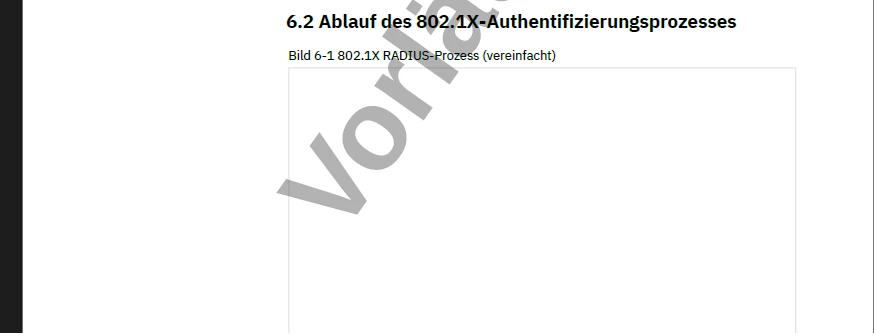
1. It contains a lot of screenshots (png) - they appear fine. It also contains a bunch of svg files. While some of them appear correctly, others (especially towards the end of the document) are simply missing. Within RH, they are displayed correctly.

  <figure>
    <figcaption>802.1X RADIUS-Prozess (vereinfacht)</figcaption>
    <img class="framed-screenshot_125mm" src="../../../assets/images/Zeichnungen/WLAN/00108491_RADIUS-Prozess.svg" />
  </figure>
 

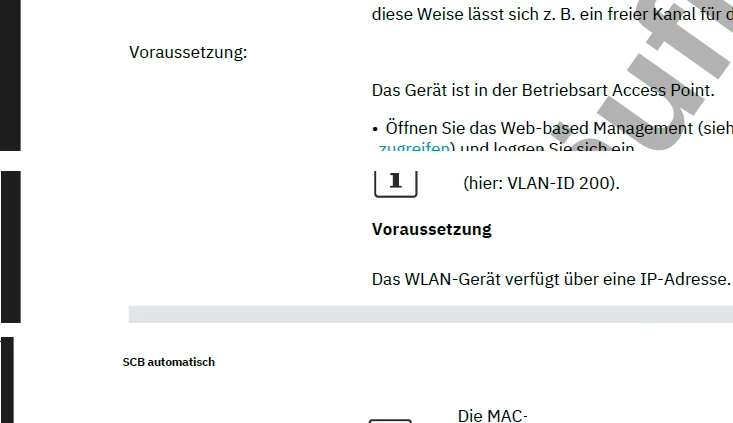
2. I have created a <h5> style. No class, just h5. It is supposed to be bold, font-size 9 and margin-left is 45mm. Within the document, I get different results for my code: 

No further styles, just this code:

In one case, it is displayed correctly (bold, with margin-left).

<h5>Voraussetzung</h5>

In most other cases, it is neither bold nor does it have a margin-left.

<h5>Voraussetzung:</h5>

In some cases, it is displayed bold but font-size 6.

<h5>SCB automatisch</h5>
 

A similar error occurs with my style h6.Margintext. It is supposed to be bold, font-size 9.

Some occurrences: bold and font-size 9.

<h6 class="Margintext">Pop-up-Fenster: DHCP Static Leases</h6>

Some occurrences: not bold

<h6 class="Margintext">Verschlüsselung: WPA2-EAP und FT-EAP</h6>

Again, within RH, everything is displayed correctly.

 

My colleague can reproduce these errors - she is missing the exact same svg files and the exact same formatting.


Any ideas on how to fix this?

Cheers

Carolin

    This topic has been closed for replies.
    Correct answer Peter Grainge

    I have been working offline with @Carolin123 and found the issues behind the problem.


    First of all, in the CSS some of the styles were grouped. That is perfectly valid CSS but RoboHelp doesn't seem to like it. The styles show if the CSS is opened but they don't show in the Styles pod making the application of styles difficult. I think it had some effect when generating an output but would need some more testing to be sure.


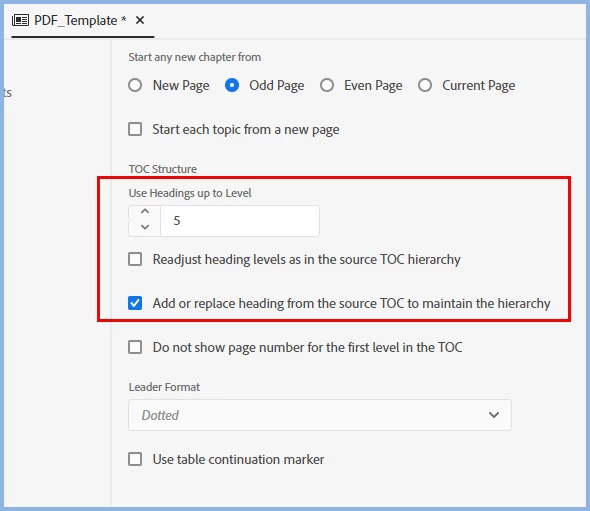
    The root cause was the settings in the template combined with the use of heading styles rather than paragraph styles for the margintext. By using the two checkboxes shown and ungrouping the styles, the correct style was shown. Although I changed the number of heading styles for the TOC shown below, that was not necessary to get the style correct in the body.


    The solution above avoids breaking the list and the attendant need to keep restarting the numbering that could be required. It also means the styles applied in the topics do not need to be changed as in the following solution.


    Before finding the above solution, I had come up with a workaround. Simply change h5 to p.margintext. Then it is no longer a heading and does not get affected by the checkboxes. However, it breaks the list so it might be necessary to keep restarting the numbering. That would mean going through every topic that uses h5 and changing the style to p.margintext. For that reason I think the first solution is the easiest to use.

    ________________________________________________________

    My site www.grainge.org includes many free Authoring and RoboHelp resources that may be of help.


    11 replies

    Peter Grainge
    Community Expert
    Community Expert
    November 23, 2023

    I believe that technically there are SVGs and SVGs. I think that issue is one for Adobe Support. See https://helpx.adobe.com/contact/enterprise-support.other.html#robohelp for your Adobe Support options. The email link tcssup@adobe.com is recommended as it reaches a team dedicated to Technical Communication Suite products including RoboHelp.

    ________________________________________________________

    My site www.grainge.org includes many free Authoring and RoboHelp resources that may be of help.


    Use menu (bottom right) to mark as Best Answer or to Highlight particularly useful replies. Found the answer elsewhere? Share it here.
    Jeff_Coatsworth
    Community Expert
    Community Expert
    November 23, 2023

    So, #2 solved - now to tackle the SVQ issue (#1) - it stands to reason that if some work & some don't, then there's got to be some difference with them when the PDF generation takes place.

    Peter Grainge
    Community Expert
    Peter GraingeCommunity ExpertCorrect answer
    Community Expert
    November 23, 2023

    I have been working offline with @Carolin123 and found the issues behind the problem.


    First of all, in the CSS some of the styles were grouped. That is perfectly valid CSS but RoboHelp doesn't seem to like it. The styles show if the CSS is opened but they don't show in the Styles pod making the application of styles difficult. I think it had some effect when generating an output but would need some more testing to be sure.


    The root cause was the settings in the template combined with the use of heading styles rather than paragraph styles for the margintext. By using the two checkboxes shown and ungrouping the styles, the correct style was shown. Although I changed the number of heading styles for the TOC shown below, that was not necessary to get the style correct in the body.


    The solution above avoids breaking the list and the attendant need to keep restarting the numbering that could be required. It also means the styles applied in the topics do not need to be changed as in the following solution.


    Before finding the above solution, I had come up with a workaround. Simply change h5 to p.margintext. Then it is no longer a heading and does not get affected by the checkboxes. However, it breaks the list so it might be necessary to keep restarting the numbering. That would mean going through every topic that uses h5 and changing the style to p.margintext. For that reason I think the first solution is the easiest to use.

    ________________________________________________________

    My site www.grainge.org includes many free Authoring and RoboHelp resources that may be of help.


    Use menu (bottom right) to mark as Best Answer or to Highlight particularly useful replies. Found the answer elsewhere? Share it here.
    Peter Grainge
    Community Expert
    Community Expert
    November 21, 2023

    Can you share the new project? If you can, then see the Contact page on my site and send the project as instructed there. Do make sure you include a link to this thread and please do not email the project direct.


    Please also email me with some notes about the topics and outputs where the styles are not working. Let's just focus on styles for now.

    ________________________________________________________

    My site www.grainge.org includes many free Authoring and RoboHelp resources that may be of help.


    Use menu (bottom right) to mark as Best Answer or to Highlight particularly useful replies. Found the answer elsewhere? Share it here.
    Known Participant
    November 21, 2023

    I sent you an email, thank you 🙂

    Peter Grainge
    Community Expert
    Community Expert
    November 21, 2023

    I have emailed what I have found. Let's solve the issue offline and then post the answer here.

    ________________________________________________________

    My site www.grainge.org includes many free Authoring and RoboHelp resources that may be of help.


    Use menu (bottom right) to mark as Best Answer or to Highlight particularly useful replies. Found the answer elsewhere? Share it here.
    Peter Grainge
    Community Expert
    Community Expert
    November 21, 2023

    Hmm! Not the result I really wanted as I was hoping it would replicate the problem so that I could offer to take a look.


    When you say it displayed correctly, are you talking about styles, SVGs or both?


    I think what I would try next is copying one folder of the topics into this new project and drag that to the TOC. The order will be wrong but that doesn't matter. The object is to find somewhere specific that it goes belly up. Keep repeating that until it breaks.

    ________________________________________________________

    My site www.grainge.org includes many free Authoring and RoboHelp resources that may be of help.


    Use menu (bottom right) to mark as Best Answer or to Highlight particularly useful replies. Found the answer elsewhere? Share it here.
    Known Participant
    November 21, 2023

    One SVG is there, one SVG is missing. But I was concentrating on the formatting - that looks correct.


    Apparently, some topics are still misbehaving. The two I tested previously remain correct even if I throw all topics in as you suggested, but I have (at least) one topic that is not displaying correctly even if it is only a handful of topics in the TOC.


    I had tested the occurrences with h5 (which is supposed to have a margin-left of 45mm, be bold and font-size 9) - the occurrences I tested are font-size 6 and bold (see screenshots above) in my original project and are now displayed correctly in my test project.

    The topic not correct now belongs to the category of "no margin, not bold, but font-size 9". No change here between original project and test project, it still looks the same.

    Peter Grainge
    Community Expert
    Community Expert
    November 20, 2023

    You refer to using your PDF.CSS. Where are you referencing that CSS? If you exclude Topic.CSS,  any stylesheets need to be in the template resources and linked to the page layouts.


    That said, I think the issue is with using SVGs in a PDF.

    ________________________________________________________

    My site www.grainge.org includes many free Authoring and RoboHelp resources that may be of help.


    Use menu (bottom right) to mark as Best Answer or to Highlight particularly useful replies. Found the answer elsewhere? Share it here.
    Known Participant
    November 20, 2023

    Well, in the output section within the PDF template where I'm supposed to reference it. 99% of that stylesheet are working, the only issue are with h5 and h6, so an incorrect referencing cannot really be the issue, right?


    So you think because I use SVGs, my h5 format is going crazy? Or are you guessing two different issues, after all?

    Peter Grainge
    Community Expert
    Community Expert
    November 20, 2023

    I've seen scenarios where it is claimed everything is referencing one CSS whereas the reality was they were referencing two copies that weren't in fact identical so that's not to be ruled out. I doubt that is it here but I wouldn't agree it cannot be the issue.


    You reference the CSS in the page layouts as I said. It can't be done via the UI. You have to open the page layouts in code view.


    I was explaining how to link the CSS for the purposes of getting the styles correct. I don't think that has anything to do with your SVG issue. 


    Can you create a new project with just a couple of topics that use the CSS that is giving probems and replicate the style problem? No SVGs in this test.

    ________________________________________________________

    My site www.grainge.org includes many free Authoring and RoboHelp resources that may be of help.


    Use menu (bottom right) to mark as Best Answer or to Highlight particularly useful replies. Found the answer elsewhere? Share it here.
    Peter Grainge
    Community Expert
    Community Expert
    November 16, 2023

    This is the thread I was thinking about but it doesn't really help. They concluded PNGs were the way to go.


    https://community.adobe.com/t5/robohelp-discussions/troubles-creating-pdf-with-svg-images/td-p/14167443

    ________________________________________________________

    My site www.grainge.org includes many free Authoring and RoboHelp resources that may be of help.


    Use menu (bottom right) to mark as Best Answer or to Highlight particularly useful replies. Found the answer elsewhere? Share it here.
    Jeff_Coatsworth
    Community Expert
    Community Expert
    November 15, 2023

    Hmm, not twigging any hits that seem to fit either of these scenarios;  @Carolin123 what happens if you go to a topic that's not behaving (in either of the two situations) and do the right-click Save As PDF? Does that produce the right output?

    Known Participant
    November 20, 2023

    Well, this is a bit hard to check, as my RH files have a different CSS file (I'm removing this CSS file for PDF output - "Exclude all topic CSS files" - and putting my PDF CSS on it instead).

    They do look like they are supposed to, though (no margins though, as there are none in my other CSS).

    My images are missing, same as in the complete PDF.

    Peter Grainge
    Community Expert
    Community Expert
    November 15, 2023

    There has been a post in the last few weeks about this issue. Pretty sure it was much the same and was answered.

    ________________________________________________________
    My site www.grainge.org includes many free Authoring and RoboHelp resources that may be of help.


    Use menu (bottom right) to mark as Best Answer or to Highlight particularly useful replies. Found the answer elsewhere? Share it here.
    Legend
    November 15, 2023

    I am wondering if your problem with the header styles might have to do something with one of these settings in the template you use:

    Have you tried an HTML5 output? Does the problem occur there as well? Or do the styles look as expected there? 

    Best regards

    Karin

    Known Participant
    November 15, 2023

    Hi Karin,

    neither h5 nor h6.Margintext appear in my TOC (only up to level 3). I've played around with the options nevertheless, but it doesn't change anything.

    And yes, in HTML output everything is fine.