
Inspiring
March 3, 2016
Question

Printed Documentation needs Microsoft Word

  • March 3, 2016
  • 3 replies
  • 721 views

I've successfully used the Printed Documentation before (although that was with RH 11; I'm using RH2015 now), but today when I try to use it, I get this:
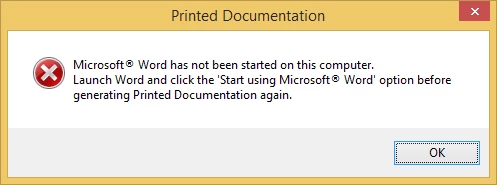
of course MS Word has been started on my computer; I've used it dozens of times this week alone. Also, where do I click "Start using Microsoft Word" ... and why, since I'm trying to create a PDF file?

thanx,

Lon

This topic has been closed for replies.

3 replies

nancy2019
Participant
March 7, 2016

I've seen this issue pop up since about 2008 between RH and Word.  My resolution has been to point to the RH 10 template from Word. Go to File > Advanced > File Locations, then modify the MS user template by pointing to RH Html > template > Word 10 (my Word version). Macros, gotta trust them too in the Trust center.  After I run the Printed Document, I typically point back to my Word template. It hasn't exploded on me yet.

aartk14862008
Participating Frequently
March 10, 2016

@ nancy

Quote: "RH Html > template > Word 10"

I see 3 options in this folder: Word 00, Word 10 an Word 11.

What shall I use when I have MSWord2016?

Aart

the Netherlands

Peter Grainge
Community Expert
Community Expert
March 3, 2016

Which version of Word are you using? Having asked that, I don't think it is the problem as wrong version usually gives a different error message. Nonetheless, I need to ask.

Was RoboHelp 2015 installed with Admin rights? It can be used without but admin rights are required at installation.


See www.grainge.org for RoboHelp and Authoring tips

@petergrainge

Use the menu (bottom right) to mark the Best Answer or Highlight particularly useful replies. Found the answer elsewhere? Share it here.
Inspiring
March 3, 2016

Thanks for responding gentlemen, but (mea culpa) you were working at a disadvantage. I later realized that our RoboHelp is lodged on a Virtual Machine, which apparently had not been introduced to MS Word ... so I introduced them and they're getting along fine.

Thanks again,

Lon

Captiv8r
Legend
March 3, 2016

Hi Lon

Hopefully Peter Grainge‌ will be along soon to advise what to do to get Word started.

As we wait, I can tell you that even though you are wanting a PDF, the process isn't as straightforward as you might think.

RoboHelp has to first create an intermediate Microsoft Word document. It then uses that Word document to create the final PDF.

Yes, we are all aware that this is now an Adobe product and PDF is "Adobe's thang", but RoboHelp wasn't an Adobe product to begin with.

Cheers... Rick