Inspiring
June 17, 2021
Answered

Project upgraded from RH9 to RH2020 missing all topics

  • June 17, 2021
  • 23 replies
  • 1929 views

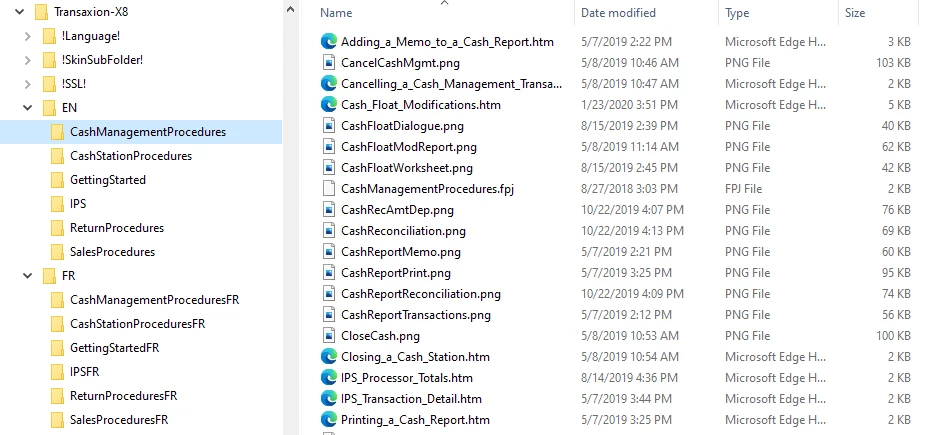
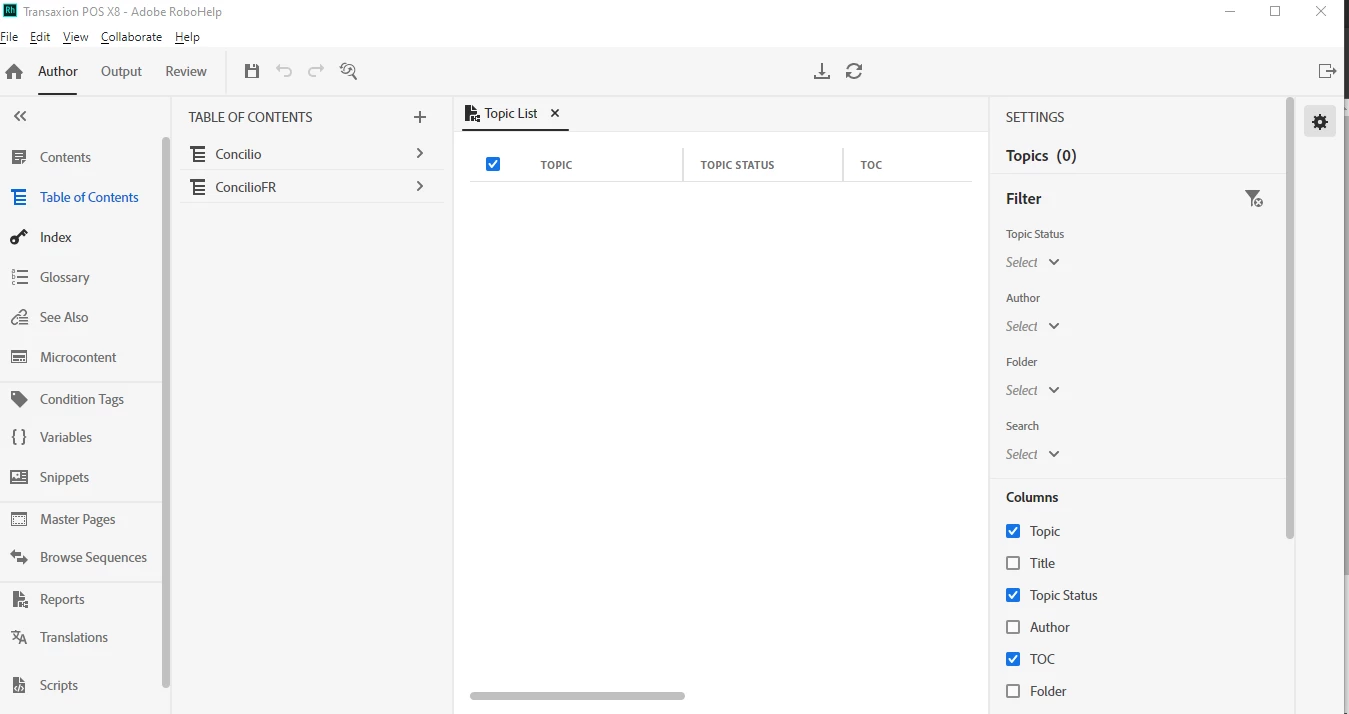
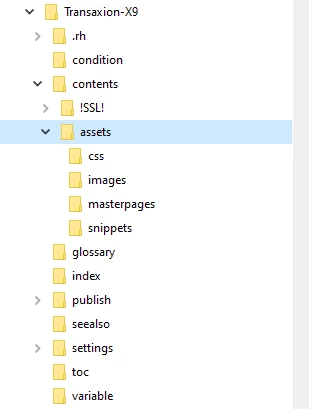
We have recently upgraded to RoboHelp 2020 and the first thing I did was to install the latest update (2020.5.71). I am trying to upgrade my existing RoboHelp 9 project but end up without any topics. All topics (and most images) are stored in sub-folders in existing RH 9 project. I cannot get a screenprint of  the RH 9 project as it constantly crashes on opening since I started running Windows 10 (which is why we upgraded to 2020). I am attaching a screenprint of the RH 9 project folders in Windows Explorer and also of the RH 2020 project folders. The project has 2 tables of contents (English & French) which are both shown in RH 2020 upgraded project but none of the content. Help topics I found online regarding upgrading classic projects to RH 2020 indicated that  topics/images in root folder would be moved to Assets folder while all others would remain in existing folders so the fact that topics/images in old project are in subfolders shouldn't be causing the issue. My project is stored on a network drive for backup purposes but I also tried to do the upgrade from a copy on my local hard drive and that didn't make a difference.
 

This topic has been closed for replies.
Correct answer PMCDEV

Just wanted to update this post to advise that I have now successfully upgraded my RH 9 project to new RH 2020 format. Thanks to everyone who offered help and especially to Ssurbi and Peter Grainge for the solution.


For anyone else who may be struggling with a similar issue and come across this post, I ended up starting the process over by fixing the root.fpj folder (which likely became corrupted by the RH 9 project in Windows 10). Then I upgraded the RH 9 project to RH 2019 Classic and finally to RH 2020. 


I think that my issues were complicated by the fact that my projects are usually located on a network drive for backup purposes. When working from my office this is normally not an issue (except for HTML help) but since I am now working from home via a VPN I believe that contributed to the problems with the project conversion. I am therefore going to stick to working on project from my local hard drive and synching with network drive every couple of days.


Now I just need to get used to the new interface! 😉 Thanks again!

23 replies

Peter Grainge
Community Expert
Community Expert
June 23, 2021

Try restoring the original name first. Worth a shot.

________________________________________________________
See www.grainge.org for free Authoring and RoboHelp Information

Use the menu (bottom right) to mark the Best Answer or Highlight particularly useful replies. Found the answer elsewhere? Share it here.
PMCDEVAuthor
Inspiring
June 23, 2021

Thanks - but the damage has been done. Since I already renamed the project and broke all the links, I guess I will just need to re-import all my topics again.

Peter Grainge
Community Expert
Community Expert
June 23, 2021

In this scenario I would leave the project name alone for now. Get the project fixed in Classic and upgrade it. The renaming can be done later.

________________________________________________________
See www.grainge.org for free Authoring and RoboHelp Information

Use the menu (bottom right) to mark the Best Answer or Highlight particularly useful replies. Found the answer elsewhere? Share it here.
Jeff_Coatsworth
Community Expert
Community Expert
June 23, 2021

Did you do the renaming from within RH?

PMCDEVAuthor
Inspiring
June 23, 2021

Yes. File - Rename Project

PMCDEVAuthor
Inspiring
June 23, 2021

Thank you, Peter. Unfortunately, I messed something up so just checking if I need to repeat everything I just did or if there is a quicker fix.


I followed your directions to recreate the folder structure in Project Manager and imported all the topics. It worked perfectly - everything was imported and both TOC's looked fine with no broken links. Then I realized that I hadn't renamed the project for the latest software version for which I will be updating the content. I saved the project first but, after I renamed it, all the links are broken again. The folder structure in Project Manager is intact but the topics/images are no longer in the folders with the exception of top level Help Overview topic. Do I need to import everything again? Or is there something else I can try?


I'm a little concerned that renaming the project seems to have caused this as it is something I would do each time I need to update the project for a new software version.

Peter Grainge
Community Expert
Community Expert
June 23, 2021

I am assuming that is the RH9 project and indeed it is corrupt as no topics show in Project Manager. That's the bad news.


The good news is it is recoverable. In 2019 Classic > Project Manager recreate the folder structure with exactly the same names, character perfect. Then right click on a folder and select Import. Browse to that folder in your project and select all the files in it. They will then import along with the graphics.


When done, generate again to prove it works in Classic. Then it will upgrade to the new version.


As above, I think the damage was done when you tried to open RH9 on Windows 10. I am assuming you don't have a backup from then that was not opened. If you do, that should still work and avoid the above.

________________________________________________________
See www.grainge.org for free Authoring and RoboHelp Information

Use the menu (bottom right) to mark the Best Answer or Highlight particularly useful replies. Found the answer elsewhere? Share it here.
PMCDEVAuthor
Inspiring
June 23, 2021

The RH 9 classic project was working fine until my laptop was upgraded to Windows 10. RoboHelp consistently crashes when I open ANY project and online research seemed to suggested that RH 9 is not compatible with Windows 10 which is why we upgraded to RH 2020. 


I am in the process of uploading the classic project as per directions on your website. It is not that large (approximately 381 MB zipped) but will take another 15 minutes or so as I am working on a VPN and unfortuntely did not think to disconnect from it before starting the file transfer which makes everything slower!

Peter Grainge
Community Expert
Community Expert
June 23, 2021

The Classic version is still working, correct?


If it is, can you send it to me as earlier.

________________________________________________________
See www.grainge.org for free Authoring and RoboHelp Information

Use the menu (bottom right) to mark the Best Answer or Highlight particularly useful replies. Found the answer elsewhere? Share it here.
Peter Grainge
Community Expert
Community Expert
June 23, 2021

Can you share the Classic project? If you can, then see the Contact page on my site and send the project as instructed there. Do make sure you include a link to this thread and please do not email the project direct.

________________________________________________________
See www.grainge.org for free Authoring and RoboHelp Information

Use the menu (bottom right) to mark the Best Answer or Highlight particularly useful replies. Found the answer elsewhere? Share it here.
Community Expert
June 23, 2021

Just to confirm, you opened the Adobe Robohelp Classic 2019 entry in your start menu, not the Adobe Robohelp 2019 entry, then selected File > Open to open your RH9 project?


I'm only checking because there have been occasions where people have not noticed there were two different entries for Robohelp, and tried to use the upgrade option in New UI instead.

PMCDEVAuthor
Inspiring
June 23, 2021

When I first installed RH 2019 and launched it, it was the new UI. When the upgrade failed the first time, I remembered reading something on this forum regarding the two versions. I deleted the failed project and opened RH 2019 Classic for other attempts.