
Known Participant
August 13, 2020
Answered

Questions and Notes - Robohelp 2020 (2020.0.156) - Related Topics, Lists/Para Styles, Updates

  • August 13, 2020
  • 31 replies
  • 888 views
Using trial of RH2020 (upgrade from 2017) and it is ... unintuitive and somewhat buggy. Couple of questions/notes based on my experience so far.


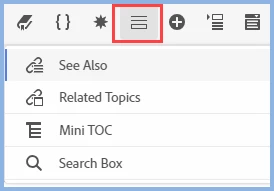
1) Related Topics - Where are they in the user interface Standard Toolbar? They appear to have ported over from an upgraded topic, but I don't see how to add them. 


I see mention of "Related Topics" in the help and in posts in this forum, but damned if I can figure out where the icon is to create them. The toolbar icons display in the following order: Contents > TOC > Index > Glossary > See Also > Microcontent (no RT, which I assume would show under or next to See Also).


2) What is it with combining lists and paragraph styles? Say I create an ordered or bulleted list - when I apply a paragraph style TO that list, I get double-paragraphs between each list entry in the Author UI (instead of a single paragraph). It does appear that you should be applying formatting to the list (not the paragraph), but I'm having trouble aligning the left margin/indent, which is enforced when I apply the paragraph style.


3) What is it with upgrades? I click on Help > Check for Updates, and I get the Creative Cloud Desktop update window (have a subscription). RoboHelp is not even listed as an application in CC. Not sure if this is just because it is a trial, although I intend to get the subscription just to keep up-to-date with the software.


4) In general - it crashes. A lot. 
    This topic has been closed for replies.
    Correct answer Peter Grainge

    It is incorrect because somewhere along the line it got changed and that wasn't picked up. The topic does say Insert Related Topics Placeholder and if you hover over the icon I have highlighted it does read Insert Placeholder. Related Topics got subsumed.


    31 replies

    Peter Grainge
    Community Expert
    Community Expert
    August 17, 2020

    The issue will be fixed in an update.


    Use the menu (bottom right) to mark the Best Answer or Highlight particularly useful replies. Found the answer elsewhere? Share it here.
    Peter Grainge
    Community Expert
    Community Expert
    August 14, 2020

    So what you are seeing is "just" that if you click the book in the output, it doesn't show the linked topic. Other than that, the TOC is working correctly, correct?


    If so I have reported that to Adobe.


    Use the menu (bottom right) to mark the Best Answer or Highlight particularly useful replies. Found the answer elsewhere? Share it here.
    Known Participant
    August 14, 2020

    Sorry - you posted in the interim. But yes. Bug. 

    Peter Grainge
    Community Expert
    Community Expert
    August 14, 2020

    For what it may be worth, it works in a Frameless output.


    Use the menu (bottom right) to mark the Best Answer or Highlight particularly useful replies. Found the answer elsewhere? Share it here.
    Peter Grainge
    Community Expert
    Community Expert
    August 14, 2020

    What I am finding if I link the Reports topic to the section is in the output clicking on it does nothing. However the topic within the section works and all other sections appear.


    Use the menu (bottom right) to mark the Best Answer or Highlight particularly useful replies. Found the answer elsewhere? Share it here.
    Peter Grainge
    Community Expert
    Community Expert
    August 14, 2020

    What specifically goes wrong in About RoboHelp when you associate that topic with the section?


    Use the menu (bottom right) to mark the Best Answer or Highlight particularly useful replies. Found the answer elsewhere? Share it here.
    Known Participant
    August 14, 2020

    The topic content should appear when the section node is selected in the contents tree in the output. It doesn't.


    See example of 2017 output. The "section" node is selected in the content tree (not a "topic" node) and the associated topic text appears.


    With 2020, I can associate the section - click on the section node - and the associated topic text does not appear, thusly. Clicking on the Access Reports link still shows the first "about" topic that opens by default:


    Peter Grainge
    Community Expert
    Community Expert
    August 14, 2020

    It's not a problem I have seen in any iteration of 2019 or 2020 including beta versions so it has to be something about your project your project or environment.


    Can you not copy the demo project to a thumb drive and send it from outside? There wouldn't be any company information in the project so would they object to that.


    Does the About RoboHelp sample give you any issues?


    Use the menu (bottom right) to mark the Best Answer or Highlight particularly useful replies. Found the answer elsewhere? Share it here.
    Known Participant
    August 14, 2020

    And ... they lock down USB ports as well ... So, no 🙂


    I just tried with the "About Robohelp" sample, and I had to change the Section Header (Reports) to be associated with the reports topic (because no section was associated with a topic in the sample). I did not make any other changes. And still no love...


    Known Participant
    August 14, 2020

    Alas, my company blocks access to file-sharing sites (including wet transfer), and I'm working in RH on a company laptop. Again - issue applied to both large converted project and new 3 topic project.

    Peter Grainge
    Community Expert
    Community Expert
    August 14, 2020

    The joys of mixing different issues in different threads. 🙂


    Can you share the project? If you can, then see the Contact page on my site and send the project as instructed there. Do make sure you include a link to this thread and please do not email the project direct.


    Use the menu (bottom right) to mark the Best Answer or Highlight particularly useful replies. Found the answer elsewhere? Share it here.
    Known Participant
    August 14, 2020

    It is in this thread ... in post beginning "Thank you. I now also have a "5". 

    Regards

    geo