
Known Participant
August 13, 2020
Answered

Questions and Notes - Robohelp 2020 (2020.0.156) - Related Topics, Lists/Para Styles, Updates

  • August 13, 2020
  • 31 replies
  • 888 views
Using trial of RH2020 (upgrade from 2017) and it is ... unintuitive and somewhat buggy. Couple of questions/notes based on my experience so far.


1) Related Topics - Where are they in the user interface Standard Toolbar? They appear to have ported over from an upgraded topic, but I don't see how to add them. 


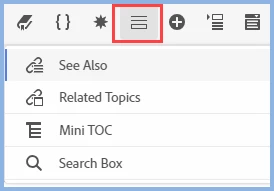
I see mention of "Related Topics" in the help and in posts in this forum, but damned if I can figure out where the icon is to create them. The toolbar icons display in the following order: Contents > TOC > Index > Glossary > See Also > Microcontent (no RT, which I assume would show under or next to See Also).


2) What is it with combining lists and paragraph styles? Say I create an ordered or bulleted list - when I apply a paragraph style TO that list, I get double-paragraphs between each list entry in the Author UI (instead of a single paragraph). It does appear that you should be applying formatting to the list (not the paragraph), but I'm having trouble aligning the left margin/indent, which is enforced when I apply the paragraph style.


3) What is it with upgrades? I click on Help > Check for Updates, and I get the Creative Cloud Desktop update window (have a subscription). RoboHelp is not even listed as an application in CC. Not sure if this is just because it is a trial, although I intend to get the subscription just to keep up-to-date with the software.


4) In general - it crashes. A lot. 
    This topic has been closed for replies.
    Correct answer Peter Grainge

    It is incorrect because somewhere along the line it got changed and that wasn't picked up. The topic does say Insert Related Topics Placeholder and if you hover over the icon I have highlighted it does read Insert Placeholder. Related Topics got subsumed.


    31 replies

    Peter Grainge
    Community Expert
    Community Expert
    August 14, 2020

    I'm getting confused here. You posted this in another thread and I suggested moving it to the relevant thread. There is nothing in this thread about sections missing but I do recall seeing a thread that had this problem. You did post that, correct?


    Each post has a date and if you click on it a link to that post is added to your clipboard. Please let me have a link to that thread as I can't find it now.


    Use the menu (bottom right) to mark the Best Answer or Highlight particularly useful replies. Found the answer elsewhere? Share it here.
    Known Participant
    August 14, 2020

    Example - Issue 5 (sections do not display associated content in Responsive HTML5 output). New 3-topic project, with one topic associated with a section.


    Peter Grainge
    Community Expert
    Community Expert
    August 13, 2020

    There is a lot of content in that project and there have been so many changes in RoboHelp since it was first launched. The project follows on from its predecessor which had 14 updates. Not too surprising something slipped through.


    Use the menu (bottom right) to mark the Best Answer or Highlight particularly useful replies. Found the answer elsewhere? Share it here.
    Known Participant
    August 13, 2020

    Thank you! I just wanted to confirm that I wasn't going bonkers. It does work as you described, obviously - but I didn't know from how it was described. I would suggest that Adobe keep on top of its changes ... there is no mention in the associated

    AR topic or online help of doing it in the manner that you supplied.

    Peter Grainge
    Community Expert
    Peter GraingeCommunity ExpertCorrect answer
    Community Expert
    August 13, 2020

    It is incorrect because somewhere along the line it got changed and that wasn't picked up. The topic does say Insert Related Topics Placeholder and if you hover over the icon I have highlighted it does read Insert Placeholder. Related Topics got subsumed.


    Use the menu (bottom right) to mark the Best Answer or Highlight particularly useful replies. Found the answer elsewhere? Share it here.
    Known Participant
    August 13, 2020

    Well - it would be a bit more clear if the About RoboHelp topic in question and the online help both didn't mention THIS. Are you telling me this information is innacurate?:


    Edit - to clarify, I cannot see the icon that the big red arrow is pointing to. I see the See Also, but not Related Links icon.


    Peter Grainge
    Community Expert
    Community Expert
    August 13, 2020

    It is explained if you read the topic. There isn't an icon any more. You simply create links to the topics. That's all Related Topics ever were.


    OK now?


    Use the menu (bottom right) to mark the Best Answer or Highlight particularly useful replies. Found the answer elsewhere? Share it here.
    Known Participant
    August 13, 2020

    Okay - I still don't get it. I don't see any Related Topics icon in the toolbar. If I open a project with related topics, they are there and show in the Properties panel, but I still don't see a way to create a new Related Topics list. Even with the topic with Related Topics, the icon is not in the toolbar...


    Peter Grainge
    Community Expert
    Community Expert
    August 13, 2020

    If you are saying you were opening the sample project from the Program Files, that is a protected folder. You should open the copy in Documents > My RoboHelp projects. It should also be listed on the start page. The copy in Program Files should never be opened, that is also explained in About RoboHelp. 


    If you are seeing First Topic, that is not the sample project, it is just a new project you have created somehow. 


    Open the correct copy of About RoboHelp and look in the Authoring folder for See Also and Related Topics.


    Please take a good look at About RoboHelp as it explains most of the features.


    Use the menu (bottom right) to mark the Best Answer or Highlight particularly useful replies. Found the answer elsewhere? Share it here.
    Known Participant
    August 13, 2020

    Thanks - I just realized my mistake looking at your page. I had somehow thought that looking at C:\Program Files\Adobe\Adobe RoboHelp 2020\resources\data\sample\projects should be what I was looking for. Silly me. 

    It doesn't show up in Documents > My RoboHelp Projects - so I'll copy/paste from the application directory as above. Thx.


    Known Participant
    August 13, 2020

    Seems to be. I copied the sample project folder and pasted outside of the App folder. No issues now. Not sure if other crashes are related though... It's more like someone else noted in this forum, it's mostly the prompt to restart the app ... not a blue screen of death or anything...


    Back to the sample project - I don't see any relevant info in it RE Related Topics. Am I missing something? There's only a single First Topic file ...