
Known Participant
August 13, 2020
Answered

Questions and Notes - Robohelp 2020 (2020.0.156) - Related Topics, Lists/Para Styles, Updates

  • August 13, 2020
  • 31 replies
  • 888 views
Using trial of RH2020 (upgrade from 2017) and it is ... unintuitive and somewhat buggy. Couple of questions/notes based on my experience so far.


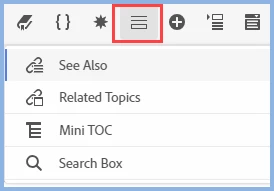
1) Related Topics - Where are they in the user interface Standard Toolbar? They appear to have ported over from an upgraded topic, but I don't see how to add them. 


I see mention of "Related Topics" in the help and in posts in this forum, but damned if I can figure out where the icon is to create them. The toolbar icons display in the following order: Contents > TOC > Index > Glossary > See Also > Microcontent (no RT, which I assume would show under or next to See Also).


2) What is it with combining lists and paragraph styles? Say I create an ordered or bulleted list - when I apply a paragraph style TO that list, I get double-paragraphs between each list entry in the Author UI (instead of a single paragraph). It does appear that you should be applying formatting to the list (not the paragraph), but I'm having trouble aligning the left margin/indent, which is enforced when I apply the paragraph style.


3) What is it with upgrades? I click on Help > Check for Updates, and I get the Creative Cloud Desktop update window (have a subscription). RoboHelp is not even listed as an application in CC. Not sure if this is just because it is a trial, although I intend to get the subscription just to keep up-to-date with the software.


4) In general - it crashes. A lot. 
    This topic has been closed for replies.
    Correct answer Peter Grainge

    It is incorrect because somewhere along the line it got changed and that wasn't picked up. The topic does say Insert Related Topics Placeholder and if you hover over the icon I have highlighted it does read Insert Placeholder. Related Topics got subsumed.


    31 replies

    Peter Grainge
    Community Expert
    Community Expert
    August 13, 2020

    Wondering if permissions could be linked to the crashing?


    Use the menu (bottom right) to mark the Best Answer or Highlight particularly useful replies. Found the answer elsewhere? Share it here.
    Known Participant
    August 13, 2020

    Tried opening sample project from FileEx. Same result.

    The person who installed it had admin rights. Alas - my company has a pretty strict policy about admin rights to machine. Properties for the file show that I have Read/Execute permission to Blank Project.rhpj ... but no modify/write, so yes - looks like a permissions issue... That's solved anyway. Thx.

    Peter Grainge
    Community Expert
    Community Expert
    August 13, 2020

    Something definitely wrong with your setup if you can't open About RoboHelp.


    1. Have you tried rebooting the machine?
    2. Was RoboHelp installed to the default location with admin rights?
    3. How are you opening the sample? Via the menu? Try locatiing it in your Documents folder and double clicking the RHPJ file.


    Use the menu (bottom right) to mark the Best Answer or Highlight particularly useful replies. Found the answer elsewhere? Share it here.
    Known Participant
    August 13, 2020

    FWIW - Generated Frameless and topic/section link does work.

    Known Participant
    August 13, 2020

    HTML5 - in Edge.

    Known Participant
    August 13, 2020

    Attempt to open the sample project to learn more on Related Topics. Encounter "Application Error" and restart prompt. Restart Robohelp (x2). Repeat. Sigh....

    Peter Grainge
    Community Expert
    Community Expert
    August 13, 2020

    Re the topic not showing, which output?


    Use the menu (bottom right) to mark the Best Answer or Highlight particularly useful replies. Found the answer elsewhere? Share it here.
    Peter Grainge
    Community Expert
    Community Expert
    August 13, 2020

    Not sure why you are getting crashes as it doesn't seem to be a general issue.

    • Work in the About RoboHelp for a while to see if that has the same problem.
    • Is there anything specific that seems to cause the crash.


    Use the menu (bottom right) to mark the Best Answer or Highlight particularly useful replies. Found the answer elsewhere? Share it here.
    Peter Grainge
    Community Expert
    Community Expert
    August 13, 2020

    1) Related Topics - Take a look at the About RoboHelp sample project. It's explained there.


    2) What is it with combining lists and paragraph styles?

    Say I create an ordered or bulleted list - when I apply a paragraph style TO that list, I get double-paragraphs between each list entry in the Author UI (instead of a single paragraph).

    That sounds like something in one style getting inherited. Are you happy to use just the list style if we can get that working?

    Start by removing the paragraph style. Then in the list style try padding rather than margin or vice versa. If that doesn't work. Give us some more precise information.


    3) What is it with upgrades? I click on Help > Check for Updates, and I get the Creative Cloud Desktop update window (have a subscription).

    It's right you get the CCD window. There is no update yet for 2020.


    Use the menu (bottom right) to mark the Best Answer or Highlight particularly useful replies. Found the answer elsewhere? Share it here.
    AntoninMaxSea
    Inspiring
    November 17, 2020

    3) What is it with upgrades? I click on Help > Check for Updates, and I get the Creative Cloud Desktop update window (have a subscription).

    It's right you get the CCD window. There is no update yet for 2020.

    About this question: Is it planned to have robohelp updates from the CCD?

    Jeff_Coatsworth
    Community Expert
    Community Expert
    November 17, 2020

    IIRC there was a bug in the first release of RH2020 that tried to use the Creative Cloud - try looking at https://www.adobe.com/support/robohelp/downloads.html to pick up the patches.

    Known Participant
    August 13, 2020

    Thank you. I now also have a "5".


    5. Topics associated with sections. After outputting, I can click on a section (Chapter) - but the associated topic info is not displayed in the output (there is an associated file in the TOC. I checked).