
Questions and Notes - Robohelp 2020 (2020.0.156) - Related Topics, Lists/Para Styles, Updates
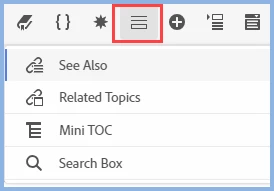
1) Related Topics - Where are they in the user interface Standard Toolbar? They appear to have ported over from an upgraded topic, but I don't see how to add them.
I see mention of "Related Topics" in the help and in posts in this forum, but damned if I can figure out where the icon is to create them. The toolbar icons display in the following order: Contents > TOC > Index > Glossary > See Also > Microcontent (no RT, which I assume would show under or next to See Also).
2) What is it with combining lists and paragraph styles? Say I create an ordered or bulleted list - when I apply a paragraph style TO that list, I get double-paragraphs between each list entry in the Author UI (instead of a single paragraph). It does appear that you should be applying formatting to the list (not the paragraph), but I'm having trouble aligning the left margin/indent, which is enforced when I apply the paragraph style.
3) What is it with upgrades? I click on Help > Check for Updates, and I get the Creative Cloud Desktop update window (have a subscription). RoboHelp is not even listed as an application in CC. Not sure if this is just because it is a trial, although I intend to get the subscription just to keep up-to-date with the software.
4) In general - it crashes. A lot.


 AdChoices