


Known Participant
June 12, 2020
Answered

RH 2019: Empty paragraph when going from second to first level in a multilevel list

  • June 12, 2020
  • 11 replies
  • 568 views

I have tried to search the forum, and I find posts about multilevel lists, but I could not see anything matching my problem.


I am using a multilevel list in RH 2019 (new design), and when I go from the second to the first level there is an empty line (parapgraph) added between the levels (see screenshot).
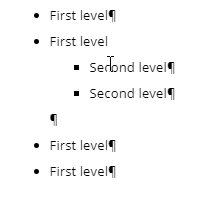
I am not able to remove it by deleting it in a normal way.

Anyone else experienced this or any ideas how to solve it?
This topic has been closed for replies.
Correct answer Amebr

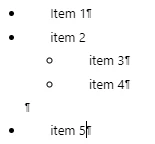
I don't think that extra paragraph mark is a problem. I think it represents the end of the nested ul or ol tag. It doesn't show when you have paragraph marks turned off, nor in the output. It's just disconcerting in RH editing mode.


Take this example.


  <ul class="Disc">
    <li>Item 1</li>
    <li>item 2
      <ul>
        <li>item 3</li>
        <li>item 4</li>
      </ul>
    </li> <!-- this is the empty paragraph mark. it correctly closes 'item 2'. -->
    <li>item 5</li>
  </ul>


11 replies

Peter Grainge
Community Expert
Community Expert
June 15, 2020

Best not to change anything if it's OK in the output and you can live with it in the editor. If you want to attach the CSS to an email to me, that's OK. See the Contact page on my site.


Use menu (bottom right) to mark as Best Answer or to Highlight particularly useful replies. Found the answer elsewhere? Share it here.
Known Participant
June 15, 2020

I only checked for "padding". There are some "margin-bottom" settings for ol.<something> list styles. I tried commenting out the setting for "ol>li", but it did not make any difference. I am not "fluent" in CSS, so I am not able to know 100% which of these settings that are relevant.

Peter Grainge
Community Expert
Community Expert
June 15, 2020

Padding or margin, in case anyone else has this issue. 


Use menu (bottom right) to mark as Best Answer or to Highlight particularly useful replies. Found the answer elsewhere? Share it here.
Known Participant
June 15, 2020

I did now, but I cannot find any "padding" setting that could be relevant in this case.

Peter Grainge
Community Expert
Community Expert
June 15, 2020

Did you check for any padding to see if that fixed things in the editor as well?


Use menu (bottom right) to mark as Best Answer or to Highlight particularly useful replies. Found the answer elsewhere? Share it here.
Known Participant
June 15, 2020

Thanks for all the good responses. It seems that the problem was only in the editor when displaying paragraph marks, and not in the output.

Peter Grainge
Community Expert
Community Expert
June 15, 2020

The code didn't change when I commented out the padding but the gap did not then appear.


In a different CSS without padding, there was no gap so I don't think that tag was the cause.


Use menu (bottom right) to mark as Best Answer or to Highlight particularly useful replies. Found the answer elsewhere? Share it here.
AmebrCommunity ExpertCorrect answer
Community Expert
June 15, 2020

I don't think that extra paragraph mark is a problem. I think it represents the end of the nested ul or ol tag. It doesn't show when you have paragraph marks turned off, nor in the output. It's just disconcerting in RH editing mode.


Take this example.


  <ul class="Disc">
    <li>Item 1</li>
    <li>item 2
      <ul>
        <li>item 3</li>
        <li>item 4</li>
      </ul>
    </li> <!-- this is the empty paragraph mark. it correctly closes 'item 2'. -->
    <li>item 5</li>
  </ul>


Peter Grainge
Community Expert
Community Expert
June 12, 2020

See if your CSS has this definition.


OL li {
 padding-bottom: 6pt;
}


If it does, comment it out and see if that fixes it. It has for me. Note the /* and */


OL li {
/* padding-bottom: 6pt; */
}


Use menu (bottom right) to mark as Best Answer or to Highlight particularly useful replies. Found the answer elsewhere? Share it here.
Peter Grainge
Community Expert
Community Expert
June 12, 2020

I'm thinking it is something in our respective CSS files.


I just took a copy of default.css from a new project and applied that to a topic. This is what I get there.


I think something in another list style is cascading and creating that extra space.


Use menu (bottom right) to mark as Best Answer or to Highlight particularly useful replies. Found the answer elsewhere? Share it here.