Inspiring
April 22, 2021
Question

RH 2020 - Breadcrumbs not working in both Indigo and Studio Skins

  • April 22, 2021
  • 22 replies
  • 544 views

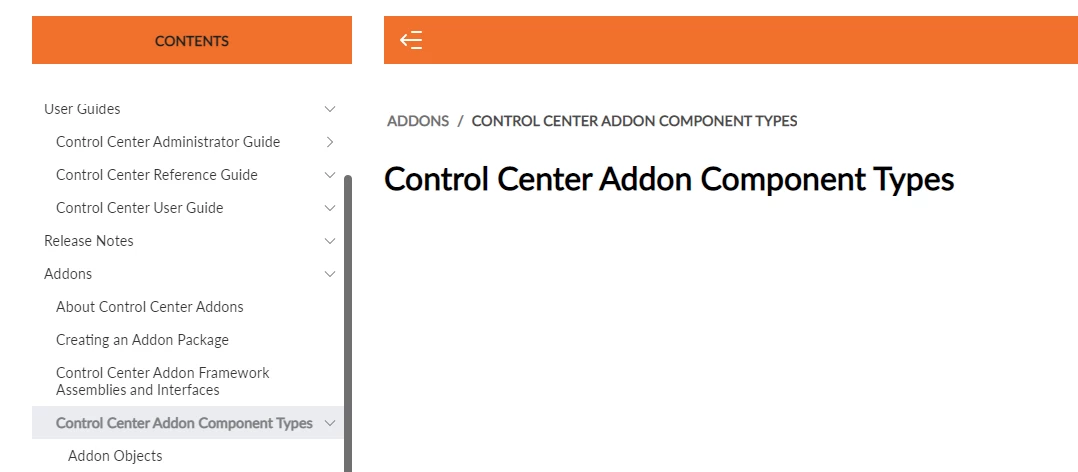
I cant seem to get breadcrumbs working in my output anymore. In the indigo skin, the breadcrumbs are there but if  you click on them, they do nothing and in the Studio skin, the dont display at all beyond heading 2. So if you have a heading 3 in your TOC, there are no breadcrumbs at all. Is there something else I have to do?



    This topic has been closed for replies.

    22 replies

    Peter Grainge
    Community Expert
    Community Expert
    April 26, 2021

    OK we are agreed on Indigo but not Studio. Test that again as you have said and let us know. 

    ________________________________________________________
    See www.grainge.org for free Authoring and RoboHelp Information

    Use the menu (bottom right) to mark the Best Answer or Highlight particularly useful replies. Found the answer elsewhere? Share it here.
    Inspiring
    April 26, 2021

    Well, yes I do still have an issue with Studio! But, as I said, I did get it working in my test project so I am going to start from scratch with a new project. 


    re "Using the TOC where the sections do have topics linked, then the breadcrumbs do fail. That is the only scenario that I can break." Yes, agreed, that is the situation that is breaking but I do not want sections that do not link to topics. I want to have a home page, with my books as tiles and to go straight to the topic pages from the book tile on the home page. I can't do that at the moment. 


    Peter Grainge
    Community Expert
    Community Expert
    April 26, 2021

    You said it wasn't working in either. Different issue but both had problems. 🙂


    I have now generated using Indigo.


    This is the output from the TOC where the sections do not have topics linked. Those breadcrumbs also work.


    Using the TOC where the sections do have topics linked, then the breadcrumbs do fail. That is the only scenario that I can break.

    ________________________________________________________
    See www.grainge.org for free Authoring and RoboHelp Information


    Use the menu (bottom right) to mark the Best Answer or Highlight particularly useful replies. Found the answer elsewhere? Share it here.
    Inspiring
    April 26, 2021

    Yes it works in the Studio Skin but it does not work using the Indigo skin

    Peter Grainge
    Community Expert
    Community Expert
    April 26, 2021

    This is what I see in the TOC that has topics linked to the sections only. All breadcrumbs work.


    With the TOC where sections are not linked to the TOC but appear separately, this is what I see.


    If I click on any HEADING, the breadcrumb for say Heading 2 will take me to Topic 2 with Topic 2 highlighted as that is the topic associated with the section. That is what I would expect to happen.


    To me it seems to be worked as designed.

    ________________________________________________________
    See www.grainge.org for free Authoring and RoboHelp Information

    Use the menu (bottom right) to mark the Best Answer or Highlight particularly useful replies. Found the answer elsewhere? Share it here.
    Peter Grainge
    Community Expert
    Community Expert
    April 26, 2021

    No worries. Now that I have the project I will look when I can.

    ________________________________________________________
    See www.grainge.org for free Authoring and RoboHelp Information

    Use the menu (bottom right) to mark the Best Answer or Highlight particularly useful replies. Found the answer elsewhere? Share it here.
    Inspiring
    April 26, 2021

    Sorry, I have raised a bug now. Please feel free to ignore my email. Here is a link to the bug I have raised:


    https://tracker.adobe.com/#/view/RH-8494 

    Peter Grainge
    Community Expert
    Community Expert
    April 26, 2021

    I didn't ask you to send it to me. I said if you could recreate it report it as a bug. Now that you have sent it I will try to have a look later.

    ________________________________________________________
    See www.grainge.org for free Authoring and RoboHelp Information

    Use the menu (bottom right) to mark the Best Answer or Highlight particularly useful replies. Found the answer elsewhere? Share it here.
    Inspiring
    April 26, 2021

    I have created a test project and proved my theory is correct. For indigo skins, if you have a section that references a topic, the breadcrumbs do not work. 


    However, I tried it with the Studio skin and its working fine. So I am not sure why my project is also broken when using the Studio skin. I think I am just going to start again with a new parent project and see if I can get it to work. 


    I don't seem to be able to attach a zip file of my project for you to look at so I have emailed it to you. Hope that is OK. 


    Thanks again for all your help.

    Peter Grainge
    Community Expert
    Community Expert
    April 23, 2021

    Create a new simple project and test that theory. It's beginning to sound like a bug. If that project confirms it, then you can try Support or report it as a bug.


    See https://helpx.adobe.com/contact/enterprise-support.other.html#robohelp for your support contact options.


    Please follow this link to report bugs. https://tracker.adobe.com Post the link to your bug report in this thread and others can vote for it. The more people who do so, the higher it gets prioritised.

    ________________________________________________________
    See www.grainge.org for free Authoring and RoboHelp Information

    Use the menu (bottom right) to mark the Best Answer or Highlight particularly useful replies. Found the answer elsewhere? Share it here.