


Inspiring
March 15, 2021
Answered

(RH 2020) Review window cuts off right half of content

  • March 15, 2021
  • 12 replies
  • 435 views

Hi, Everyone.


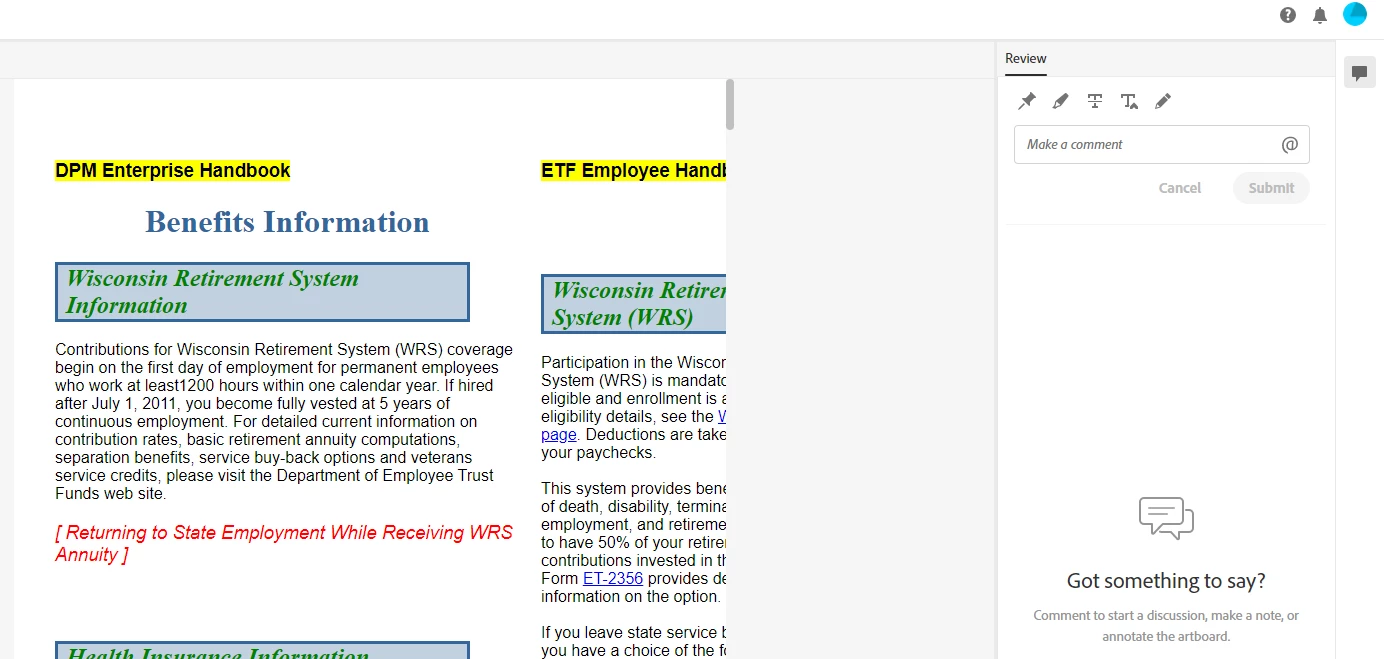
In RH 2020, the online review window is cutting off the right side of the page, without any way to scroll to it (screenshot, below).


Any advice for me? Thank you!


SCREENSHOT
    This topic has been closed for replies.
    Correct answer martinl83372021

    Thanks, Peter, I've submitted my bug report to the Tracker.


    Here's the link to it:  https://tracker.adobe.com/#/view/RH-8928 


    PS:  I no longer think it's the table-within-a-table that's causing this issue. I've removed it, but the issue persists. 

    12 replies

    Peter Grainge
    Community Expert
    Community Expert
    March 17, 2021

    Import that one topic into a new project that uses the same CSS, Send that to me.

    ________________________________________________________
    See www.grainge.org for free Authoring and RoboHelp Information

    Use menu (bottom right) to mark as Best Answer or to Highlight particularly useful replies. Found the answer elsewhere? Share it here.
    martinl83372021AuthorCorrect answer
    Inspiring
    March 17, 2021

    Thanks, Peter, I've submitted my bug report to the Tracker.


    Here's the link to it:  https://tracker.adobe.com/#/view/RH-8928 


    PS:  I no longer think it's the table-within-a-table that's causing this issue. I've removed it, but the issue persists. 

    Inna Iak_ko
    Known Participant
    September 28, 2023

    Seems I'm experiencing the same issues with the latest RH 2022.3.93 . At first no scroll bar displayed in Chrome. But the scrollbar showed up but with no text - only highlight that I've added with the Review tool.


    Peter Grainge
    Community Expert
    Community Expert
    September 28, 2023

    Please add your vote to the bug report.

    ________________________________________________________

    My site www.grainge.org includes many free Authoring and RoboHelp resources that may be of help.


    Use menu (bottom right) to mark as Best Answer or to Highlight particularly useful replies. Found the answer elsewhere? Share it here.
    Peter Grainge
    Community Expert
    Community Expert
    March 17, 2021

    I think both need to be reported as bugs. Please follow this link to report bugs. https://tracker.adobe.com

    Post the link to your bug report in this thread and others can vote for it. The more people who do so, the higher it gets prioritised.

    ________________________________________________________
    See www.grainge.org for free Authoring and RoboHelp Information

    Use menu (bottom right) to mark as Best Answer or to Highlight particularly useful replies. Found the answer elsewhere? Share it here.
    Inspiring
    March 17, 2021

    SOLUTION!

    Peter, good idea re. images. Turns out, images aren't the problem. It's tables (tables within the two-cell table layout), like this:


    Actually, I have found one other thing that I think is problematic - a set of drop-downs did not open (screenshot 2):


    SCREENSHOT 2


    Peter Grainge
    Community Expert
    Community Expert
    March 16, 2021

    It's looking the table is not playing nicely with Review. We can test that tomorrow.


    Are there any images in the topic? If there are, then duplicate the topic and remove the images in the copy. Does that play nicely with the review?

    ________________________________________________________
    See www.grainge.org for free Authoring and RoboHelp Information


    Use menu (bottom right) to mark as Best Answer or to Highlight particularly useful replies. Found the answer elsewhere? Share it here.
    Inspiring
    March 16, 2021

    Here's the body tag of my CSS (screenshot 1):


    SCREENSHOT 1


    There's the vertical scroll bar (Screenshot 2), but no horizontal scroll bar, even when scrolled to the very bottom.


    SCREENSHOT 2

    Peter Grainge
    Community Expert
    Community Expert
    March 16, 2021

    The scroll bar is that little bit of dark grey in you first screen shot. 


    Page width might have been set for the body tag in your CSS. 

    ________________________________________________________
    See www.grainge.org for free Authoring and RoboHelp Information


    Use menu (bottom right) to mark as Best Answer or to Highlight particularly useful replies. Found the answer elsewhere? Share it here.
    Inspiring
    March 16, 2021

    Peter, when you say, "If that is one topic, it has been suggested that you may have set a page width and are using a two column table," can you give me more guidance?  


    Yes, I am using a two-column table to set up the two-column layout.


    I'm looking at the table properties of the three pages. And they all look the same (screenshot).  

    (Where do I look for "page width"?) 


    Thank you!


    SCREENSHOT:

    Inspiring
    March 16, 2021

    Thanks, Amber. No, there is no horizontal scroll bar.


    Peter, no it's not two topics. It's one topic with a two-column layout (via two-cell table).


    I've just tried closing and re-opening the review (and have dumped my browser cache). No change.


    One thing I've noticed is how two other pages in the review display just fine. And the review displays those two pages with much narrower columns than they have in the actual document (Screenshot A). The page that gets cut off is handled differently. The review seems to adjust its column-widths only slightly more narrowly (screenshot B). 


    SCREENSHOT-A


    SCREENSHOT-B


    Peter Grainge
    Community Expert
    Community Expert
    March 16, 2021

    If that is one topic, it has been suggested that you may have set a page width and are using a two column table.

    ________________________________________________________
    See www.grainge.org for free Authoring and RoboHelp Information

    Use menu (bottom right) to mark as Best Answer or to Highlight particularly useful replies. Found the answer elsewhere? Share it here.