



Mark_Noc
Inspiring
September 7, 2021
Question

[RH2020.5.71] Search Freezes On Random Search Terms (responsive HTML5 output)

  • September 7, 2021
  • 17 replies
  • 837 views

This is a very frustrating problem that I just can't seem to pin down. Sometimes, while performing a search, the web page will just freeze showing the following error after about 30 seconds:
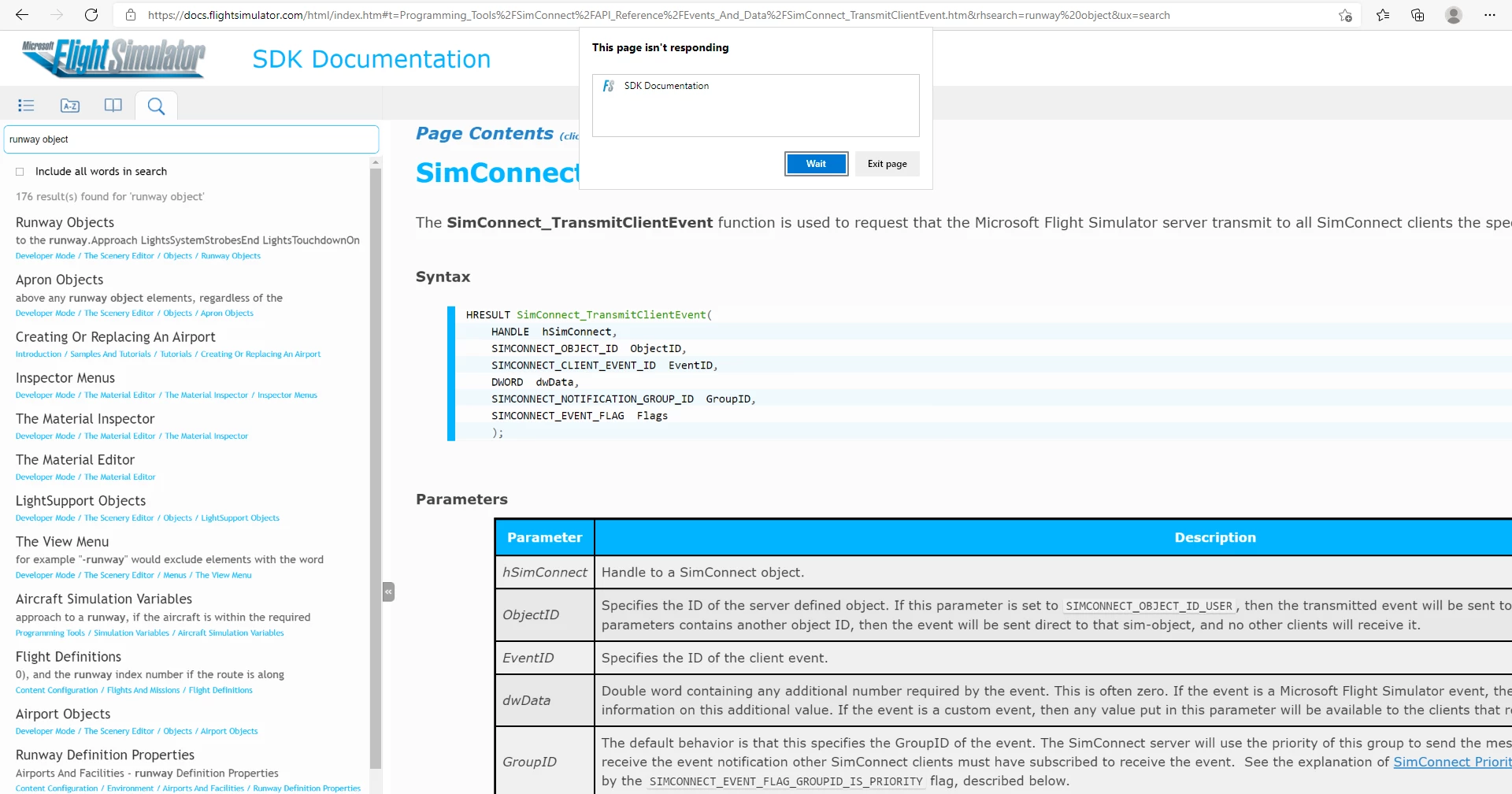
 

This seems to happen on all browsers (reported on Edge, Chrome and Firefox), and is completly random. For example, if I can for "Runway Objects" on chrome and it will freeze the first two times, but then work suddenly, while it won't freeze on any of the other browsers (and it'll never freeze on Chrome for that search term again!). This makes it impossible to reproduce consistently, as you never know when a search term will cause this freezing. It's also impossible to debug, as the browser dev tools seem to be useless in this situation. If you try to open them after it happens then they either can't be opened or show nothing, and if they happen to be open when it does happen, they still show nothing! 


Has anyone else experienced this happening to them? Can anyone think of a way I can work around this issue?

This topic has been closed for replies.

17 replies

Known Participant
April 6, 2022

We dealt with this, a month ago, by re-outputting the Robohelp file and publishing it again.


Yesterday, when I published our latest version, Search did not work. Luckily, re-outputting and publishing again worked AGAIN.  

Mark_Noc
Mark_NocAuthor
Inspiring
March 9, 2022

This hasn't been fixed yet, but the bug report I made has been set to "Critical" in the last week or so, which would suggest that Adobe are now aware that the problem exists and is serious... so I'd hope that a fix will be forthcoming in the next update.

Known Participant
March 9, 2022


Known Participant
March 9, 2022

Hi,


Have there been any fixes to this yet? We have 2020.7.46. Each time I search, the results show up but the page freezes and I can't click on them. Then I get "Page Unresponsive". So our customers literally cannot search anything on our site.


Thanks,


Julianna

Peter Grainge
Community Expert
Community Expert
November 23, 2021

You need to add your vote to the bug report R https://tracker.adobe.com/#/view/RH-10017. That is where Adobe will become aware it is a general issue.

________________________________________________________
See www.grainge.org for free Authoring and RoboHelp Information


Use the menu (bottom right) to mark the Best Answer or Highlight particularly useful replies. Found the answer elsewhere? Share it here.
Participant
November 23, 2021

We have the same problem, whether locally or on a server.

It has been reported to us by customers, which is very annoying (for us and for them).

We are using Robohel 2020.6.76.

We have not found a workaround.

We've tried the server reboot but it has not solved the problem.


Peter Grainge
Community Expert
Community Expert
November 19, 2021

The person who logged the bug has found it is now fixed after they got IT to clear the server cache and reboot the server.

________________________________________________________
See www.grainge.org for free Authoring and RoboHelp Information

Use the menu (bottom right) to mark the Best Answer or Highlight particularly useful replies. Found the answer elsewhere? Share it here.
Peter Grainge
Community Expert
Community Expert
November 19, 2021

Whilst RH-10374 | Tracker (adobe.com) is not about random terms, it has the feel of something related.

________________________________________________________
See www.grainge.org for free Authoring and RoboHelp Information

Use the menu (bottom right) to mark the Best Answer or Highlight particularly useful replies. Found the answer elsewhere? Share it here.
Erwin.Timmerman
Inspiring
September 10, 2021

Apart from replicating the bug, I really doubt it can be solved easily. The RH search is quite extensive, but that probably also means there is quite a lot going on behind the scenes after you press enter. I could imagine a network blip could disturb that process. I think either an increase of efficiency or an increase of robustness of the search routines could help, but both would probably not be an easy fix. And then it could be at the browser end as well... how many times do you open a web page that is only loaded halfway and then stalls, and then after a refresh loads just perfectly within seconds?

But yeah, if they at some point could look into it, would be appreciated. I have upvoted the bug.

Mark_Noc
Mark_NocAuthor
Inspiring
September 9, 2021

You are quite right Peter and I have removed the "correct answer"... I haven't tried the Frameless output for a few versions but will give it a go and see what happens. I had issues with it previously which is why we switched to the Responsive HTML5, but it's certainly worth checking again. Thank you!

Inspiring
September 9, 2021

We use the frameless output and still get this annoying, hard-to-reproduce bug. *sigh*