
CarrieWilkey
Participating Frequently
October 2, 2019
Question

RoboHelp 2015 Won't Generate Printed Documentation to Word or PDF

  • October 2, 2019
  • 27 replies
  • 1008 views

I used to be able to generate PDFs or Word docs in RoboHelp 2015. However, the ability to do that recently stopped. We recently upgraded from Windows 1703 to Windows 1809. And, we switched from Office 2016 to Office 365.

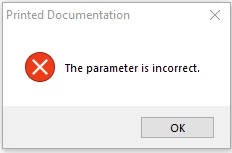
When I try to choose Printed Documentation, I get a "Parameter is Incorrect" error. Any ideas how to fix this? Does anyone know what this error means?

Thank you.
 

This topic has been closed for replies.

27 replies

Peter Grainge
Community Expert
Community Expert
October 18, 2019

I don't know if that error does trigger a log file and, if it does, where it would be. I am trying to find out. Meantime and on the basis of any port in a storm get IT to give you a new log in. Keep the old for now as you will want that if it doesn't help.


You will likely also need to reinstall RoboHelp for that user, not sure.


The only other thing I could find is to check your Word security settings. They must be at the lowest level. I don't think that is the problem but you do need them set low anyway.


Use the menu (bottom right) to mark the Best Answer or Highlight particularly useful replies. Found the answer elsewhere? Share it here.
Participating Frequently
October 18, 2019

Yes, I installed with an admin account.


Is there any way to generate a log file from RoboHelp that might make troubleshooting easier?


Peter Grainge
Community Expert
Community Expert
October 18, 2019

Possibly but it's an old warning that didn't occur often and hasn't been seen for a long while. I can't find anything more on it using my resources.


I assume you did install with admin rights. That was important with 2015.


Use the menu (bottom right) to mark the Best Answer or Highlight particularly useful replies. Found the answer elsewhere? Share it here.
Participating Frequently
October 17, 2019

I've installed RoboHelp 2015 on a brand new test system with Office 2016 and still receive the same "The parameter is incorrect" error message.  Could this be a compatibility issue between RoboHelp 2015 and Windows 10 ver1809?

Peter Grainge
Community Expert
Community Expert
October 11, 2019

Sadly my contact has come back without anything to help.


I don't know what else to suggest now as we have checked:


  1. The versions of Word and RoboHelp are compatible.
  2. Word was installed and used before installing RoboHelp.
  3. Projects and output are local.
  4. It occurs with all projects.
  5. Normal.dot is on the local hard drive.


Things left.

  1. Was RoboHelp installed with admin rights?
  2. Have you tried installing on another PC? You don't need another licence as you can install it in trial mode.


If the last two items don't help, please send me a new project with just a couple of topics where this occurs when you print. I can only test in 2017 but let's see what happens. See the contact page on my site.


Use the menu (bottom right) to mark the Best Answer or Highlight particularly useful replies. Found the answer elsewhere? Share it here.
CarrieWilkey
Participating Frequently
October 11, 2019

Hi, Peter. Yes, we are generating files to the same drive as the project. I have also tried generatingn them to a different location, but continue to get the same error. Thanks for continuing to look into this issue. I appreciate your assistance.

Peter Grainge
Community Expert
Community Expert
October 11, 2019

I now see your earlier confirmation. Forums emails are a problem at the moment.


I will make some enquiries as this was a known issue, albeit not too common.


  1. Is your project local?
  2. Are you generating to the same drive as the project?
  3. Is your Normal.dot template on your local drive?


I don't think those will be the problem but I need you to rule them out.


I will post back when I have some more information but likely it will not be until next week because of time zone differences.


Use the menu (bottom right) to mark the Best Answer or Highlight particularly useful replies. Found the answer elsewhere? Share it here.
Peter Grainge
Community Expert
Community Expert
October 11, 2019

Did deleting those files fix the problem?


Use the menu (bottom right) to mark the Best Answer or Highlight particularly useful replies. Found the answer elsewhere? Share it here.
CarrieWilkey
Participating Frequently
October 11, 2019
No, deleting those files did not correct the problem.
Peter Grainge
Community Expert
Community Expert
October 9, 2019

I'm hopeful this might be the answer. Close the project, delete both the CPD file and the PSS file, then reopen the project and try again.


Use the menu (bottom right) to mark the Best Answer or Highlight particularly useful replies. Found the answer elsewhere? Share it here.
CarrieWilkey
Participating Frequently
October 11, 2019
I deleted those files and continue to get the same problem.
Peter Grainge
Community Expert
Community Expert
October 9, 2019

Also did you use Word just once before installing RoboHelp? If not, uninstall RoboHelp, make sure you open Word, then reinstall RoboHelp.


Use the menu (bottom right) to mark the Best Answer or Highlight particularly useful replies. Found the answer elsewhere? Share it here.