

CarrieWilkey
Participating Frequently
October 2, 2019
Question

RoboHelp 2015 Won't Generate Printed Documentation to Word or PDF

  • October 2, 2019
  • 27 replies
  • 1008 views

I used to be able to generate PDFs or Word docs in RoboHelp 2015. However, the ability to do that recently stopped. We recently upgraded from Windows 1703 to Windows 1809. And, we switched from Office 2016 to Office 365.

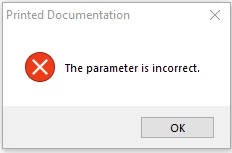
When I try to choose Printed Documentation, I get a "Parameter is Incorrect" error. Any ideas how to fix this? Does anyone know what this error means?

Thank you.
 

This topic has been closed for replies.

27 replies

Peter Grainge
Community Expert
Community Expert
October 9, 2019

In 2015 RoboHelp creates a Word document behind the scenes and you don't see it. However any Word issue still applies.


Does this happen if you create another simple project?


I'll see if I can find out more.


Use the menu (bottom right) to mark the Best Answer or Highlight particularly useful replies. Found the answer elsewhere? Share it here.
CarrieWilkey
Participating Frequently
October 11, 2019
I tried creating another project and continue to get the same error.
Participating Frequently
October 9, 2019

Uninstalled Office 365 and RoboHelp 2015.  Reinstalled Office 365 and then reinstalled RoboHelp 2015.  Still receiving the Parameter Incorrect error message.  Like I mentioned before, I don't think this is related to Office because we receive the same error message when we try to create pdf files as well as Word docs.

Peter Grainge
Community Expert
Community Expert
October 9, 2019

It's important with older versions that RoboHelp is installed after Word. Try uninstalling and reinstalling RoboHelp.


Use the menu (bottom right) to mark the Best Answer or Highlight particularly useful replies. Found the answer elsewhere? Share it here.
Participating Frequently
October 9, 2019

I'm working on this issue for Carrie.  The referenced information did not resolve the issue.  We get the same error message when we try to create PDF files as well, which makes me think that it's not related to Office 365.  We've update to the latest version of RoboHelp ver 12.0.4.460 which has not resolved the issue.  Is there anything else that we could try to resolve this issue?  Thanks

Participating Frequently
October 9, 2019

Deleted

Peter Grainge
Community Expert
Community Expert
October 2, 2019

2015 supported Office 365 so that shouldn't be the problem.


Item 14 in http://www.grainge.org/pages/snippets/snippets.htm#robohtml refers to the same error but in a different context. The solution there is worth a try though.


If in doubt, create a backup first. I always recommend creating the backup as a zip file. That prevents you opening it accidentally and working on it before you realise it was the backup. This way you always have a clean backup that can be used to create a new clean copy time after time.


Use the menu (bottom right) to mark the Best Answer or Highlight particularly useful replies. Found the answer elsewhere? Share it here.
Jeff_Coatsworth
Community Expert
Community Expert
October 2, 2019

It's probably more the change to Office 365 that's messed you up.