
olkkka
Known Participant
August 1, 2017
Question

RoboHelp 2017 - Indoigo layout - breadcrumbs not working

  • August 1, 2017
  • 4 replies
  • 1696 views

Hi there,

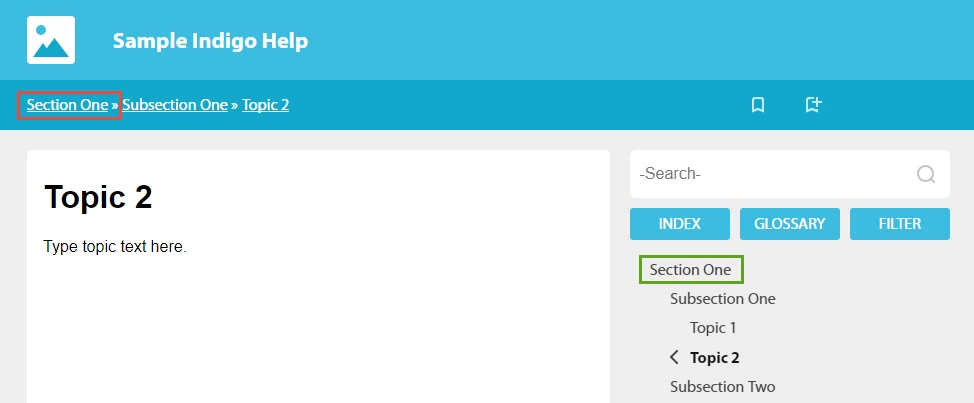
Currently, I'm using an Indigo layout for my project, which builds breadcrumbs pretty well by default. Hovewer, It's not possible to move anywhere around my Help by clicking the breadcrumb links. They look like links, but seem not to be working. For example, clicking Section One in the breadcrumbs area does nothing, while clicking Section One in TOC opens the corresponding default topic for this folder.

Any idea how to fix it?
This topic has been closed for replies.

4 replies

marthuun
Participant
August 3, 2017

Hi,

Could you please follow up on this matter? surbhi_maheshwari

Thank you

Peter Grainge
Community Expert
Community Expert
August 3, 2017

Have you tried importing the layout again giving it a new name?

Peter Grainge

www.grainge.org

@petergrainge

Use the menu (bottom right) to mark the Best Answer or Highlight particularly useful replies. Found the answer elsewhere? Share it here.
marthuun
Participant
August 3, 2017

Hi Peter,

Yay! Layout renaming did the trick!
Thank you so much for your help!

Marta

marthuun
Participant
August 2, 2017

Surbhi,

So it went not quite successful. I followed all the advised steps, however, the issue seems to be not resolved in 13.0.1.279 build.

Also, I noticed that it was not mentioned among the resolved issues: Issues resolved in Adobe RoboHelp (2017 release)

Awaiting your reply.

marthuun
Participant
August 2, 2017

Hello,

I have same issue as olkkka. It's quite urgent to get it resolved asap. Will there be any follow up on this? Captiv8r surbhi_maheshwari

Thanks heaps!

surbhi_maheshwari9120543
Community Manager
Community Manager
August 2, 2017

Hi,

This issue is fixed in patch one release of RH 2017.

Follow these steps:

Go to Help> Updates

Update the RoboHelp.  BUild number will be 13.0.1.279

In your project select a new indigo layout from gallery and generate HTML5.

It should work fine.

Let me know how it goes.

Thanks and Regards,
Surbhi Maheshwari

Participating Frequently
August 1, 2017

Hi,

From the image you have shared it looks like you are opening the topic from toc by clicking it. In your case there is a book without link having topics inside it. Section One does not have link to any topic and that is why, clicking it in breadcrumb does nothing and clicking it in toc will expand/close this book.

To check the link of Section One, Go to Table of contents pod.

Select the entry and right-click>properties

Now you can see that there is option to link the book with some topic.

Once you link it with some topic then it will start working.

Let me know if you need any help.

Thanks and Regards,
Surbhi MaheshwariRoboHelp Team

olkkka
olkkkaAuthor
Known Participant
August 1, 2017

HI Surbhi, unfortunately your assumption is not correct. Section One folder does have a default topic set. Any other ideas how to fix it?

surbhi_maheshwari9120543
Community Manager
Community Manager
August 1, 2017

This case is working correctly at my end. When a book has link then it opens from breadcrumb as well.

Let me know your RH Build number from Help>About RoboHelp

I will investigate and let you know.

Regards,
Surbhi Maheshwari