

chelluvsGod
Inspiring
September 16, 2020
Question

RoboHelp 2019 Not allowing upgraded project topics to be updated.

  • September 16, 2020
  • 14 replies
  • 284 views

I just "Upgraded Project RoboHelp Classic project" 

I went to the first topic I needed to update and the some of the bulleted items have an extra bullet.
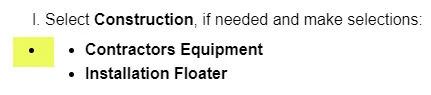
 

I removed the extra bullet but it removed them all. Now when I try to reinsert the bullets and tab to place the words where I want them, the tab key does not work. I tried using Properties/Alignment/Increase Indent but that does nothing. I went to the bottom of the topic to see if the tab key or Increase/Decrease Incdent works, but nothing happens. 
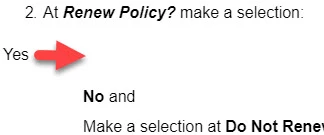
 

I am afraid to do anything else for fear of really messing up the guide I am working on. I've never experience issues when upgrading a project to a new version in the past. 

I really hope I don't have to recreate this project from scratch as it very large. 

Thank you.

    This topic has been closed for replies.

    14 replies

    Peter Grainge
    Community Expert
    Community Expert
    September 25, 2020

    The problem here is that it is the code in your topics that is giving RoboHelp a problem upgrading. Because your security people will not let us see that code we simply cannot help.


    Use the menu (bottom right) to mark the Best Answer or Highlight particularly useful replies. Found the answer elsewhere? Share it here.
    Community Manager
    September 25, 2020

    Unfortunately, the critical part is missing in the code screenshot (that is, the beginning of the list where the list starts):


    Without the full code snippets, it’s hard to debug.

    But looking at the breadcrumbs:


    My hunch is, that there is a construction like this:


    <ul>
    	<li> <!-- creates the outer bullet point -->
    		<ul>
    			<li> <!-- creates the second bullet point -->
    				<p>Click Save ...</p>
    			</li>
    		</ul>
    	</li>
    </ul>

     The outer bullet point is probalby (again, just a hunch without seeing the full code), coming from an empty list item that contains anouther unsorted list (ul).

    But it might also be a CSS issue.

    What ever it might be, as Peter already said, it's just HTML5 and CSS3 and therefore pretty much everything can get fixed without (re)creating the whole project 🙂

    Peter Grainge
    Community Expert
    Community Expert
    September 25, 2020

    There's quite of lot of cleaning up potentially so they really are creating a lot of work for you. The communication between us would not be direct to or from my site but via wetransfer.com. Maybe that will change their view?


    Basically I am being asked to fix the car without being able to look under the hood/bonnet. 


    What I can't see is how you are going to rebuild the projects in a way that fixes the problem. Importing a topic with a lot of issues ain't gonna fix them.


    It's up to you how much you and your line manager want to discuss this with them but do they really think I would build a site such as mine on the offchance I might get the opportunity to get hold of one of your projects? 


    If your rebuild does get the project working, that's great. If not you're going to need someone's help. 


    Hey ho, the offer is there.


    Use the menu (bottom right) to mark the Best Answer or Highlight particularly useful replies. Found the answer elsewhere? Share it here.
    chelluvsGod
    Inspiring
    September 25, 2020

    Hi Peter. 

    You won't have to try to figure this one out. The Information Security Office in my corporation did not approve my uploading files on your site. Looks like I'll be recreating my project. Yeah, it's only 465 printed pages; 161 topics. 


    I think the issue has to do with how HTML forward RoboHelp 2019 is. I've never had issues in the past when upgtrading a project. I assume the way I inserted images and did bulleting may have something to do with the bulleting issue I have. I expect this to continue in other projects that I upgrade. The one this thread is about is small in comparison to some others I have. 

    chelluvsGod
    Inspiring
    September 21, 2020

    Hi Peter. 

    I have not forgotten about you and this thread. My company requires my request to upload files to you to go through our Information Security Office. It is currently under review.

    Michele

    Peter Grainge
    Community Expert
    Community Expert
    September 17, 2020

    I cleared the formatting. I'm not sure what I should have seen, the the extra bullet did not go away. I went in the source code and I don't see the MSONormal for the bulleting I'm trying to change.

    In the first screenshots there is some content showing MSONormal. You need to locate that paragraph and then in author view click in the same paragraph and then click Clear Formatting. It may do nothing but I'm hoping it will help.


    I don't know what to look at in the CSS. Maybe you're talking about something other than what I'm thinking.

    Go to Assets > CSS in RoboHelp and open the CSS used in the topic. You should find something like p.MSONormal.


    I did create a new project to send you. I've never imported before. I tried it but I'm not sure what you mean by importing the CSS files. Here is what I see when I try to import:

    The import dialog is defaulting to HTML files and you are trying.


    ****************************************


    If my last post didn't make sense, it's because this one didn't get sent. Doh!


    Use the menu (bottom right) to mark the Best Answer or Highlight particularly useful replies. Found the answer elsewhere? Share it here.
    Peter Grainge
    Community Expert
    Community Expert
    September 17, 2020

    If it's easier you can send the whole project but make sure you give me the names of a few topics with the problem. 


    Use the menu (bottom right) to mark the Best Answer or Highlight particularly useful replies. Found the answer elsewhere? Share it here.
    chelluvsGod
    Inspiring
    September 17, 2020

    Peter,

    I cleared the formatting. I'm not sure what I should have seen, the the extra bullet did not go away. I went in the source code and I don't see the MSONormal for the bulleting I'm trying to change.


    I don't know what to look at in the CSS. Maybe you're talking about something other than what I'm thinking.


    I did create a new project to send you. I've never imported before. I tried it but I'm not sure what you mean by importing the CSS files. Here is what I see when I try to import:

    Initiate Import

    I navigate to the files:

    I open the folders and there is nothing in them. 

    Can you give me more information on what I should be doing? 

    Thank you,

    Michele

    Peter Grainge
    Community Expert
    Community Expert
    September 17, 2020

    I cringed as soon as I saw MsoNormal as that comes with content imported or pasted in from Word.


    Go to a topic that has the double bullet problem and select the list. In the General tab of the Properties you will see an icon for Clear Formatting. Try that.


    Also look in the CSS for a class MsoNormal and delete it. It's not really the right way of fixing things as it will leave the code in the topics but right now we are just looking for causes and this is a copy of the project.


    If that doesn't work, then create a new project and import the CSS files in it and a few of the rogue topics. See the Contact page on my site and send the project as instructed there. Do make sure you include a link to this thread and please do not email the project direct.


    Use the menu (bottom right) to mark the Best Answer or Highlight particularly useful replies. Found the answer elsewhere? Share it here.
    Peter Grainge
    Community Expert
    Community Expert
    September 16, 2020

    UK. 


    Use the menu (bottom right) to mark the Best Answer or Highlight particularly useful replies. Found the answer elsewhere? Share it here.