


cadbase
Known Participant
April 6, 2019
Question

RoboHelp 2019 Update 6 - Missing TOC link error

  • April 6, 2019
  • 1 reply
  • 982 views

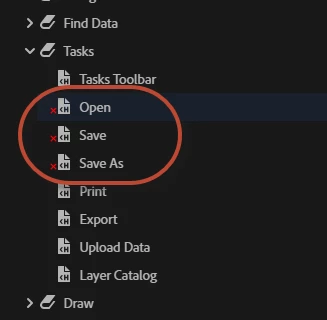
I've converted a project from RH 2019 Classic to RH 2019 Update 6 and found a possible bug where any topics in the TOC that point to a bookmark within a page show up as missing...
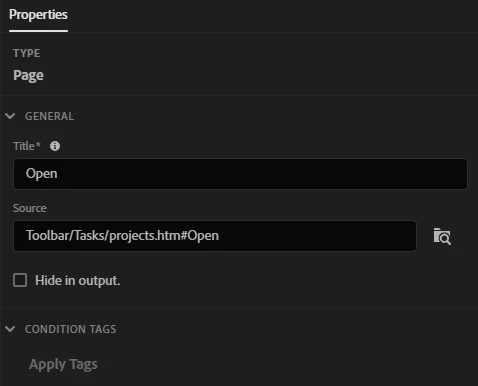
The properties appear okay:
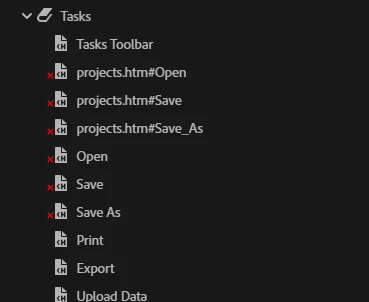
If I re-add them using the New Page context menu, the red X appears and the links appears broken after a short while.
I can't open the page from the TOC, and I get red error messages saying that RH needs to be closed.

When I publish, the TOC does appear to work okay in a responsive layout.

The problem didn't exist in RH 2017 or 2019 Classic.

This topic has been closed for replies.

1 reply

Peter Grainge
Community Expert
Community Expert
April 6, 2019

I think there is a bug here. I just added a bookmark to a topic in a simple new project. On adding a link to it from the TOC, I got the error message telling me to restart RoboHelp.

Like you, it works OK in a responsive output. I will report it.


See www.grainge.org for free RoboHelp and Authoring information.

@petergrainge

Use the menu (bottom right) to mark the Best Answer or Highlight particularly useful replies. Found the answer elsewhere? Share it here.
Adobe Employee
April 7, 2019

Hi cadbase​, this is a bug. it regressed due to some other fix. We will resolve it soon in the next update.