


Known Participant
July 17, 2020
Answered

Share for Review not working

  • July 17, 2020
  • 12 replies
  • 5151 views

Hi all,


I'm having an untold number of problems with RH2020 - and had just as many problems with RH2019.


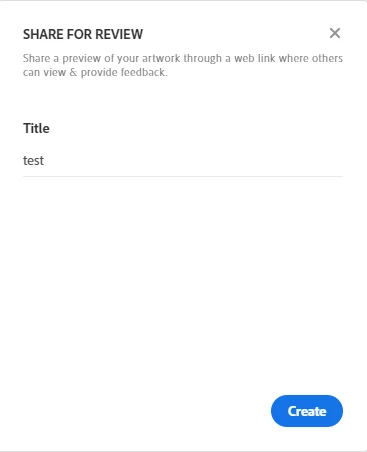
Has anyone had any issues with getting Share for Review to work? After looking at Peter's guidance, I notice my 'Share' box is lacking options. When I try to start the review session, it says 'Unable to start sharing':


    This topic has been closed for replies.
    Correct answer Amitojsingh

    Just checking to see if you have "Creative cloud for Desktop App installed" and did you sign in using the same user as RH ?


    thanks

    Amitoj SIngh


    12 replies

    Jeff_Coatsworth
    Community Expert
    Community Expert
    September 13, 2021

    @zeckstein are you trying to use Share for Review in RoboHelp or InDesign?? If it's the latter, then you need to post your problem over in the InDesign forum I suspect...

    Peter Grainge
    Community Expert
    Community Expert
    September 11, 2021

    @zeckstein You will have to tell us more than that. What exactly is happening for you and what update do you have applied (see the Help menu).

    ________________________________________________________
    See www.grainge.org for free Authoring and RoboHelp Information

    Use menu (bottom right) to mark as Best Answer or to Highlight particularly useful replies. Found the answer elsewhere? Share it here.
    zeckstein
    Participant
    September 13, 2021

    Sure, so here's what consistently happens when I use "Share for Review":


    • The first time I generate a review link, all goes well.
    • When I attempt to update the link, often times (I would say 75% of the time) the panel loads with the animated spinner and then never completes the update. I've let it run for upwards of 10 minutes.
    • If I close InDesign (not just the file, but the whole program) I am able to use Share for Review again, but again, around 75% of the time, the previously generated share link has been wiped and I have to create a brand new link and then email my team and tell them this is the NEW link, which sort of defeats the purpose have the one place for everyone to review.


    I really like this feature, but it just seems extremely buggy and unreliable.


    On a whole other note, it would so great if viewers could rotate the document while reviewing.

    Peter Grainge
    Community Expert
    Community Expert
    April 23, 2021

    @ShaneH Are you having problems with Review in RoboHelp or InDesign. It sounds like that latter but you have posted in the Robohelp forum where we cannot help with other products.

    ________________________________________________________
    See www.grainge.org for free Authoring and RoboHelp Information

    Use menu (bottom right) to mark as Best Answer or to Highlight particularly useful replies. Found the answer elsewhere? Share it here.
    Known Participant
    April 23, 2021

    More often than not, I have problems with it. Adobe has been promoting it hard on the InDesign splash screen. Now I'm embarrassed because I talked my team into using it. Most times I try to update the link, i get an endless spinning circle with no indication of what it's doing. For older links, forget it. You have to delete the link and start over. Duplicating files also causes conflicts. 

    zeckstein
    Participant
    September 10, 2021

    This. This happen every single time.

    Peter Grainge
    Community Expert
    Community Expert
    July 17, 2020

    Please clarify is it just the settings when you click Share that are missing or is it that if you close RoboHelp and reopen it, the whole review is missing?


    If you haven't tried the latter, please do so and let me know.


    Use menu (bottom right) to mark as Best Answer or to Highlight particularly useful replies. Found the answer elsewhere? Share it here.
    Known Participant
    July 17, 2020

    Hi Peter,


    I did. The actual review shars and is perfectly fine. But the settings vanish after the fact, rendering it fairly useless.

    Peter Grainge
    Community Expert
    Community Expert
    July 17, 2020

    Did you select some topics before configuring?


    Use menu (bottom right) to mark as Best Answer or to Highlight particularly useful replies. Found the answer elsewhere? Share it here.
    Peter Grainge
    Community Expert
    Community Expert
    July 17, 2020

    They should come back if you click the Share button again.


    It's all explained in the RoboHelp Tour on my site.


    Use menu (bottom right) to mark as Best Answer or to Highlight particularly useful replies. Found the answer elsewhere? Share it here.
    Adobe Employee
    July 17, 2020

    Please click on Create and you would be all set up. 


    thanks

    Known Participant
    July 17, 2020

    Apologies, to clarify:

    1. I create a review
    2. Configure it.
    3. Works fine.
    4. Click to another tab or part of the system.
    5. When I go back to that review and click 'Share' those settings have gone?
    6. If I click Create again, it re-introduces those settings - but with all my configurations wiped out.
    7. Rinse and repeat!
    Known Participant
    July 17, 2020

    That said, I'm having an issue where, once I've started sharing a review - including setting who's invited etc - those settings are no longer accessible after clicking away from that tab.


    So, where I could once see those settings and the live link, it reverts to this: 


    Is that how it should behave?

    Peter Grainge
    Community Expert
    Community Expert
    July 17, 2020

    Here's the link for anyone else needing to install.


    https://creativecloud.adobe.com/apps/all/desktop/pdp/creative-cloud


    Use menu (bottom right) to mark as Best Answer or to Highlight particularly useful replies. Found the answer elsewhere? Share it here.