



Cara Bereck Levy
Known Participant
August 3, 2022
Question

Snippets hts#p gone-crazy-tags 8-{

  • August 3, 2022
  • 14 replies
  • 1039 views

Hello lovely people! I upgraded a large, snippet-rich project created in RH 2017 to RH 2020, all updated and patched.

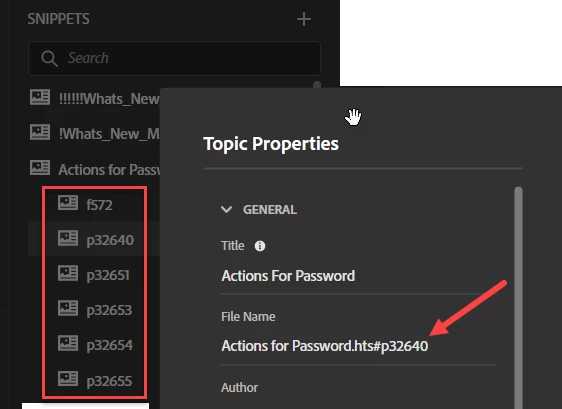
My snippets now have dozens of added tags, as shown in the capture below. What are these weird entities? Will my project disintegrate if I delete them? They are incredibly annoying and deserve deletion.

Thank you for any light you can shine on this mysterious issue 🙂
 

    This topic has been closed for replies.

    14 replies

    Peter Grainge
    Community Expert
    Community Expert
    August 6, 2022

    RH-10929 | Tracker (adobe.com)

    ________________________________________________________

    My site www.grainge.org includes many free Authoring and RoboHelp resources that may be of help.


    Use the menu (bottom right) to mark the Best Answer or Highlight particularly useful replies. Found the answer elsewhere? Share it here.
    Peter Grainge
    Community Expert
    Community Expert
    August 6, 2022

    UPDATE 06 August 2022


    Having demo'ed this to Adobe, it seems that bookmarks within a snippet were getting picked in the Snippets panel.


    This will be fixed in an update.

    ________________________________________________________

    My site www.grainge.org includes many free Authoring and RoboHelp resources that may be of help.


    Use the menu (bottom right) to mark the Best Answer or Highlight particularly useful replies. Found the answer elsewhere? Share it here.
    Cara Bereck Levy
    Known Participant
    August 8, 2022

    Peter--thank you for working on this and bringing it tp the attention of Adobe! I greatly appreciate it 🙂

    Peter Grainge
    Community Expert
    Community Expert
    August 4, 2022

    The indented snippets seem to have been caused by some code in the original Classic project that messed with the upgrade process.


    I have sent @Cara Bereck Levy full details that I can't put here because of confidential information.


    The suspicion is output topics were imported back into the source and some point but nothing can prove that.

    ________________________________________________________

    My site www.grainge.org includes many free Authoring and RoboHelp resources that may be of help.


    Use the menu (bottom right) to mark the Best Answer or Highlight particularly useful replies. Found the answer elsewhere? Share it here.
    Jeff_Coatsworth
    Community Expert
    Community Expert
    August 4, 2022

    "I very occasionally import a docx of pdf for reference." - that might be your culprit right there @Peter Grainge 

    Cara Bereck Levy
    Known Participant
    August 8, 2022

    Hi 🙂
    98% of the content in my project was created by me--written from scratch in RoboHelp.
    That includes the snippets--almost all were created from scratch in RH.

    Peter Grainge
    Community Expert
    Community Expert
    August 4, 2022

    Let us know how you get on. As I said, I am happy to take a look.

    ________________________________________________________

    My site www.grainge.org includes many free Authoring and RoboHelp resources that may be of help.


    Use the menu (bottom right) to mark the Best Answer or Highlight particularly useful replies. Found the answer elsewhere? Share it here.
    Cara Bereck Levy
    Known Participant
    August 4, 2022

    @Peter Grainge 🙂
    Thanks for offering to take a look at the Classic project.
    I did compile the weird snippets in RH 2020 as you suggested, and it is working OK--so not worried as to my deadline 🙂
    I zipped and sent via wetransfer, along with a link to this thread--again, my thanks!

    Community Expert
    August 4, 2022

    If this content was copied from developer documentation, that's were the fragmentid stuff might have come from. (As near as I can tell, they might be a bit like a context id for each element of a web application.) 


    I haven't ever seen it in Robohelp created content, so my guess is it will be safe to delete, although if you update the content from the same source they'd be re-added with the new content. 


    They are essentially bookmarks (id is the new way of doing bookmarks instead of <a name='xxx'>), so should not affect the output display. So as Peter says, for the sake of the deadline you should be able to ignore them for the moment.

    Peter Grainge
    Community Expert
    Community Expert
    August 3, 2022

    Why not try generating an output and checking it is OK? Then worry about the issue afterwards. At least it will stop the deadline being a worry if it works.

    ________________________________________________________

    My site www.grainge.org includes many free Authoring and RoboHelp resources that may be of help.


    Use the menu (bottom right) to mark the Best Answer or Highlight particularly useful replies. Found the answer elsewhere? Share it here.
    Peter Grainge
    Community Expert
    Community Expert
    August 3, 2022

    Where are those shots from?


    Can you share the Classic project? If you can, then see the Contact page on my site and send the project as instructed there. Do make sure you include a link to this thread and please do not email the project direct.


    I will try to look tomorrow but it might not be until the weekend.

    ________________________________________________________

    My site www.grainge.org includes many free Authoring and RoboHelp resources that may be of help.


    Use the menu (bottom right) to mark the Best Answer or Highlight particularly useful replies. Found the answer elsewhere? Share it here.
    Peter Grainge
    Community Expert
    Community Expert
    August 3, 2022

    Your first screenshot shows Action for Passwords just above the red rectangle.

    ________________________________________________________

    My site www.grainge.org includes many free Authoring and RoboHelp resources that may be of help.


    Use the menu (bottom right) to mark the Best Answer or Highlight particularly useful replies. Found the answer elsewhere? Share it here.
    Cara Bereck Levy
    Known Participant
    August 3, 2022

    Ok--I opened my RH2017 original and imported/upgraded into RH2020.

    I did nothing else, cross my heart.

    And in Explorer--some of the .hts files were duplicated.
    I am stumped. But now I have to go fix dinner because the people in my house have gotten hungry again. I will do some more exploring later--I have a deadline coming up, of course!

    Peter Grainge
    Community Expert
    Community Expert
    August 3, 2022

    So you have a topic whose filename seems to be concatenation of a Snippet category and the Snippet file name but the topic content is nothing to do with that snippet, correct?


    In the Author panel, you see the table rather than just a reference to a snippet, correct?

    ________________________________________________________

    My site www.grainge.org includes many free Authoring and RoboHelp resources that may be of help.


    Use the menu (bottom right) to mark the Best Answer or Highlight particularly useful replies. Found the answer elsewhere? Share it here.
    Cara Bereck Levy
    Known Participant
    August 3, 2022

    @Peter Grainge The snippets and the topic themselves where the snippets live look fine. The main problem for me - apart from that I am fearful that maybe the project might explode - is having to scroll through dozens of weird tags; typing the name of the snippet in the search field brings up dozens of tags.

    Peter Grainge
    Community Expert
    Community Expert
    August 3, 2022

    Hold up!


    Looking again, there is a topic with the filename that seems to be the concatenation of Snippet cateory and Snippet file.


    Is there both a topic Actions for Password and a Snippet with the same name?

    ________________________________________________________

    My site www.grainge.org includes many free Authoring and RoboHelp resources that may be of help.


    Use the menu (bottom right) to mark the Best Answer or Highlight particularly useful replies. Found the answer elsewhere? Share it here.
    Cara Bereck Levy
    Known Participant
    August 3, 2022

    Look at this code:
    body>
    <p class="ParaVision" style=""><span class="Strong">Struct</span></p>
    <table cellspacing="0" class="tableintopic" style="border-collapse: collapse;" width="648">
    <colgroup>
    <col width="199" />
    <col width="70" />
    <col width="354" />
    </colgroup>
    <tbody>
    <tr style="vertical-align: top; text-align: left;">
    <td bgcolor="#F7F7F7" style="border-top: solid 1px #ADADAD; border-left: solid 1px #ADADAD;
    border-right: solid 2px #ADADAD; border-bottom: solid 2px #ADADAD;
    padding-left: 2px; padding-top: 2px; padding-right: 2px; padding-bottom: 2px;">
    <p class="tableheader" fragmentid="1" id="p48646" style="">Parameter Name</p>
    </td>
    <td bgcolor="#F7F7F7" style="border-top: solid 1px #ADADAD; border-right: solid 1px #ADADAD;
    border-bottom: solid 2px #ADADAD; padding-left: 2px; padding-top: 2px;
    padding-right: 2px; padding-bottom: 2px;">
    <p class="tableheader" fragmentid="2078" id="p48648" style="">Data Type</p>
    </td>
    <td bgcolor="#F7F7F7" style="border-top: solid 1px #ADADAD; border-right: solid 1px #ADADAD;
    border-bottom: solid 2px #ADADAD; padding-left: 2px; padding-top: 2px;
    padding-right: 2px; padding-bottom: 2px;">
    <p class="tableheader" fragmentid="2079" id="p48650" style="">Description</p>
    <

    and so on

    the topic looks like this

    Cara Bereck Levy
    Known Participant
    August 3, 2022

    HOWEVER---other topecs with these mystery tags are not tables....