

michelled60596123
Known Participant
December 4, 2019
Question

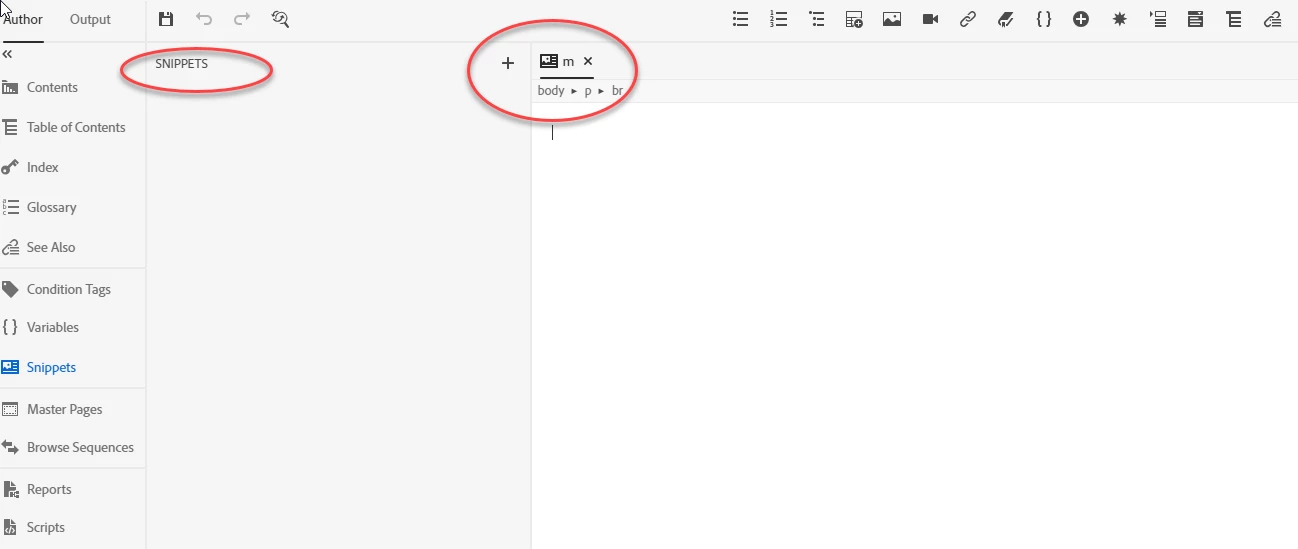
Snippets not being created

  • December 4, 2019
  • 22 replies
  • 1272 views

I am using RoboHelp 2019.0.9

When I create Snippets they do not appear in the Snippets pane as demonstrated in the following screenshot. Does anyone else have this issue?

We are due a RoboHelp update, does anyone know when it is coming?

Kind regards

Michelle
 

This topic has been closed for replies.

22 replies

Peter Grainge
Community Expert
Community Expert
December 5, 2019

@MDDwork. Adobe do not think the underscores should give problems. Please try with a project close to the root of the drive. C:\MyTestProject for example.


www.grainge.org

Use the menu (bottom right) to mark the Best Answer or Highlight particularly useful replies. Found the answer elsewhere? Share it here.
Peter Grainge
Community Expert
Community Expert
December 5, 2019

@MDDwork My apologies. I must sit nearer the screen. 🙂 I will let Adobe know about the underscores.


@Erwin Wondering if you exceeded Windows limit of 256 characters. Nobody can get around that.


www.grainge.org

Use the menu (bottom right) to mark the Best Answer or Highlight particularly useful replies. Found the answer elsewhere? Share it here.
Jeff_Coatsworth
Community Expert
Community Expert
December 5, 2019

Best practices in RH-land have always been to keep things short - c:\projects\<project_name>\ - for minimal issues. 😁

Erwin.Timmerman
Inspiring
December 5, 2019

Hmmm that's a bit strange. I've tested myself now with 

C:\Teeeeeeeeeeeeeeeeeeeest\Foooooooooooooooooooooor\A_Loooooooooooooooooooooooonggggggggggg\Paaaaaaaaaaaaaaaaaaaaaaaath\RoboHelp_Reimagined

with a long path and some underscores, and the snippet creation still works for me. 


The use of unicode characters also works fine, when I use the folder RöbōHelp_Rëïmägined, it still creates snippets just fine.


When I make the path even longer:

 C:\Teeeeeeeeeeeeeeeeeeeest\Fooooooooooooooooooooooooooooooooooor\A_Looooooooooooooooooooooooooooooooooooooooooooooooonggggggggggg\Paaaaaaaaaaaaaaaaaaaaaaaaaaaaaaaaaaaaaaaaaaaaaaaaaaaaaaaaaaath\RoboHelp____________________________Reimagined


The project doesn't open at all, I get into the project opening splash page when I double-click on the project file. So when a path actually is too long , the project has bigger problems than creating snippets.


I hope this gives the troubleshooters some extra data to work with.

michelled60596123
Known Participant
December 5, 2019

@peter grainge  - I am female btw and I do not have dots in my path, but I have underscores

Peter Grainge
Community Expert
Community Expert
December 5, 2019

Hopefully it will be in the next update. Not everyone has hit this problem so there must be a lot of user names without dots. Either that or no one is using snippets. 🙂


www.grainge.org

Use the menu (bottom right) to mark the Best Answer or Highlight particularly useful replies. Found the answer elsewhere? Share it here.
Community Expert
December 4, 2019

I hope they fix it, as it's really common for work user names to be dot separated, and many, many people keep their projects in the default location, which is in their user folder which is dot separated.


Mind you this is not a new problem and I've encountered it with several different tools for at least a decade.

Peter Grainge
Community Expert
Community Expert
December 4, 2019

I believe it is a general issue with dots in file names rather than just being snippets.


www.grainge.org

Use the menu (bottom right) to mark the Best Answer or Highlight particularly useful replies. Found the answer elsewhere? Share it here.
Erwin.Timmerman
Inspiring
December 4, 2019

Since we're talking about paths, I have found that in the HTML5 responsive output with the blue skin, if you use a logo file with spaces in it, the logo file isn't shown. It took me quite some time fumbling with resolutions and file formats before I thought of that. If they're fixing paths anyway, maybe they can fix that too 🙂 Unless that's a browser thing, but then they shouldn't allow these file names in the dialog.

Erwin.Timmerman
Inspiring
December 4, 2019

I can confirm that when I rename C:\RoboHelp Reimagined to C:\RoboHelp.Reimagined it stops working again:

The path on the file is shown as ../RoboHelp.hts.