

michelled60596123
Known Participant
December 4, 2019
Question

Snippets not being created

  • December 4, 2019
  • 22 replies
  • 1272 views

I am using RoboHelp 2019.0.9

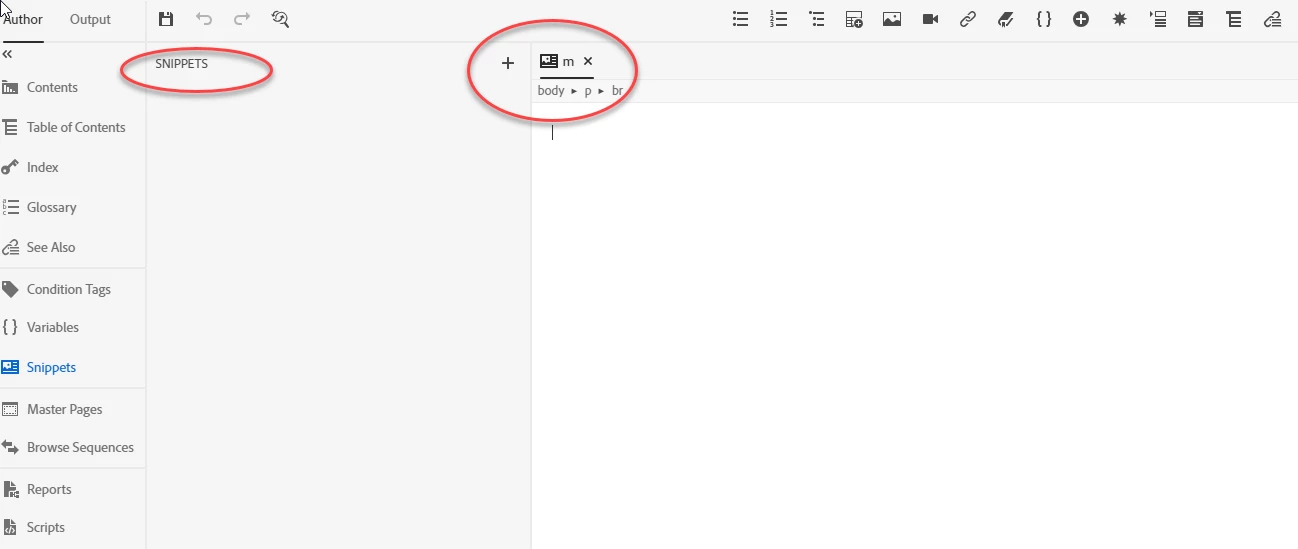
When I create Snippets they do not appear in the Snippets pane as demonstrated in the following screenshot. Does anyone else have this issue?

We are due a RoboHelp update, does anyone know when it is coming?

Kind regards

Michelle
 

This topic has been closed for replies.

22 replies

Peter Grainge
Community Expert
Community Expert
December 4, 2019

It is thought the problem is the dot in your user name. Perhaps MDDwork can confirm his their user name also has a dot in it?


This will be fixed in the next update.


www.grainge.org

Use the menu (bottom right) to mark the Best Answer or Highlight particularly useful replies. Found the answer elsewhere? Share it here.
Peter Grainge
Community Expert
Community Expert
December 4, 2019

That was my thinking, thanks for proving it. 🙂


I'll report the problem.


www.grainge.org

Use the menu (bottom right) to mark the Best Answer or Highlight particularly useful replies. Found the answer elsewhere? Share it here.
Erwin.Timmerman
Inspiring
December 4, 2019

That works! Is the path too long? My original path is this:

C:\Users\erwin.timmerman\Documents\ET\_current\RH\RoboHelp Reimagined\contents\assets\snippets


Peter Grainge
Community Expert
Community Expert
December 4, 2019
Use the menu (bottom right) to mark the Best Answer or Highlight particularly useful replies. Found the answer elsewhere? Share it here.
Peter Grainge
Community Expert
Community Expert
December 4, 2019

Does this still happen if the project is directly off the root of your local drive?


www.grainge.org

Use the menu (bottom right) to mark the Best Answer or Highlight particularly useful replies. Found the answer elsewhere? Share it here.
Erwin.Timmerman
Inspiring
December 4, 2019

You mean as in    C:\projectfolder     ?

Erwin.Timmerman
Inspiring
December 4, 2019

I have tried again, and can recreate the problem.

  • RH 2019.0.9, hotfix applied (at least I don't have the problems the hotfix is meant to fix).
  • Recently completely reinstalled, due to a licensing problem which is resolved now.
  • Using the stock Robohelp Reimagined project.


What I did is the following:

  • Open the Reimagined project and select the Snippets tab (menu?)
  • Click on the + next to SNIPPETS.

  • Enter the snippet details and click Create.

(screenshot see the reply to this post)


The result is below. It opens a blank page called erwin (the first part of my login name). The snippet seems to be located all the way in the root, but a complete search of my disk for erwin.hts gives no results.

So indeed, if I want to create snippets I have to resort to the Windows Explorer workaround I posted earlier. No big deal for me, just annoying.

Erwin.Timmerman
Inspiring
December 4, 2019


This should have been the 2nd screenshot. This forum keeps deleting images as I post multiple in one post. Editing doesn't help, it just deletes it again. But anyway, here it is.

Peter Grainge
Community Expert
Community Expert
December 4, 2019

In File Explorer you will find the snippets in projectpath\contents\assets\snippets.


If they are not being created in any project, then something is wrong with the installation. I would uninstall and then install the latest. There is a later build then 2019.0.9. See http://www.grainge.org/pages/authoring/rh2019/rh2019.htm for information and a link to the build on Adobe's site.


www.grainge.org

Use the menu (bottom right) to mark the Best Answer or Highlight particularly useful replies. Found the answer elsewhere? Share it here.
Erwin.Timmerman
Inspiring
December 4, 2019

\contents\assets\snippets

If there are no snippets you might need to create this folder yourself.

The files have .hts extensions.


Here's an example of what should be in it, so you can create the initial file yourself.


<?xml version="1.0" encoding="utf-8" ?>
<!DOCTYPE html>
<html xmlns="http://www.w3.org/1999/xhtml">
<head>
<meta http-equiv="Content-Type" content="text/html; charset=utf-8" />
<meta name="generator" content="Adobe RoboHelp 2019" />
<title>title of the snippet</title>
<meta name="topic-status" content="Draft" />
</head>
<body>
<p>aa</p>
</body>
</html>


michelled60596123
Known Participant
December 4, 2019

This workaround helped me create a snippet outside of RoboHelp and to use it in topics in my project. However, I cannot create snippets in the RoboHelp IDE.

Erwin.Timmerman
Inspiring
December 4, 2019

Yes, just copy the file as many times as you need using Windows Explorer, and then use the IDE to edit them. Depends on your number of snippets if this is a workable workaround or not.

michelled60596123
Known Participant
December 4, 2019

I do not have a Snippets folder, where should it be?

michelled60596123
Known Participant
December 4, 2019

I followed the creation process as outlined in the RoboHelp documentation and the snippets are not created as expected.