


Inspiring
August 12, 2021
Question

ToC broken after republish on site

  • August 12, 2021
  • 11 replies
  • 343 views

Robohelp 2020.5
Windows 10
Frameless output

Hi all.
After we generate a new output and publish it to our website, ToC goes to be broken for almost all users from different IPs, locations, PC's. 
Topics from Section A can be in Section C, etc. 
For example: 
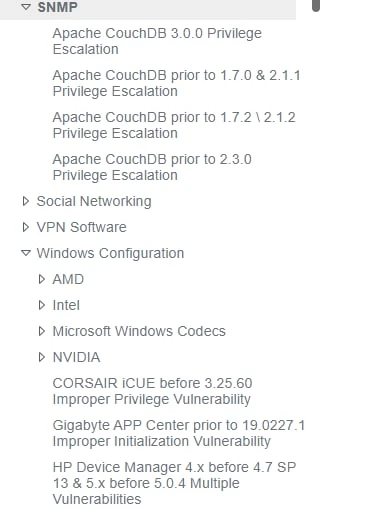
And correct variant:
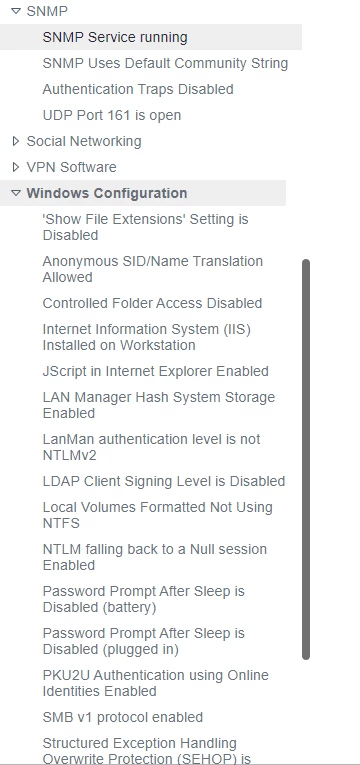
 

Right now SNNP section contain 4 topics from Databases. (What is interesting, is that Databases section containss 300+ topics and SNMP section only 4, which means that ToC takes the real number of topics in current section and after that puts wrong topics). 
Locally - everything is fine, so we are thinking this is cookies issue.
Our upload algorithm - delete all content of previous output -> upload new in empty folder 
We tried different browser, incognito mod, cache and cookie clearing - nothing. We also tried to go from empty VM - same result. Only 2% of computers display ToC correctly (we don't know why) 

This topic has been closed for replies.

11 replies

Community Expert
August 13, 2021

 My best guess for the toc behaviour goes something like this:

* A week ago, "topic 1" was in toc1.js.

* You access the page and toc1.js is cached on the server (because you don't change your script files very often, right.)

* Two days ago, the content is updated, and now "topic 1" is in toc2.js

* You access the page, and the cached toc1.js is used rather than the correct toc2.js, so everything appears wrong because the wrong js file ha been slotted in to the toc.


Try getting your server administrator set a much shorter max age value for the http cache-control headers on the whxdata folder.


Specify that you only want to change the max age for that folder, not all js files on the server, because those files aren't traditional, static js files. 


Inspiring
August 12, 2021

>Is it feasible to autocreate a new TOC? 
I will try it, however, upload takes about 1.5 hour, so i'll do it later. We need our site to be reachable now. 
Also, we got 2 different ToCs. Without subcategories (sections and only topics inside) and with subcategories (section inside section). Both broken on site. 

>And it's working & looking correctly when you launch from that "local folder you used for upload"? If so, is there anything different about the server? Not just a plain old webserver?
Yes, everything is okay. I'm not responsible for the server, the only thing I know - this is not a plain webserver with only Robo on it. We also store a main site there.

Jeff_Coatsworth
Community Expert
Community Expert
August 12, 2021

And it's working & looking correctly when you launch from that "local folder you used for upload"? If so, is there anything different about the server? Not just a plain old webserver?

Peter Grainge
Community Expert
Community Expert
August 12, 2021

It could be a change on the server that is not allowing certain file types to run properly, I have seen that before.


Is it feasible to autocreate a new TOC? The structure will be wrong but if that works and your TOC does not, you can republish using the broken TOC so that you are no worse off in the short term. At least then you will know something about what is broken.

________________________________________________________
See www.grainge.org for free Authoring and RoboHelp Information


Use the menu (bottom right) to mark the Best Answer or Highlight particularly useful replies. Found the answer elsewhere? Share it here.
Inspiring
August 12, 2021

As I know there is no single ToC file, that I can check for correctness. ToC is controlled by a big amount of .js files.
I compared whole whxdata folder and its content using TotalCommander file comparison with local folder that I used for upload. All files are the same .

Peter Grainge
Community Expert
Community Expert
August 12, 2021

As @Jeff_Coatsworth says. I use Beyond Compare but there are various ways.

________________________________________________________
See www.grainge.org for free Authoring and RoboHelp Information

Use the menu (bottom right) to mark the Best Answer or Highlight particularly useful replies. Found the answer elsewhere? Share it here.
Jeff_Coatsworth
Community Expert
Community Expert
August 12, 2021

More like fire up an FTP client or File Explorer & look at the files that are behaving correctly on your local machine & the mis-behaving files on the server and see if any don't match.

Inspiring
August 12, 2021

Every upload we delete all content of the server folder, and only after this we upload the new content.
Yes, we tried comparison earlier.
To be clear: You mean upload files on the server, then download them back and compare with those which was uploaded?

Peter Grainge
Community Expert
Community Expert
August 12, 2021

I assume you have already tried deleting everything and uploading again. It does look like a corrupted upload. 


Did you try the server / local comparison?

________________________________________________________
See www.grainge.org for free Authoring and RoboHelp Information

Use the menu (bottom right) to mark the Best Answer or Highlight particularly useful replies. Found the answer elsewhere? Share it here.
Inspiring
August 12, 2021

Hi Peter.
This is not a new issue, however in past we observe only content (topics) missing  or old cached version. Now all topics in different sections and neither cache clearing,  nor new device (that never opened site before) helps.
Files are the same.
For now we haven't an ability to upload it to a different location in this server, but I will ask our team. 
A week has passed since the last update, but the ToC is still damaged