


Wrong Topics Displaying in TOC
Hi. I'm using RoboHelp 2020.6.76 on a Windows 10 machine.
I'm having an odd problem with my published Table of Contents. Topics are being displayed in a section where they shouldn't be, completely replacing the topics that should be there.
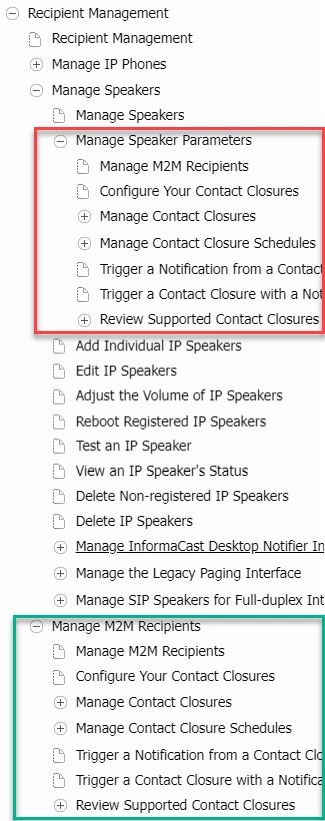
The following picture shows the TOC in my published output. The red box is around the topics that are in the wrong place. The Manage Speaker Parameters section is correct, but everything under it about M2M and contact closures is wrong, and the topics that should be there are missing. Further down the image in the green box, the M2M topics are in the right place and order, as expected.
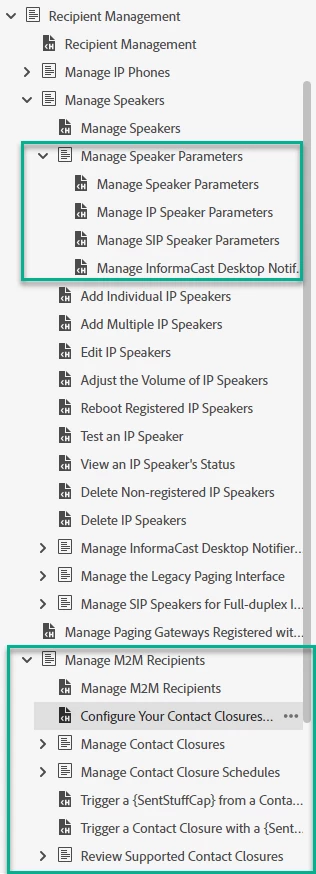
The following image is from my project's TOC, which is displaying correctly. The first green box is around the contents that should be displaying under the Manage Speaker Parameters section (the part that's wrong in my published output TOC). The second green box is around the M2M/contact closures content, which is in the right place and displaying correctly.
What's going wrong between my project and my published output? Everything is correct in my project, but goes awry in the published output.
 AdChoices