


kjetils30485119
Inspiring
October 27, 2017
Answered

Not working: Open in Essential Graphics from Team project panel

  • October 27, 2017
  • 3 replies
  • 3954 views

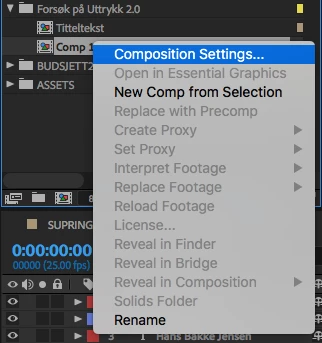
I am trying to right click on a comp and open it in the essential graphics panel.

The option is greyed out. What works is to use the dropdown Master (Select a composition) menu in the Essential Graphics panel, but if you have many comps, this is almost impossible to use.

Is it because I am using Team Projects this isn't working?

Thanks! kind regard, Kjetil
This topic has been closed for replies.
Correct answer Kevin J. Monahan Jr.

Kevin-Monahan​ - any tips?


Hi,

If you work at a company and have a Creative Cloud for Enterprise account then a number of features might not be available, including Libraries. This could be at the heart of your issue and also why you cannot reach standard support. Your IT Administrator should be able to file a support ticket for you for this. This is actually what you will want to do now and in the future. Sorry for the confusion.

If your support ticket simply is not being addressed, kindly send me a private message and I will try and remedy the situation.

Thanks,
Kevin

3 replies

Known Participant
February 28, 2018

Same here. Would love to find the best workflow to create lower thirds for example using team projects and sharing changes with collaborators.

Essential Graphics panel doesn't work in this case and is greyed out. Other methods I've tried that don't work: Converting Ae project to regular project then uploading/installing template, sharing a library containing a graphics template, installing identical files and trying to relinking them.

Creating a single lower third BUT being able to change the text in a template would be great. So far, the only thing that works is creating separate Ae comps. But, what if I have to make a small change? Then, I then have to adjust ALL of the comps I've created in Ae. This is a time killer. Hope there's a solution to this.

I think the easiest solution is to re-enable the "Template" tick box again like the previous version so at least that option is still useable. 

Kevin J. Monahan Jr.
Community Manager
Community Manager
November 14, 2017

Hi Kjetil,

That's odd as I don't see that issue. Can you work with our video queue? Contact them here.

Thanks,
Kevin

Kevin Monahan - Sr. Community and Engagement Strategist – Adobe Pro Video and Audio
kjetils30485119
Inspiring
November 14, 2017

If I can work with your video queue? The link sends me to a contact customer care page with tons of options, none of them related to this problem or After Effects.

kjetils30485119
Inspiring
November 15, 2017

Kevin-Monahan​. Sorry, what did you mean? Thanks.

kjetils30485119
Inspiring
October 27, 2017

Export Motion Graphics-button is also greyed out? I can't design Motion Graphics in a team project?
