


Participant
December 2, 2022
Question

Team Project Auto Save Not Working

  • December 2, 2022
  • 2 replies
  • 1391 views

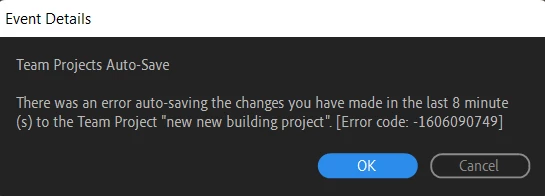
I am using Premiere Pro 2023 on Windows, and it is all updated. Whenever I join a team project, I can't share or get the latest changes. Also, every now and then, a error pops up. It seems like Premiere is mainly having problems with any type of saving in a team project. Also, everything in a individual project works.


[Moderator note: moved to best forum.]

This topic has been closed for replies.

2 replies

Participant
December 3, 2022

Issue: Whenever I join a team project, I can't share or get the latest changes. Also, every now and then, a error pops up. It seems like Premiere is mainly having problems with any type of saving in a team project. Also, everything in a individual project works.

Version Number: Version 23.0.0 (Build 63)

Operating System: Windows 11

System Info: 

CPU: Intel(R) Core(TM) i5-10300H 

GPU: NVIDIA GeForce GTX 1650 Driver Version: 10.0.22000.832

RAM: 8 GB

Hard Drive: Windows-SSD

Video Format: All the video is 1080p30 

Workflow: This is a multicam sequence.

Steps to Reproduce: Go into a team project, invite someone to the project, start making changes, then an error will pop up.

Expected Result: The project should auto-save by itself, making me able to share my progress, and also receive progress.

Actual Result: A bug popped up with the attached image below.

 Thanks,

Andrew

Kevin J. Monahan Jr.
Community Manager
Community Manager
December 3, 2022

Hi Andrew,

Is it possible to get more info from you? How do I write a bug report?

The product team prefers the info in a template.


Thanks,
Kevin

Kevin Monahan - Sr. Community and Engagement Strategist – Adobe Pro Video and Audio