


Acrobat PDFMaker was not able to mail merge the document
As the title suggests, I am running into this error and cannot get this feature to work no matter what I try.
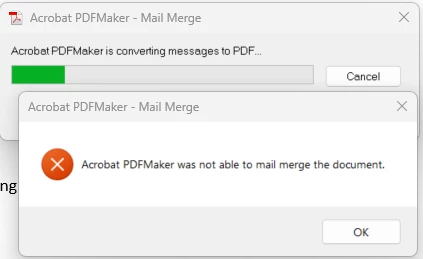
My operating systems and applications are fully up-to-date at the time of this posting. The versions of my operating system and related applications are as follows:
- Windows 11 Enterprise, 64-bity, 22H2, OS Build 22621.1413
- Adobe Acrobat Pro, Continuous Release | Version 2023.001.20064 | 64-bit
- Microsoft Word for Microsoft 365 MSO (Version 2302 Build 16.0.16130.20298) 64-bit
- Microsoft Excel for Microsoft 365 MSO (Version 2302 Build 16.0.16130.20298) 64-bit
- Microsoft Visual C++ 2015-2019 Redistributable (x64) - 14.29.30139
To eliminate the possibility of a specific Word document or Excel datasource being the issue, I created a very basic and straight-forward test mail merge and datasource and am still running into the issue.
Installing Microsoft Visual C++ 2015-2019 Redistributable (x64), as recommended in a few other Adobe Support articles I found did not correct the issue.
I've also enabled logging and haven't found any useful information, as it appears to suggest its completing successfully even through it is not. Below are the outputs of the logs:
PDFMWord.log:
Mon Mar 20 11:30:18 2023 [INFO]: VBA::InitializePDFMakerDLL:Initialization of PDFMaker DLL started...
Mon Mar 20 11:30:18 2023 [INFO]: VBA::InitializePDFMakerDLL:Initialization of PDFMaker DLL Successfully Completed.
Mon Mar 20 11:30:18 2023 [INFO]: VBA::ShutdownPDFMakerDLL:Release pointers of PDFMaker DLL's.
Mon Mar 20 11:30:36 2023 [INFO]: VBA::PDFMakerConvertUsingSettings:PDFMWord to PDF conversion workflow started...
Mon Mar 20 11:30:36 2023 [INFO]: VBA::InitEverything:Initialization Started...
Mon Mar 20 11:30:36 2023 [INFO]: VBA::InitializePDFMakerDLL:Initialization of PDFMaker DLL started...
Mon Mar 20 11:30:36 2023 [INFO]: VBA::InitializePDFMakerDLL:Initialization of PDFMaker DLL Successfully Completed.
Mon Mar 20 11:30:36 2023 [INFO]: VBA::SetAppLanguage:Set PDFMaker Language Started.
Mon Mar 20 11:30:36 2023 [INFO]: VBA::SetAppLanguage:Set PDFMaker Language Completed.
Mon Mar 20 11:30:36 2023 [INFO]: VBA::InitEverything:Initialization Successfully Completed.
Mon Mar 20 11:30:36 2023 [INFO]: VBA::PDFMakerConvertUsingSettings:Log events corresponding to review/Share button click Info.
Mon Mar 20 11:30:36 2023 [INFO]: VBA::ConvertToPDFEx:Started Convert to PDF workflow...
Mon Mar 20 11:30:36 2023 [INFO]: VBA::PrintingEntryWithNoOptionsDlg:Initialization of PDFMWord was successful, now ready to start CreatePDFFile workflow.
Mon Mar 20 11:30:36 2023 [INFO]: VBA::CreatePDFFile:Creation Of PDF Started...
Mon Mar 20 11:30:36 2023 [INFO]: VBA::CreatePDFFile:Current Active Doc Font is Office Font.
Mon Mar 20 11:30:36 2023 [INFO]: VBA::GetFinalPDFFileName:Get PDF File Name.
Mon Mar 20 11:30:36 2023 [INFO]: VBA::Preprocess:Preprocessing for EMF started...
Mon Mar 20 11:30:36 2023 [INFO]: VBA::Preprocess:Preprocessing for EMF Successfully Completed.
Mon Mar 20 11:30:36 2023 [INFO]: VBA::GetFinalPDFFileName:Get PDF File Name.
Mon Mar 20 11:30:36 2023 [INFO]: VBA::CreatePDFFile:Successfully Got EMF.
Mon Mar 20 11:30:36 2023 [INFO]: VBA::ShutdownPDFMakerDLL:Release pointers of PDFMaker DLL's.
Mon Mar 20 11:30:36 2023 [INFO]: VBA::ShutdownPDFMakerDLL:Release pointers of PDFMaker DLL's.
Mon Mar 20 11:30:36 2023 [INFO]: VBA::ConvertToPDFEx:Convert to PDF workflow Completed.
PDFMEngine.log:
Mon Mar 20 11:30:36 2023 [INFO]: PDFMEngineImpI::PDFMEngineConvertDoc:Doc To Pdf conversion has started.
Mon Mar 20 11:30:36 2023 [INFO]: PDFMDocExporter::convert:Doc To Pdf conversion has started.
Mon Mar 20 11:30:36 2023 [INFO]: WordExporter::doExport:Word Exporter Workflow has started...
Mon Mar 20 11:30:36 2023 [INFO]: WordExporter::doExport:Word Exporter Workflow has Ended Successfully.
Mon Mar 20 11:30:36 2023 [INFO]: PDFMDocExporter::convert:Doc To Pdf conversion has ended with return value 4 .
Mon Mar 20 11:30:36 2023 [INFO]: PDFMEngineImpI::PDFMEngineConvertDoc:Doc To Pdf conversion has successfully completed.
Mon Mar 20 11:30:36 2023 [INFO]: PDFMEngineImpI::PDFMEngineConvertDoc:PDFMEngine Workflow has Completed with return value 4 .
Furthermore, the issue seems to only be present with the Merge to Adobe PDF/Mail Merge function within Microsoft Word. All other functions of Adobe PDF Maker within Microsoft Word are working as intended.
 AdChoices