


Mac N Cheese
Participant
August 20, 2018
Answered

Acrobat Pro CS4 on mid-2015 MacBook pro laptop doesn't launch

  • August 20, 2018
  • 3 replies
  • 662 views

Recently installed m old CS4 on a mid-2015 MacBook Pro 15" Retina laptop. Running El Capitan (OS X 10.11.6).  Upgrading from older MacBook Pro 17" model to a newer laptop.

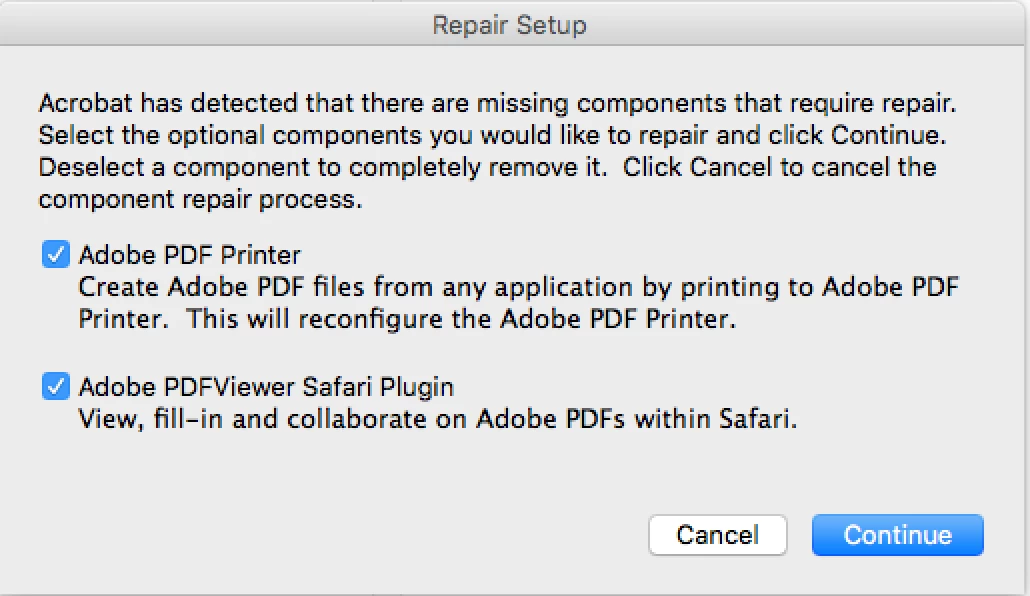
Everything seems to have installed correctly off the DVD...except that Adobe Acrobat Pro doesn't launch.   Illustrator, Photoshop all run fine.    Initial start up screen on starting Acrobat Pro says this....see below.  After the prompt, I press continue and the screen stays blank and nothing happens.

I've tried a clean re-install off the DVD three times and each time I get the same.   Also,   I did install the Java 6 for Mac as prompted initially.

Any ideas on what may be wrong and how to correct this?

Thanks in advance to anyone who might have a solution.
This topic has been closed for replies.
Correct answer Adorobat

Hi Mac N Cheese,

As per the issue description mentioned above, you are facing issue when trying to launch Acrobat 9 on your mac machine, is that correct?

Acrobat 9 is quite an old version and not supported with most newer operating system. You may refer to the following forum thread for the same: Adobe Acrobat Pro from CS4 won't run when newly installed

System requirements | Adobe Creative Suite 4, Point Products 

You may try the troubleshooting steps given in this forum thread: I installed Acrobat Pro 9 on a new Macbook Pro but I keep getting a Repair Setup message and Acrobat won't function...

Thanks,

Shivam

3 replies

Adorobat
Community Manager
AdorobatCommunity ManagerCorrect answer
Community Manager
August 21, 2018

Hi Mac N Cheese,

As per the issue description mentioned above, you are facing issue when trying to launch Acrobat 9 on your mac machine, is that correct?

Acrobat 9 is quite an old version and not supported with most newer operating system. You may refer to the following forum thread for the same: Adobe Acrobat Pro from CS4 won't run when newly installed

System requirements | Adobe Creative Suite 4, Point Products 

You may try the troubleshooting steps given in this forum thread: I installed Acrobat Pro 9 on a new Macbook Pro but I keep getting a Repair Setup message and Acrobat won't function...

Thanks,

Shivam

Mac N Cheese
Participant
August 20, 2018

Thank you Brucgovn.  I'll give it a try.  I'm going to assume that I need to uninstall all previous Adobe products to make this work..?

Jeffrey_A_Wright
Community Manager
Community Manager
August 20, 2018

Moving this discussion to the Installing, Updating, & Subscribing to Acrobat forum.

Govardhan.V
Participating Frequently
August 20, 2018