

Answered
Adobe Acrobat DC Downloads but will not run
This is the error message that I receive. I have downloaded; uninstalled and downloaded again; and gone through the repair steps. Got the same message every time.
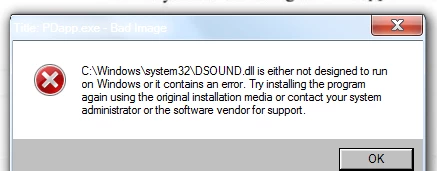

This is the error message that I receive. I have downloaded; uninstalled and downloaded again; and gone through the repair steps. Got the same message every time.
Hello Bettyr,
We apologize for the inconvenience caused, as per the description above, you are not able to install Acrobat Pro DC on your Windows machine, is that correct?
Please use Acrobat cleaner tool to remove any previous installed Acrobat corrupt files and reboot the machine, download the Acrobat cleaner tool from Download Adobe Reader and Acrobat Cleaner Tool - Adobe Labs
Also, install the updates of the operating system(if available) once and reboot the machine and then download and install Acrobat from Download Pro or Standard versions of Acrobat DC, 2017, XI, or X
Run the setup as an Administrator(only for Windows), right click on the setup of Acrobat and choose Run as an Administrator.
Let us know how it goes and share your findings.
Regards,
Anand Sri.
[Edited response]
Already have an account? Login
Enter your E-mail address. We'll send you an e-mail with instructions to reset your password.
 AdChoices