Participating Frequently
March 20, 2021
Answered

Adobe PDF Printing has stopped working on my Win10 64b machine

  • March 20, 2021
  • 4 replies
  • 2799 views

Double-clicking on the PDF file it creates, I get "There was an error opening this document. This file cannot be found" even after double clicking on the very file that was just created by the latest Adobe Reader CC that I downloaded and installed. My default installation is Adobe Acrobat 9 Pro.  Test print files Adobe PDF printer creates can be opened, at least, but have completely screwed up fonts. It just looks like Adobe PDF printing has been completely hosed somehow.  I've tried reinstalling Adobe PDF according to Adobe instructions several times but got the same results.  My last effort was to update to latest Adobe Reader CC to let it install the Adobe PDF but same result.  How do I get Adobe PDF printer to work properly again?   I've spent hours on this to no avail.  Following Adobe Online Help doesn't work.
This topic has been closed for replies.
Correct answer Dov Isaacs

I worked directly with @defaultxmo22hw89o9e and I discovered the underlying cause of the problem he was experiencing.


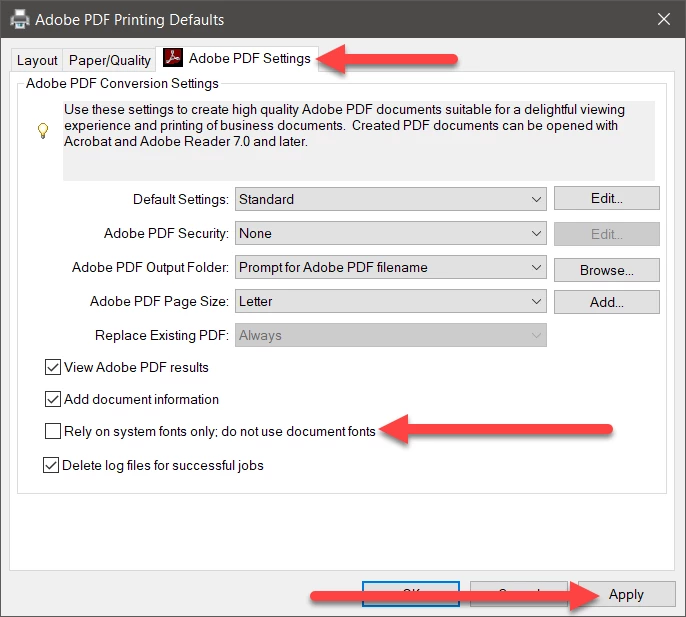
The default settings for the Adobe PDF PostScript printer driver were improperly set to Rely on system fonts only. This setting should always be disabled. And after any Acrobat update, please check the settings again to make sure that the update didn't reset this setting.


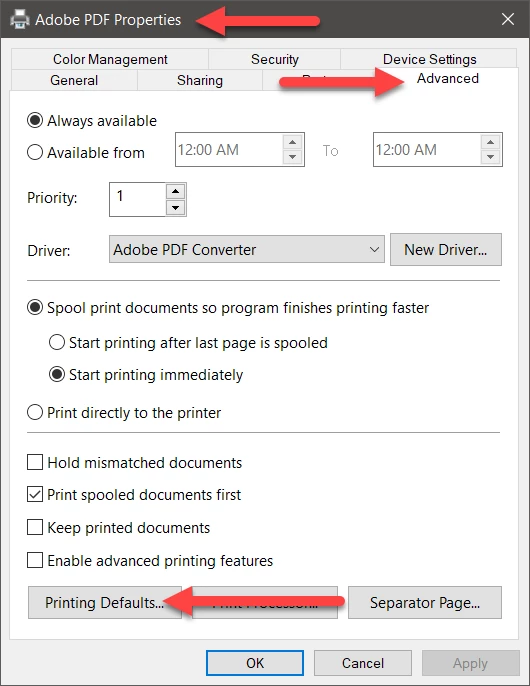
Get the Printer Properties of the Adobe PDF PostScript printer driver instance.


Click on the Advanced tab and then on the Printing Defaults button.


Click on the Adobe PDF Settings tab and then deselect the option reading Rely on system fonts only. Then click on Apply. Then click on Apply (if not grayed out) and then OK on the original Adobe PDF Properties dialog.


This fixed the problem.


And again, after any Acrobat updates, check that this option hasn't been re-enabled!


4 replies

Dov Isaacs
Dov IsaacsCorrect answer
Legend
March 21, 2021

I worked directly with @defaultxmo22hw89o9e and I discovered the underlying cause of the problem he was experiencing.


The default settings for the Adobe PDF PostScript printer driver were improperly set to Rely on system fonts only. This setting should always be disabled. And after any Acrobat update, please check the settings again to make sure that the update didn't reset this setting.


Get the Printer Properties of the Adobe PDF PostScript printer driver instance.


Click on the Advanced tab and then on the Printing Defaults button.


Click on the Adobe PDF Settings tab and then deselect the option reading Rely on system fonts only. Then click on Apply. Then click on Apply (if not grayed out) and then OK on the original Adobe PDF Properties dialog.


This fixed the problem.


And again, after any Acrobat updates, check that this option hasn't been re-enabled!


- Dov Isaacs, former Adobe Principal Scientist (April 30, 1990 - May 30, 2021)
Dov Isaacs
Legend
March 21, 2021

I will contact you offline to discuss this issue.


- Dov Isaacs, former Adobe Principal Scientist (April 30, 1990 - May 30, 2021)
radzmar
Community Expert
Community Expert
March 21, 2021

Distiller means your're using Acrobat Pro instead of Acrobat Reader. So I moved this thread into the Acrobat forum.

Participating Frequently
March 21, 2021

I subsequently installed the latest version of Adobe reader CC, to have install the Adobe PDF printer, but nothing changed in printing to PDF from Microsoft 365 Word Enterprise.

Participating Frequently
March 21, 2021

From tips there, I tried first repairing Acrobat Pro v9 and then, when that did nothing, uninstalled Acrobat Pro v9 and reinstalled it from the original distribution disk.  Again, no change in the problem of Adobe PDF printer failing because it can't find the fonts in the Microsoft 365 Word Enterprise from which I was trying to print.

Participating Frequently
March 20, 2021

....I do see a .log file when I try to print to Adobe PDF that indicates failed printing due to it not finding a font:


%%[ ProductName: Distiller ]%%
Calibri-Bold not found, using Courier.
%%[ Error: invalidfont; OffendingCommand: xshow ]%%

Stack:
-dict-
-file-

%%[ Flushing: rest of job (to end-of-file) will be ignored ]%%
%%[ Warning: PostScript error. No PDF file produced. ] %%