
htausch
Participant
June 2, 2025
Question

Adobe Pro AI is not showing on my work desktop

  • June 2, 2025
  • 2 replies
  • 886 views

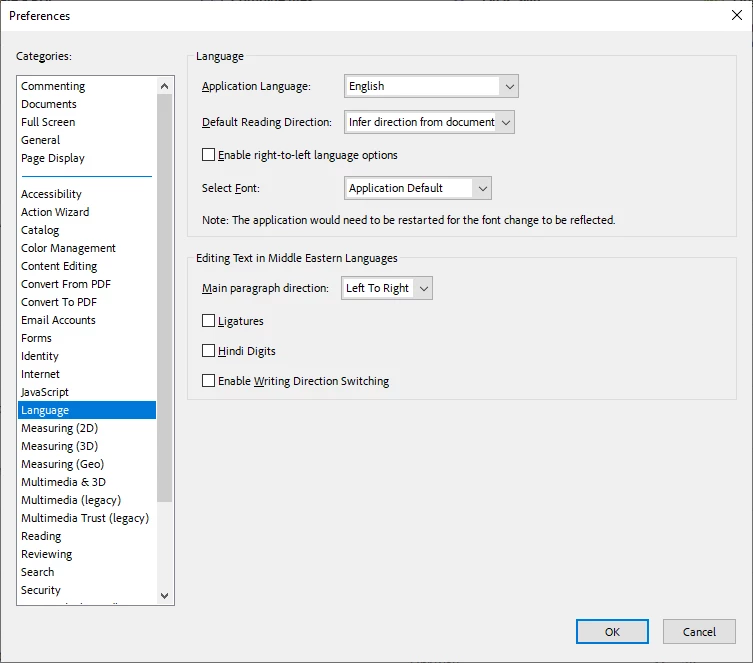
I have my personal Creative Cloud installed on my work computer and I pay seperately for AI assistant in addition to my plan. The AI assistant doesn't show on the desktop app on my work computer. The app saves it's up to date but my preferences doesn't even have Generative AI as an option to enable. 

Version: 25.1
 

2 replies

Adobe Employee
June 3, 2025

Hi @htausch


Thanks for reporting the issue. To assist us in investigating the issue, could you please provide the following information:

  1. The version of Adobe Acrobat/Reader installed on your system : 

          You can check this by following these steps:

    • Open Adobe Acrobat or Reader

    • Go to Help > About Adobe Acrobat/Reader

    • A window will appear displaying the version number

  2. The country or region from which you are accessing the application
  3. The locale setting of your Acrobat/Reader
  4. An export of the following registry path: HKEY_CURRENT_USER\Software\Adobe\Adobe Acrobat

Steps to export:

  • Press Win + R, type regedit, and press Enter to open the Registry Editor

  • Navigate to: HKEY_CURRENT_USER\Software\Adobe\Adobe Acrobat

  • Right-click on the Adobe Acrobat folder

  • Select Export

  • Choose a location to save the .reg file and provide a filename

  • Click Save


Once done, please attach the exported .reg file.

Your input will help us analyze the issue more effectively. Thanks for your cooperation!


Thanks,

Vinod

htausch
htauschAuthor
Participant
June 3, 2025
  • There is not a custom install from my IT department. I asked if they were blocking access in anyway and they said no.
  • I do not have another desktop to test but I do have access to the AI feature on my iPad and iPhone
  • I gave my current version in my original post but my continuous reslease version is 2025.001.20474
  • I am accessing it in the United States
  • I don't know what "locale setting of your Acrobat/Reader" means but Google seems to think you are asking for my language settings which is English. 
  • Navigate to: HKEY_CURRENT_USER\Software\Adobe\Adobe Acrobat returns the following message: Windows Cannot find 'HKEY_CURRENT_USER\Software\Adobe\Adobe'. Make sure you typed the name correctly, and then try again."
Adobe Employee
June 3, 2025

@htausch - Thanks for the prompt response. 

Just to clarify, the complete registry path we need is:

'HKEY_CURRENT_USER\Software\Adobe\Adobe Acrobat'

—not 'HKEY_CURRENT_USER\Software\Adobe\Adobe'.


Additionally, could you please provide the Acrobat Diagnostic logs? These logs will help us investigate the issue in greater detail. Kindly follow the steps below:


  1. Download and run the Diagnostics Utility from: https://helpx.adobe.com/acrobat/kb/acrobat-diagnostics.html
  2. Click on Start Diagnostics.
  3. Launch Acrobat, reproduce the issue with your file.
  4. Once done, click Stop Monitoring.
  5. Share the Log ID with us.


Thanks,

Vinod

Community Manager
June 2, 2025

Hi @htausch


Sorry for the troubled experience, and thank you for reaching out. 

Was the IT admin able to customize the Acrobat installation? If so, they may have disabled the AI assistant. 


You may check the AI assistant on the Acrobat web. If that is visible to you, you may visit https://adobe.ly/3HnzH5l. Let us know if that is possible

You may also try installing Acrobat on your personal machine and check if the AI assistant is visible to you. Also, let us know the country you are based in. 


I will be waiting for your response.


~Tariq